
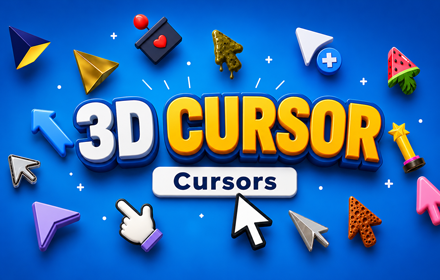
Give Your Browser a Dimension Upgrade with the Best 3D Custom Cursor Extension
If you’ve ever wished your mouse pointer had a little more personality, depth, and visual punch, the 3D Cursor extension for Chrome is exactly what you’ve been looking for. Gone are the days of a flat, boring default arrow. With 3D Cursor, every click, hover, and scroll feels like it belongs in a whole new dimension.
Whether you’re a digital creator, a gamer, a designer, or simply someone who loves personalizing their online space, this Chrome extension delivers a fun, immersive, and eye-catching browsing experience — one mouse pointer at a time.
What Is 3D Cursor for Chrome?
3D Cursor is a lightweight Chrome browser extension that replaces your standard mouse pointer with a collection of stunning three-dimensional cursor designs. Each cursor is crafted with depth, shadow, and perspective — giving the illusion that your pointer is actually floating above your screen.
The extension draws on bold, spatial design styles: glossy orbs, geometric shapes, neon-lit spheres, chrome-effect arrows, crystal textures, and more. It’s the perfect way to make your browser feel alive, dynamic, and uniquely yours.
It runs quietly in the background, installs in seconds, and requires zero technical setup to enjoy.
Key Features of 3D Cursor
✦ A Rich Collection of 3D Cursor Designs
The extension includes a wide variety of custom 3D cursor styles to match any mood or aesthetic. From polished metallic arrows and glowing energy orbs to sharp geometric pointers and translucent crystal designs — there’s something for every taste. New designs keep the collection fresh and exciting.
✦ Realistic Depth and Shadow Effects
What sets 3D Cursor apart from standard custom cursor extensions is the genuine sense of depth in every design. Each cursor features carefully crafted shading, highlights, and perspective that make it look three-dimensional on any flat screen. The effect is subtle enough to feel natural but striking enough to turn heads.
✦ Adjustable Cursor Size
Use the built-in size slider to scale your cursor up or down to suit your screen and preferences. Larger cursors make the 3D detail more visible and impressive, while smaller sizes are ideal for precise work on high-resolution displays. Adjustments apply instantly with no need to reload.
✦ Favorites System for Quick Switching
Found a few designs you love? Save them to your personal favorites list for one-click access at any time. Swap between a sleek chrome arrow for productivity sessions and a glowing orb cursor for late-night browsing — it only takes a second.
✦ Zero Lag, Zero Bloat
3D Cursor is engineered to be efficient. It uses minimal memory, loads quickly, and has no measurable impact on browser speed or page performance. You get all the visual flair with none of the slowdown.
✦ Easy On/Off Toggle
Need to switch back to your default cursor temporarily? A single click on the toolbar icon toggles the extension on or off without touching any settings. It’s seamless, fast, and completely reversible — perfect for work calls, presentations, or screen sharing.
How to Install 3D Cursor on Chrome
Getting started takes less than a minute:
- Open the Chrome Web Store and search for 3D Cursor.
- Click Add to Chrome to install the extension.
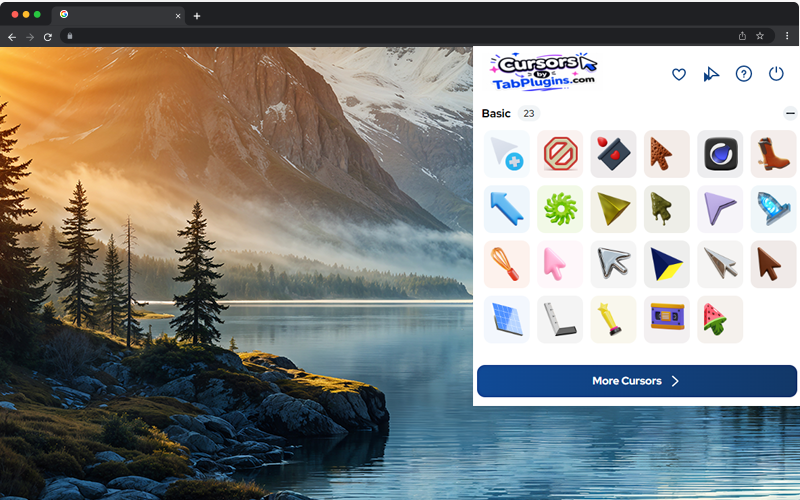
- After installation, click the 3D Cursor icon in your Chrome toolbar.
- Browse the cursor collection and click any design to activate it instantly.
- Use the size slider to fine-tune the cursor to your liking.
- Save your go-to designs to Favorites for fast access later.
- Browse any website and enjoy your new 3D pointer in action.
Who Is 3D Cursor For?
The 3D Cursor extension is a great fit for anyone who wants to bring more personality and dimension to their digital life. It’s especially popular with:
- Gamers and streamers who want a setup that looks as good on screen as it performs
- Digital artists and designers who appreciate high-quality, visually refined aesthetics
- Content creators looking to add unique personality to screen recordings or tutorials
- Students and professionals who want to personalize their browser without sacrificing performance
- Anyone who just loves a great-looking, custom cursor experience
If you spend hours in a browser every day, why not make the experience as visually satisfying as possible?
Frequently Asked Questions
Does 3D Cursor work on all websites? The custom cursor works across the vast majority of websites and pages you visit in Chrome. A small number of browser-level pages (such as Chrome settings or certain new tab configurations) may display the default cursor due to built-in browser security restrictions.
Will 3D Cursor slow down my browser? No. The extension is intentionally lightweight and built for performance. Most users notice zero impact on browsing speed, tab loading, or overall browser responsiveness.
Can I use more than one cursor design? Absolutely. You can switch between any design in the collection at any time from the extension panel. Use the favorites system to keep your most-used styles within a single click.
Is 3D Cursor free? The extension is available to install directly from the Chrome Web Store. Once installed, you can start exploring and using cursor designs right away.
Can I turn it off without uninstalling? Yes. The toggle in the toolbar lets you switch between your 3D cursor and the default browser cursor at any moment — no uninstalling or disabling required.

kakakakaakkakkaa