
The CORS Unblocker Chrome extension is a lightweight developer tool that lets you bypass Cross-Origin Resource Sharing (CORS) restrictions directly from your browser — no backend changes, no command-line workarounds, no wasted time. If you regularly hit the “Blocked by CORS policy: No ‘Access-Control-Allow-Origin’ header present” error during local development or API testing, this extension was built for you.
What Is CORS Unblocker?
CORS Unblocker is a Chrome extension designed to temporarily disable the browser’s CORS policy enforcement during web development and testing. CORS is a security mechanism built into browsers that restricts how web pages can request resources from a different domain. While this is essential for production security, it often gets in the way during development when you need to connect a local frontend to a remote API or test cross-origin requests quickly.
This extension gives developers, QA engineers, and API integrators a simple on/off toggle to control CORS behavior in the browser without touching server-side configuration. All changes are session-based, meaning everything resets automatically when the browser is closed.
Key Features of CORS Unblocker
One-Click CORS Toggle
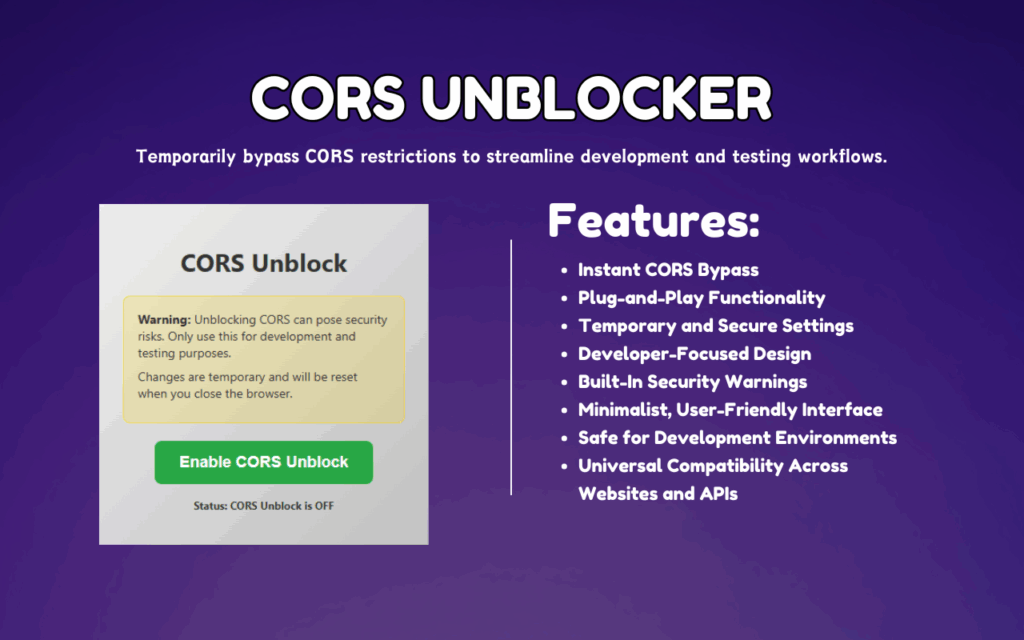
Enable or disable CORS bypass instantly with a single click on the extension icon. There is no configuration panel to navigate or settings file to edit — the toggle is the entire workflow.
Session-Based Security
All CORS unblocking settings are automatically cleared when you close the browser. This ensures your standard browsing sessions remain protected and the extension never interferes with your everyday web activity.
Built-in Security Warnings
The extension displays clear, visible warnings when CORS restrictions are disabled so you always know the current state. This helps developers make informed decisions and avoid accidentally leaving the extension active outside of a testing context.
Universal Site and API Compatibility
CORS Unblocker works across all websites, domains, and API endpoints without requiring per-site configuration. Whether you are testing against a public API, a private staging server, or a local development backend, the extension handles it consistently.
Minimalist Developer Interface
The UI is intentionally simple — a clean popup with a clear status indicator and toggle. This keeps the tool fast to use and accessible even when you are deep in a debugging session and need quick access.
Zero Setup Required
Install the extension and it is ready to use immediately. There are no accounts to create, no permissions to manually configure, and no additional software dependencies to install alongside it.
How to Install CORS Unblocker
- Open the Chrome Web Store and search for CORS Unblocker.
- Click the Add to Chrome button on the extension listing page.
- Confirm the installation when the browser prompts you.
- Once installed, click the extension icon in your Chrome toolbar to open the popup.
- Toggle CORS Unblocker on, then reload the page you are working on.
- When your testing session is complete, toggle the extension off or simply close the browser to reset.
Why Developers Love CORS Unblocker
Front-end developers and API integrators frequently encounter CORS errors during the early stages of a project — before the backend team has configured proper headers or before a staging environment is fully set up. In these situations, waiting for a server-side fix can stall progress for hours. CORS Unblocker removes that bottleneck entirely by letting developers continue their work independently.
QA professionals also find value in this tool when testing API responses, validating front-end behavior against multiple environments, or replicating bugs that only surface in cross-origin scenarios. The session-based reset feature means there is no risk of accidentally leaving the extension active in a production context, which keeps testing practices safe and controlled.
Teams working on rapid prototyping or third-party API integrations benefit from the speed this tool provides — there is no back-and-forth with backend engineers just to get a fetch request working during a proof-of-concept build.
Screenshots
Frequently Asked Questions
Is it safe to use CORS Unblocker during development?
Yes, when used in a controlled development environment it is safe. The extension is designed exclusively for testing purposes and includes built-in warnings to remind you when it is active. You should never use it while browsing general websites or in a production context.
Does CORS Unblocker affect all browser tabs?
The extension applies CORS bypass settings at the browser level while it is toggled on. It is recommended to use it in a dedicated browser window or profile reserved for development to avoid unintended behavior on other tabs.
Will my CORS settings stay active after I restart Chrome?
No. All settings are session-based and reset automatically when the browser closes. Each development session starts fresh, which is an intentional safety feature.
Do I need to modify my server or API configuration to use this extension?
No server-side changes are required. That is the primary advantage of this tool — it allows you to test cross-origin requests from the browser without any backend involvement.
Does this extension work with all types of APIs?
Yes. CORS Unblocker is compatible with REST APIs, GraphQL endpoints, and any other HTTP-based API regardless of the domain or hosting environment.
CORS Unblocker is a practical, no-nonsense tool that every web developer should have in their Chrome extension toolkit. Install it once and eliminate one of the most common friction points in the front-end development process.





