

The SVG to Icon Converter is a lightweight Chrome extension that lets developers, designers, and creators convert SVG vector graphics into crisp PNG icons directly in the browser. Whether you need a 16×16 favicon or a 128×128 app icon, this tool handles the entire process locally — no file uploads, no third-party services, and no design software required.
What Is SVG to Icon Converter?
SVG to Icon Converter is a browser-based Chrome extension built to simplify the process of generating PNG icons from SVG source files. Instead of opening a graphic editor or relying on online converters that send your files to remote servers, this extension processes everything on your device. You upload or paste your SVG, choose your target sizes, and download production-ready PNG icons in seconds. It is designed for speed, privacy, and simplicity — making it an essential utility for anyone working with web or app assets regularly.
Key Features of SVG to Icon Converter
Instant SVG to PNG Conversion
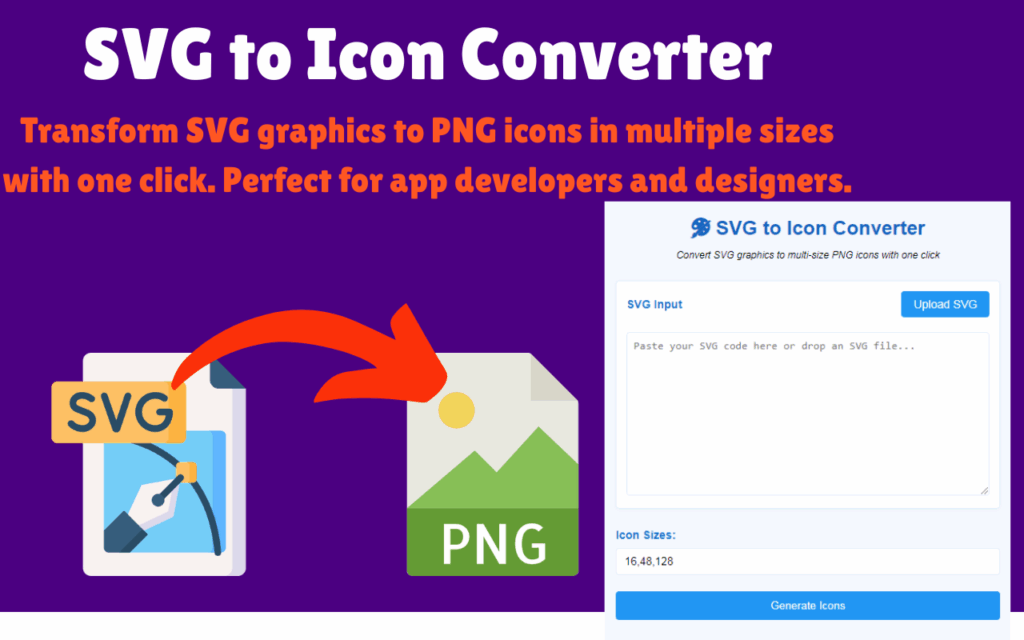
Paste SVG code directly or upload an SVG file to generate PNG icons with a single click. The conversion is handled immediately within the browser, so there is no waiting for server responses or dealing with upload limits.
Custom and Preset Icon Sizes
The extension supports standard icon dimensions including 16×16, 32×32, 48×48, and 128×128 pixels. You can also enter custom sizes separated by commas, giving you full control over the output dimensions for any project requirement.
High-Quality Output at Every Resolution
Icons are rendered with precision to maintain sharpness and clarity across all sizes. This makes the tool equally reliable for tiny favicons and large-format app icons used in storefronts or dashboards.
Preview Before You Download
Before saving any file, you can preview how each icon will look at its target resolution. This ensures your icons meet visual standards before they go into production, saving you time on revisions.
Drag and Drop File Import
Simply drag an SVG file from your file system and drop it into the extension interface. This eliminates the need to navigate file dialogs and speeds up your workflow when working with multiple assets.
Fully Offline Processing
Once installed, the extension works without an internet connection. All conversion logic runs locally in your browser, which means your files never leave your device and you are not dependent on any external API or cloud service.
Privacy-First Design
Your SVG files and generated icons remain entirely on your local machine. There is no data collection, no analytics on your files, and no risk of sensitive design assets being exposed to third parties.
Lightweight and Fast Performance
The extension is optimized to use minimal system resources. It runs quickly even on older machines, making it a practical tool for everyday use without impacting browser performance.
How to Install SVG to Icon Converter
- Open the Chrome Web Store and search for SVG to Icon Converter.
- Click the Add to Chrome button on the extension listing page.
- Confirm the installation by clicking Add Extension in the popup dialog.
- Once installed, click the extension icon in your Chrome toolbar to open the converter interface.
- Upload or paste your SVG, select your desired icon sizes, and click Generate to download your PNG icons.
Why Developers and Designers Love It
Working with icons is a routine task in web and app development, but it often involves unnecessary friction — opening Figma or Illustrator just to export a single favicon, or using an online tool that requires an account or has file size restrictions. SVG to Icon Converter removes all of that overhead. It fits naturally into a developer’s browser-based workflow, works offline, and produces consistent results every time. UI/UX designers preparing assets for handoff, front-end developers building favicon sets, and app developers packaging icon bundles all benefit from having this tool one click away. It handles the repetitive parts of icon generation so you can stay focused on building.
Screenshots
Frequently Asked Questions
Does SVG to Icon Converter send my files to any server?
No. All processing happens locally within your browser. Your SVG files and generated PNG icons never leave your device, and no data is transmitted to any external server.
What icon sizes does the extension support?
The extension includes preset sizes of 16×16, 32×32, 48×48, and 128×128 pixels. You can also enter any custom dimensions you need by typing them into the size field, separated by commas.
Can I convert multiple SVG files at once?
The extension is designed to convert one SVG at a time, but you can generate multiple icon sizes from a single SVG in one operation. This makes it easy to produce a complete icon set from a single source file.
Does it work without an internet connection?
Yes. Once the extension is installed, it operates fully offline. You do not need an active internet connection to convert SVG files or download the generated icons.
Is the extension compatible with all SVG files?
The extension supports standard SVG files and inline SVG code. Highly complex SVGs with external dependencies or non-standard syntax may require minor cleanup before conversion, but most commonly used SVG formats work without any modifications.
If you regularly work with icons, favicons, or vector-based UI assets, SVG to Icon Converter is a straightforward upgrade to your browser toolkit. Install it once and have a reliable, private, offline-capable icon generator ready whenever you need it.





