Take full control of your browsing experience with the Custom New Tab URL Extension — a lightweight and powerful Chrome extension that lets you replace the default new tab page with your preferred website, dashboard, or even a local HTML file .
Perfect for developers, productivity enthusiasts, and anyone who wants to personalize their browser, this tool helps you boost efficiency , streamline workflows , and customize your Chrome environment exactly how you like it.
Say goodbye to generic new tabs and hello to a smarter, more personalized browsing experience.
🔧 What Is the Custom New Tab URL Extension?
The Custom New Tab URL Extension is a simple yet flexible Chrome add-on that allows you to:
- 🖥️ Replace Chrome’s default new tab page with any custom URL
- 📁 Load local HTML files or dashboards directly into new tabs
- 💻 Use offline-friendly tools or internal dashboards without internet access
This means every time you open a new tab, you’re greeted with the content that matters most to you — whether it’s a task manager, company intranet, personal dashboard, or a local development project.
⚙️ Key Features That Make Browsing Personal Again
✅ Customizable New Tab Page
Set any URL (website, app dashboard, or internal tool) to load automatically when you open a new tab.
✅ Support for Local Files
Load HTML files from your computer directly into new tabs — perfect for developers and offline users.
✅ Lightweight & Fast
Uses minimal memory and loads instantly — no impact on browser performance.
✅ Easy-to-Use Settings
Configure your custom URL or file path through a clean and intuitive options page — no technical knowledge required.
✅ Persistent Preferences
Your settings are securely saved across sessions — so your new tab stays customized.
✅ Offline Functionality
Access local files and dashboards even when you’re not connected to the internet.
✅ Privacy-Focused
No tracking, no data collection — your preferences stay private and secure.
✅ Optional Host Permissions
Only requests file://*/* access if you choose to use local files — keeping permissions minimal by default.
🧠 Why You’ll Love This Extension
If you’ve ever wanted to:
- 🛠️ Open your favorite dashboard or internal tool with every new tab
- 👨💻 Load local development files or test environments directly in Chrome
- 🧹 Replace cluttered new tab pages with something clean and useful
- 📝 Access your own HTML-based tools or notes offline
Then the Custom New Tab URL Extension is built for you.
It’s ideal for:
- 💼 Productivity lovers using task managers like Todoist, Trello, or Notion
- 👨💻 Developers testing local projects or documentation
- 🏢 Enterprise users accessing internal portals or dashboards
- 📝 Minimalists who want a distraction-free new tab experience
- 🔌 Offline users needing quick access to local tools
Make every new tab work for you — not against you.
🛠️ How to Use Custom New Tab URL Extension
- Install the extension from the Chrome Web Store .
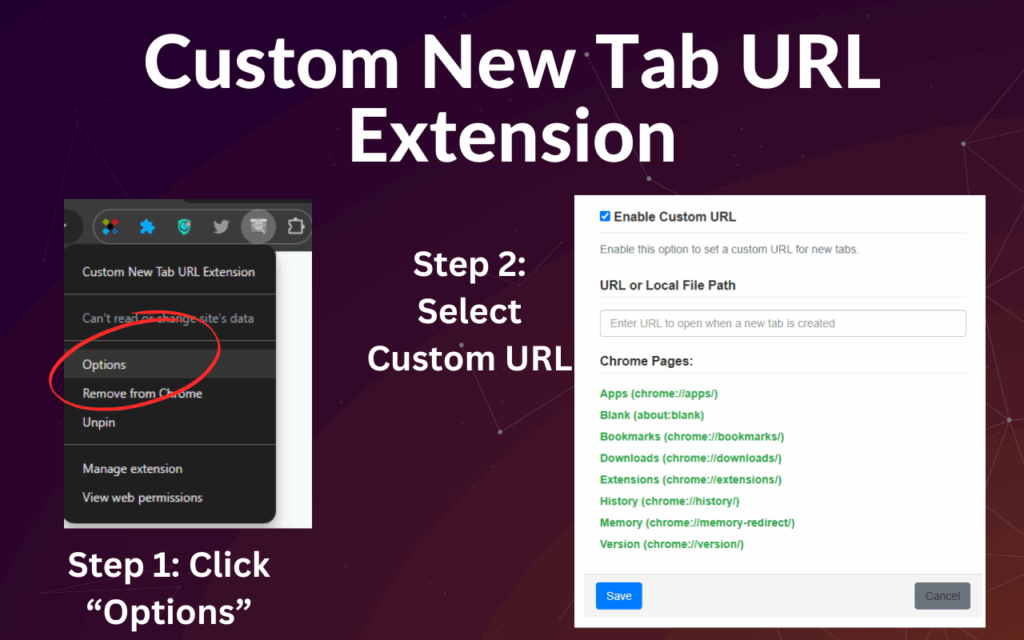
- Click the extension icon and select “Options” .
- Enter your preferred URL or local file path (e.g.,
file:///C:/my-dashboard/index.html). - Save your settings — and that’s it!
Now every time you open a new tab, your custom page will load instantly.
🚀 Final Thoughts
In a world where browsers can feel impersonal and cluttered, the Custom New Tab URL Extension gives you back control — letting you design your Chrome environment around your needs, not someone else’s.
Whether you’re optimizing for productivity, workflow, or just personal preference, this extension makes every new tab count.
Install today and make Chrome truly yours.
ℹ️ Frequently Asked Questions (FAQ)
Q: Does this extension work on mobile Chrome?
A: Currently, this extension is only available for Google Chrome desktop .
Q: Can I use it with HTTPS websites?
A: Yes! It supports all standard URLs including HTTP, HTTPS, and local file paths.
Q: Is my data safe?
A: Yes — the extension does not collect or transmit any personal information.
Q: Do I need developer skills to use it?
A: No — it’s designed to be user-friendly for everyone, regardless of technical background.
📬 Got Feedback or Suggestions?
We’d love to hear from you! Use the feedback option inside the extension to share your thoughts, report issues, or suggest improvements.
Let’s make personalization easier together.