
The HuggingFace Model Compatibility Scanner is a free Chrome extension that checks whether a GGUF-based large language model will actually run on your hardware — before you spend time downloading it. By detecting your CPU and available RAM, it displays color-coded compatibility badges directly on HuggingFace.co model pages, so you can make informed decisions at a glance. If you work with local LLMs and have ever wasted hours downloading a multi-gigabyte model that your system couldn’t load, this tool solves that problem completely.
What Is HuggingFace Model Compatibility Scanner?
The HuggingFace Model Compatibility Scanner is a browser extension built specifically for users who browse and download AI models from HuggingFace.co. It automatically analyzes your system’s hardware profile — including CPU type and total RAM — and compares it against the memory requirements of each GGUF model listed on the page. The result is a simple, visual indicator that tells you whether your machine can handle a given model without any manual calculations or external tools. All analysis runs locally inside your browser, meaning no data is transmitted to any server.

Key Features
Real-Time Compatibility Badges
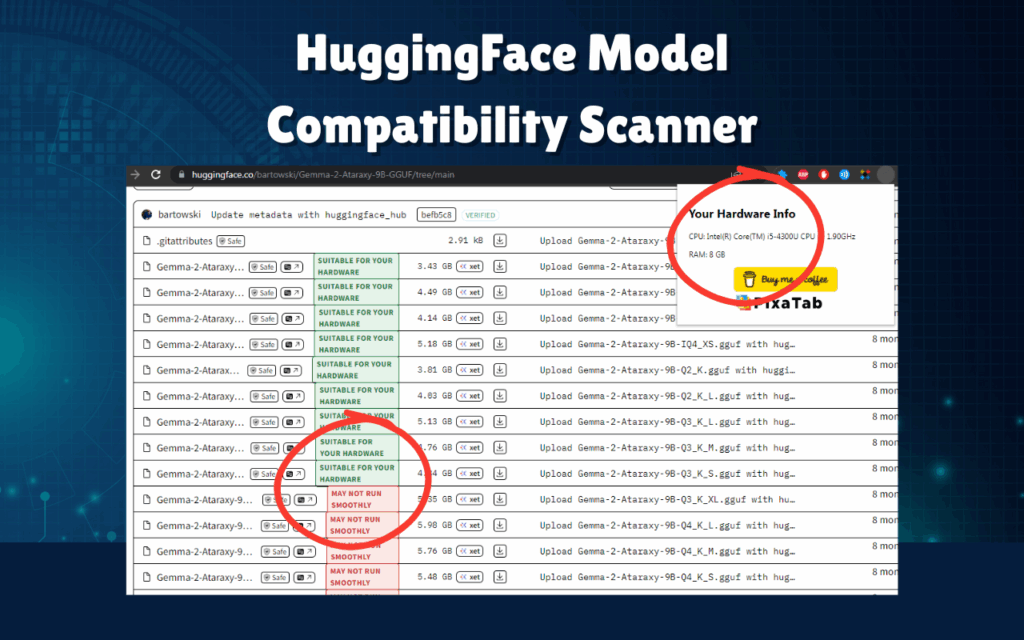
As you browse HuggingFace model repositories, the extension overlays green or red badges next to each GGUF file listing. Green indicates your system meets the memory requirements, while red signals that the model exceeds what your hardware can support. This visual feedback is immediate and requires no interaction on your part.
Automatic Hardware Detection
The extension silently reads your CPU model and system RAM without requiring any manual input. This hardware profile is then used as the baseline for all compatibility checks across every model you browse, making the experience fully hands-free from the moment you install it.
Memory Requirement Calculator
Running a GGUF model smoothly typically requires approximately 1.5 times the model’s file size in available RAM. The extension applies this rule automatically to each model and compares it against your detected memory, saving you from needing to do the math yourself every time you encounter a new model listing.
Seamless HuggingFace Integration
The extension works natively across HuggingFace repository pages, model cards, and file listing views that contain .gguf files. There is no configuration required — simply install the extension and continue browsing HuggingFace as you normally would, with compatibility data appearing automatically alongside model entries.
Lightweight and Privacy-Focused
The extension runs in the background with minimal resource usage and does not interfere with your normal browsing experience. Because all processing happens locally within your browser, no personal data, hardware details, or browsing activity is collected or sent to external servers.
How to Install
- Open the Chrome Web Store and search for HuggingFace Model Compatibility Scanner.
- Click the Add to Chrome button on the extension listing page.
- Confirm the installation by clicking Add extension in the browser prompt.
- Visit any model repository on HuggingFace.co that contains GGUF files.
- Compatibility badges will appear automatically next to each listed model file.
Why AI Developers and Researchers Love It
Anyone working with open-source language models locally knows how frustrating it is to download a 10 GB or 20 GB file, only to discover the model fails to load due to insufficient memory. This extension is particularly valuable for AI developers running experiments on personal hardware, researchers evaluating multiple models for deployment, students working within tight resource constraints, and hobbyists exploring the growing ecosystem of open-source LLMs. Rather than consulting documentation, calculating RAM manually, or relying on trial and error, users get the answer they need directly on the page they are already browsing.
Screenshots
Frequently Asked Questions
Which file formats does this extension support?
The extension is designed specifically for GGUF model files, which is the most widely used format for running quantized LLMs locally on consumer hardware.
Does it work on all HuggingFace pages?
It works on repository pages, model cards, and file listing views on HuggingFace.co where GGUF files are present. It does not modify or affect any other websites.
How does the extension access my hardware information?
The extension uses standard browser APIs to read CPU and memory information from your local system. This data never leaves your device and is only used to calculate compatibility on the current page.
Is the 1.5x RAM rule always accurate?
The 1.5x multiplier is a widely accepted rule of thumb for estimating the RAM needed to run a GGUF model without performance issues. Actual requirements can vary based on quantization level and system configuration, so the badge serves as a reliable guide rather than an absolute guarantee.
Does the extension slow down my browser?
No. The extension is designed to be lightweight and only activates on relevant HuggingFace pages. It has no measurable impact on browser performance during normal use.
If you regularly browse HuggingFace for local LLM models, the HuggingFace Model Compatibility Scanner is one of the most practical tools you can add to your workflow. Install it from the Chrome Web Store today and start browsing smarter.





