
What Is the YouTube Quick Search Context Menu Tool?
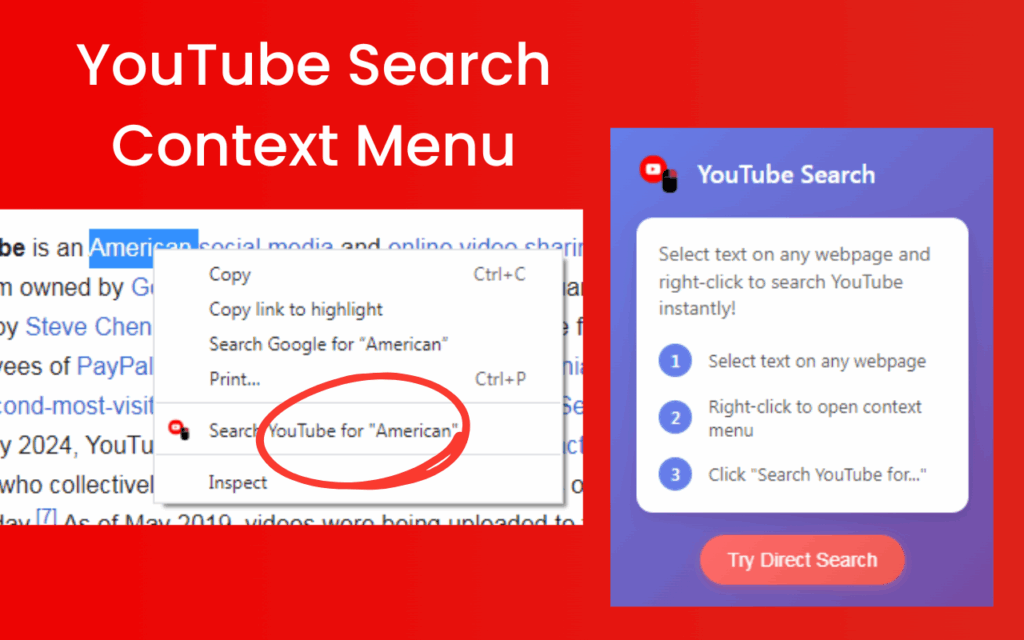
The YouTube Quick Search Context Menu Tool is a Chrome extension that lets you search YouTube directly from any webpage using your browser’s right-click menu. Instead of copying text, opening a new tab, navigating to YouTube, and typing your query manually, this extension reduces the entire process to two steps: highlight and right-click. The YouTube quick search context menu integration makes it effortless to find tutorials, reviews, explainer videos, and more — without ever leaving the page you’re reading.
Whether you’re a student researching a topic, a developer looking up coding concepts, or a shopper comparing products, this tool removes the friction between reading content and finding relevant video resources. It works on virtually every website you visit, including news sites, blogs, documentation pages, and e-commerce platforms.

Key Features of the YouTube Quick Search Context Menu Tool
Right-Click Context Menu Integration
The extension adds a “Search YouTube for [selected text]” option directly to your browser’s native right-click menu. This feels completely natural and requires no extra toolbar buttons or keyboard shortcuts to remember. The integration is clean, lightweight, and unobtrusive — it only appears when you’ve highlighted text.
Instant YouTube Search Results
Once you click the context menu option, YouTube search results for your selected phrase open in a new tab within seconds. There is no noticeable lag or delay, making it one of the fastest ways to access YouTube content while actively browsing the web.
No Typing or Copy-Paste Required
Traditional YouTube searches while reading require you to manually copy text, switch tabs, paste into YouTube’s search bar, and hit enter. This extension eliminates every one of those steps. Just highlight the word or phrase you’re curious about, and the search happens automatically.
Opens Results in a New Tab
Search results always open in a new tab, so your original page stays untouched and fully intact. You can review the YouTube results, watch a video, and return to exactly where you left off — no lost progress, no disrupted reading flow.
Universal Website Compatibility
This tool works across all types of websites without restriction. Whether you’re on a technical documentation page, a Reddit thread, a news article, or an online course platform, the right-click YouTube search option is always available. There are no site-specific limitations or whitelist requirements.
Lightweight and Non-Intrusive
The extension runs silently in the background and does not inject visible elements onto web pages or slow down your browsing. It only activates when you choose to use it, making it one of the most unobtrusive productivity extensions available for Chrome.
How to Install the YouTube Quick Search Context Menu Tool
- Open the Chrome Web Store and search for “YouTube Quick Search Context Menu Tool.”
- Click the extension listing to open its detail page.
- Select “Add to Chrome” and confirm by clicking “Add Extension” in the pop-up dialog.
- Once installed, navigate to any webpage and highlight any text.
- Right-click the highlighted text and select “Search YouTube for [your text]” from the context menu.
- A new tab will open automatically with YouTube search results for your selected phrase.
Why Students, Researchers, and Professionals Love It
Anyone who regularly uses YouTube as a learning resource understands the frustration of context-switching. Reading a dense article and then having to manually search YouTube breaks concentration and wastes time. This extension solves that problem in a way that feels seamless and intuitive.
Students can look up video explanations of complex concepts without leaving their study materials. Developers can find coding tutorials based on specific error messages or documentation they’re reading. Journalists and researchers can quickly find video coverage of topics they’re investigating. Shoppers can pull up product reviews without navigating away from a product listing. The use cases are wide-ranging, and the productivity benefit is immediate from the very first use.
Screenshots
Frequently Asked Questions
Does this extension work on all websites?
Yes, the extension is designed to work on any webpage you visit in Chrome. There are no blocked or unsupported sites — if you can highlight text on a page, you can use the right-click YouTube search feature.
Will it slow down my browser?
No. The extension is extremely lightweight and only activates when you right-click on highlighted text. It has no background processes that consume memory or CPU resources during normal browsing.
Does it require any account or login?
No account or login is required. After installation, the tool is immediately ready to use with no configuration or sign-in steps needed.
Where do the search results open?
All results open in a new browser tab, so your current page remains open and unchanged. You can freely switch between tabs without losing your place.
Can I search for multi-word phrases or full sentences?
Yes. You can highlight anything from a single word to a full sentence or paragraph. The extension passes your entire selection as the YouTube search query, so longer phrases work just as well as single keywords.
If you spend any meaningful time reading online and watching YouTube videos, this extension belongs in your browser. Install it once and immediately reclaim the time you’ve been wasting on unnecessary tab switching and manual searches.