What Is SecurePass Generator Pro?
SecurePass Generator Pro is a free Chrome password generator extension designed to help users create strong, random, and cryptographically secure passwords in seconds. Whether you are signing up for a new account, updating credentials after a breach, or simply trying to improve your online security habits, this lightweight browser extension gives you full control over password length and character types — all without ever leaving your browser tab. It works completely offline, meaning your generated passwords never touch a server or get stored anywhere outside your device.
Weak or reused passwords remain one of the leading causes of account takeovers. Tools like this extension remove the friction from good password hygiene, making it easy for everyday users and professionals alike to stay protected.

Key Features of SecurePass Generator Pro
Instant Password Generation
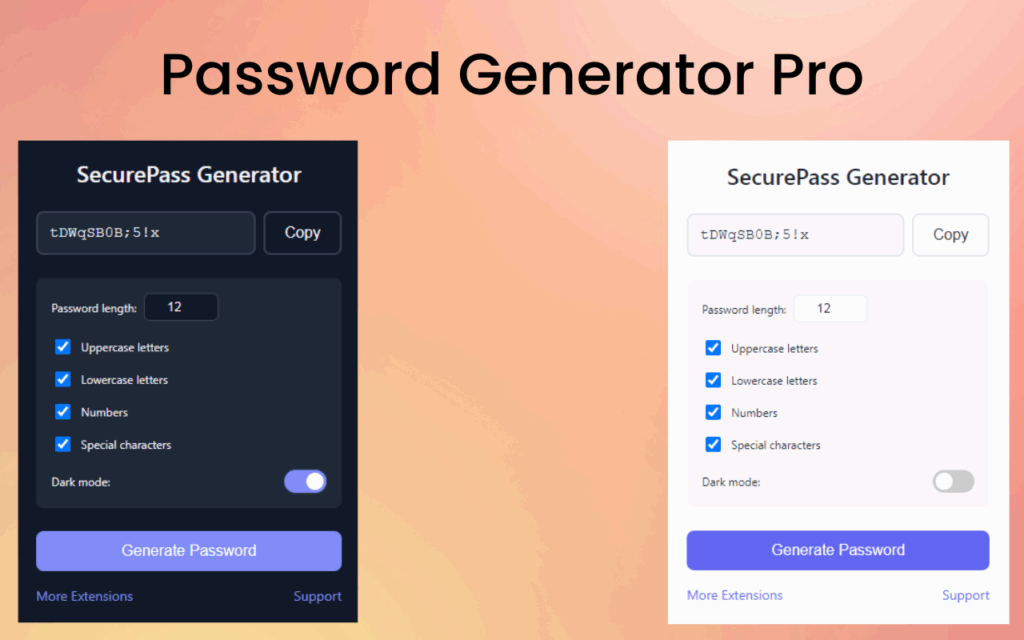
With a single click, SecurePass Generator Pro produces a complex, randomized password ready for immediate use. There is no loading time, no account creation, and no configuration required before your first use — just open the extension and generate.
Customizable Password Length
Users can set password length anywhere from 8 to 32 characters to meet the specific requirements of different websites and platforms. This flexibility ensures you are never locked into a one-size-fits-all output that may not satisfy a site’s password policy.
Full Character Set Control
Choose exactly which character types to include in your password: uppercase letters (A–Z), lowercase letters (a–z), numbers (0–9), and special symbols such as !, @, #, and more. Mixing and matching these options lets you tailor every password to the exact requirements of any login form.
Cryptographically Secure Randomization
The extension uses secure randomization algorithms to ensure every password generated is statistically unpredictable and resistant to brute-force attacks. This is the same class of randomness used in enterprise security tools, now available directly in your browser.
One-Click Clipboard Copy
Once your password is generated, copying it to your clipboard takes a single click — no highlighting, no right-clicking, no manual effort. This small convenience makes it significantly faster to use strong passwords without slowing down your workflow.
Fully Offline Operation
SecurePass Generator Pro runs entirely within your browser with no internet connection required after installation. No data is transmitted to external servers, and no passwords are logged or stored, making it one of the most privacy-respecting tools of its kind.
Dark Mode Support
The extension includes a dark mode interface for users who prefer low-light environments or simply want a more comfortable visual experience. It adapts cleanly to different usage conditions without requiring any additional settings changes.
How to Install SecurePass Generator Pro
- Open the Chrome Web Store in your Google Chrome browser.
- Search for SecurePass Generator Pro in the search bar.
- Click on the extension listing to open its detail page.
- Click the Add to Chrome button and confirm the prompt.
- Once installed, click the extension icon in your Chrome toolbar to start generating passwords immediately.
Why Security-Conscious Users Love It
Users who take their online security seriously appreciate SecurePass Generator Pro because it removes all the excuses for using weak passwords. It is free with no ads, requires no subscription, and does not ask for unnecessary permissions. IT professionals use it to quickly generate credentials for client accounts. Students rely on it when registering for new platforms. Remote workers use it to maintain strong, unique passwords across dozens of work tools. The combination of simplicity, privacy, and genuine cryptographic strength makes it a practical daily-use tool rather than a novelty.
Screenshots
Frequently Asked Questions
Does SecurePass Generator Pro store my passwords?
No. The extension does not store, log, or transmit any passwords you generate. Everything happens locally within your browser, and nothing is saved after you close the popup.
Can I use it without an internet connection?
Yes. After installation, the extension works completely offline. It does not need to connect to any server to generate passwords.
Is this extension free to use?
SecurePass Generator Pro is entirely free. There are no premium tiers, no ads, and no in-app purchases required to access any of its features.
What is the maximum password length supported?
The extension supports passwords up to 32 characters in length. You can also set a minimum of 8 characters, giving you a wide range to work with depending on the platform’s requirements.
Is it safe to use on shared or work computers?
Because the extension stores nothing and operates offline, it is safe to use on any device. However, always ensure you paste generated passwords directly into a trusted password manager or secure field rather than leaving them in your clipboard for extended periods.
If you are serious about protecting your accounts, SecurePass Generator Pro is one of the simplest upgrades you can make to your daily browsing routine. Search for it in the Chrome Web Store and start generating stronger passwords today.