
The Discount Calculator Chrome Extension is a free, lightweight browser tool that helps online shoppers instantly calculate final prices, total savings, and tax-adjusted totals — without ever leaving the product page. Whether you are hunting deals on major e-commerce platforms or comparing international prices, this extension gives you accurate, real-time results with minimal effort.

What Is Discount Calculator?
Discount Calculator is a Chrome extension built for everyday shoppers who want to stop guessing and start saving. It runs directly inside your browser and computes discounted prices based on the original price, discount type, and applicable tax rate. Instead of switching between tabs or doing mental math, you get a clear breakdown of what you will actually pay — and exactly how much you are saving.
The tool supports multiple currencies and both percentage-based and fixed-amount discounts, making it equally useful for local bargain hunters and international buyers comparing deals across regions.
Key Features of the Discount Calculator Chrome Extension
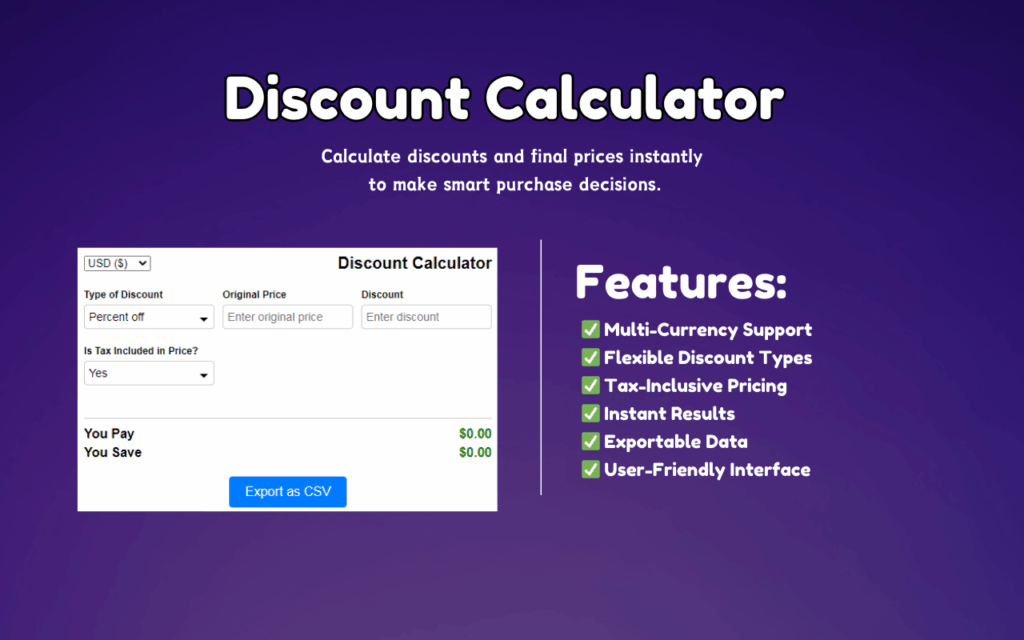
Multi-Currency Support
Calculate discounts and final prices in USD, EUR, GBP, JPY, CAD, AUD, and several other major currencies. This makes the extension particularly useful for international shoppers who need accurate price comparisons without manually converting figures.
Flexible Discount Types
Choose between a percentage-off discount (such as 20% off) or a fixed-amount reduction (such as $15 off). This flexibility ensures that the calculator matches the exact type of promotion being offered, so your results are always precise.
Tax-Inclusive Pricing Toggle
Enter a custom sales tax rate and switch between tax-inclusive and tax-exclusive totals with a single click. This is especially helpful when shopping on international sites where displayed prices may not reflect your local tax obligations.
Real-Time Calculations
As soon as you adjust any input — price, discount, or tax — the “You Pay” and “You Save” values update instantly. There is no need to press a calculate button, which keeps your workflow smooth and interruption-free while browsing.
Exportable CSV Results
Download your calculation results as a CSV file for budgeting, expense tracking, or deal comparisons. This feature is particularly valuable for shoppers managing a strict budget or comparing multiple products side by side.
Clean, Intuitive Interface
The extension features a simple, uncluttered layout that anyone can use immediately after installation. There are no confusing menus or settings to navigate — just input your numbers and read your results.
How to Install Discount Calculator
- Open the Chrome Web Store and search for “Discount Calculator” by TabPlugins.
- Click the “Add to Chrome” button on the extension listing page.
- Confirm the installation when prompted by your browser.
- Once installed, the extension icon will appear in your Chrome toolbar.
- Click the icon on any product page to open the calculator and start entering your values.
Why Online Shoppers Love This Extension
Shoppers who regularly browse sales, seasonal promotions, or international storefronts know how frustrating it can be to figure out the real cost of a deal. The Discount Calculator removes that friction entirely. It is designed for people who want fast, reliable answers — not another complicated tool to learn.
Budget-conscious buyers appreciate the CSV export feature, which lets them track spending over time. Deal hunters benefit from the instant comparison capability across different discount types. International shoppers rely on the multi-currency support to make confident cross-border purchases. In short, it fits naturally into any shopping habit.
Screenshots
Frequently Asked Questions
Does the extension work on all e-commerce websites?
Yes. The Discount Calculator works on any website you visit in Chrome, including Amazon, eBay, AliExpress, and independent online stores. You simply open the extension from your toolbar and enter the relevant price details manually.
Is the Discount Calculator extension free to use?
Yes, the extension is completely free. There are no subscriptions, premium tiers, or hidden charges involved in using the core features.
Can I use it for both percentage and flat discounts?
Absolutely. The extension supports both percentage-off and fixed-amount discount types, so you can match the exact format of any promotion you encounter while shopping.
Does it require a login or account?
No account or login is required. Install the extension and it is ready to use immediately — your data stays local to your browser.
Can I save or export my calculations?
Yes. The extension includes a CSV export option that lets you save your results for future reference, helping you track savings or compare deals over time.
If you are serious about making smarter purchasing decisions, the Discount Calculator Chrome Extension is a simple addition to your browser that pays off every time you shop. Install it once and use it on every deal you find.





