
What Is GitHub Email Finder Pro?
GitHub Email Finder Pro is a Chrome extension built for anyone who needs to connect directly with developers on GitHub. Whether you are a recruiter sourcing engineering talent, a founder looking for a technical co-founder, or a researcher reaching out to open-source contributors, this GitHub email finder extension does the heavy lifting for you. Instead of manually sifting through profile pages, commit logs, and repository documentation, you get publicly available email addresses surfaced in seconds — right inside your browser.
GitHub hosts millions of developers, project maintainers, and software innovators. But finding their contact information is rarely straightforward. GitHub Email Finder Pro solves that problem with a clean, focused tool that respects platform guidelines and ethical outreach practices.

Key Features of GitHub Email Finder Pro
Instant Email Discovery from Profiles and Repositories
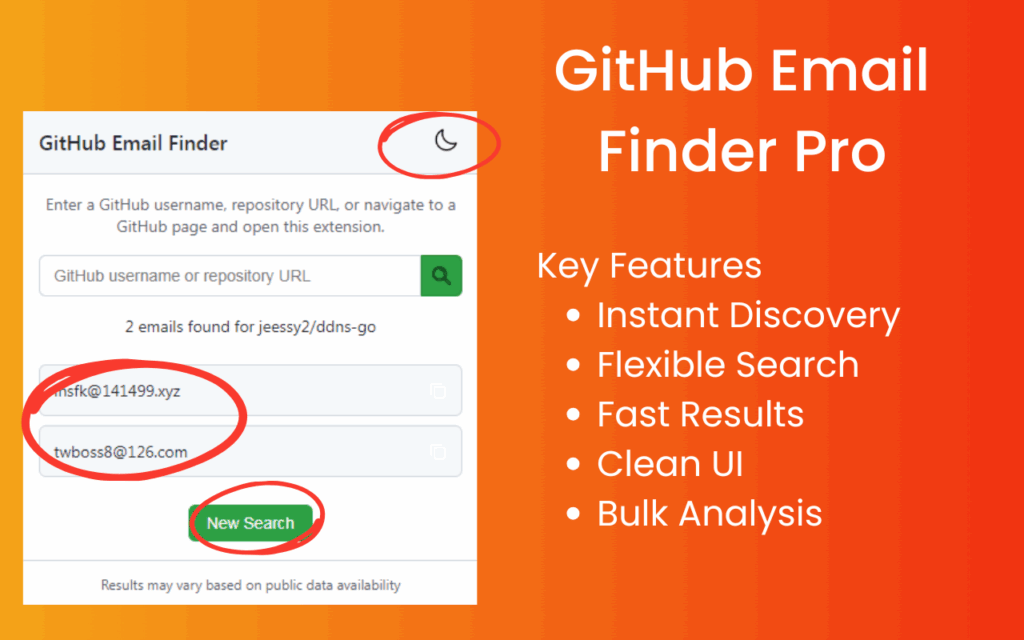
Enter a GitHub username or paste a repository URL and the extension immediately scans for any publicly associated email addresses. Results appear within seconds inside the extension popup, so there is no need to open new tabs or copy information manually between pages.
Multiple Search Methods
The extension gives you three ways to find emails depending on your workflow. You can run a direct search using a username or repo link, activate on-page discovery while browsing any GitHub profile, or use batch processing to extract contact details from multiple contributors at once. This flexibility makes it suitable for both one-off outreach and larger recruitment campaigns.
Deep Repository and Commit Analysis
GitHub Email Finder Pro goes beyond surface-level profile scanning. It analyzes commit logs, pull request comments, contributor bios, and README files to uncover email addresses that would otherwise take significant manual effort to find. This deeper analysis is especially useful when targeting active contributors to a specific project.
Organization-Wide Contact Extraction
The extension supports not just individual GitHub profiles but also entire organizations. You can extract contributor emails from a company’s public repositories, making it straightforward to identify and contact the engineers behind popular open-source projects or tools you depend on.
Clean In-Browser Results Display
All discovered email addresses are displayed clearly inside the extension popup without redirecting you anywhere. Results are easy to copy for use in your outreach tools, CRM, or email campaigns. The interface is minimal and distraction-free, keeping your workflow efficient.
How to Install GitHub Email Finder Pro
- Open the Chrome Web Store and search for GitHub Email Finder Pro.
- Click the Add to Chrome button on the extension listing page.
- Confirm the installation by clicking Add Extension in the browser prompt.
- Once installed, navigate to any GitHub profile or repository page.
- Click the GitHub Email Finder Pro icon in your browser toolbar to activate the extension and begin your search.
Why Recruiters and Researchers Love It
Technical recruiters consistently run into the same wall — GitHub profiles show impressive portfolios but rarely include a visible email address on the surface. This extension removes that friction entirely. Instead of spending hours cross-referencing commit histories and external profiles, recruiters can identify contact details for qualified candidates in a fraction of the time.
Researchers and open-source enthusiasts also find real value here. If you want to collaborate with the maintainer of a library you use, or you need to credit and contact a contributor for a project fork, GitHub Email Finder Pro surfaces that information without requiring any technical workaround. It is built for ethical, professional use — surfacing only what developers have already made publicly available.
Screenshots
Frequently Asked Questions
Does GitHub Email Finder Pro access private email addresses?
No. The extension only surfaces email addresses that are publicly available through GitHub profiles, commit metadata, and repository content. It does not access private account data or bypass any GitHub privacy settings.
Is this extension compliant with GitHub’s terms of service?
GitHub Email Finder Pro is designed to work with publicly accessible data only. It does not scrape authenticated or private information. Users are responsible for ensuring their outreach activities comply with applicable laws and platform policies.
Can I use it to extract emails from an entire organization?
Yes. The extension supports organization-wide scanning across public repositories, allowing you to collect contributor contact details from multiple projects under a single GitHub organization.
What browsers does GitHub Email Finder Pro support?
The extension is built for Google Chrome and Chromium-based browsers such as Microsoft Edge and Brave. It is optimized for desktop use.
How accurate are the email results?
Accuracy depends on what developers have made publicly visible. The extension uses multiple discovery methods — including profile fields, commit logs, and repository files — to maximize the number of valid addresses returned for any given search.
If you need a faster, smarter way to connect with developers on GitHub, GitHub Email Finder Pro is the tool your workflow has been missing. Add it to your browser and start building real connections today.