

The Google Search Image Sizer is a free Chrome extension that puts precise size control directly into Google Images, letting you filter results by exact pixel dimensions and resolutions. Instead of scrolling through hundreds of irrelevant images and resizing them after the fact, you can define your target width and height upfront and instantly see only the images that match your criteria.
What Is Google Search Image Sizer?
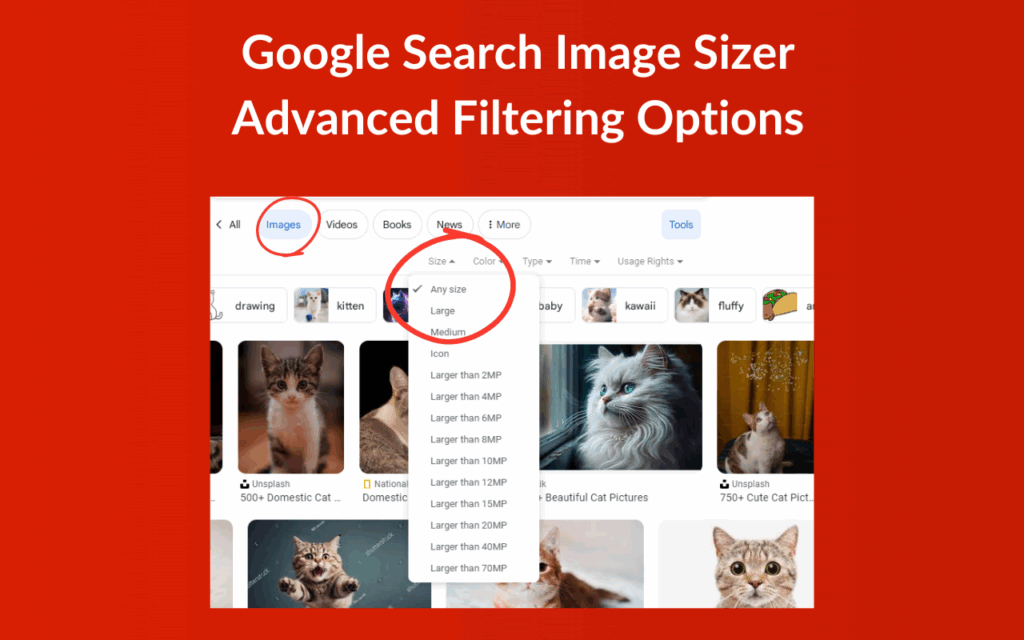
Google Search Image Sizer is a lightweight browser extension designed to enhance the native Google Images search experience. Google’s built-in size filters are limited to vague categories like “large” or “medium” — this extension goes further by letting you specify exact pixel values or select from standard preset resolutions such as 1920×1080, 1080×1080, or 3840×2160.
It works by integrating a clean size filter panel directly into the Google Images interface. There are no separate windows, no redirects, and no impact on your browser’s performance. Whether you need a specific wallpaper dimension, a social media asset, or a design element that fits a precise layout, this tool gives you the control you need without extra steps.
Google Search Image Sizer

Key Features of Google Search Image Sizer
Custom Pixel Dimension Filtering
You can manually enter any width and height value in pixels to filter Google Images results to match your exact specifications. This is particularly useful when you’re working within a design system or content template that requires images of a fixed size. No more downloading an image only to find it’s 200 pixels too narrow.
Preset Resolution Options
For common use cases, the extension includes a set of ready-to-use preset resolutions including HD (1920×1080), square (1080×1080), and 4K (3840×2160). These presets save time when you regularly search for images in standard formats, such as YouTube thumbnails, Instagram posts, or desktop wallpapers. Simply select a preset and apply — no manual entry required.
Seamless Google Images Integration
The size filter panel appears directly within the Google Images interface, so your workflow stays uninterrupted. Unlike third-party image search tools that take you to a different platform entirely, this extension layers its controls on top of the search results you’re already browsing. The experience feels native and intuitive from the first use.
Lightweight and Non-Intrusive
The extension runs silently in the background and does not slow down your browser or interfere with other tabs. It only activates when you are using Google Images, which means it has no unnecessary footprint during your regular browsing. Users on older machines or with many extensions installed will not notice any performance degradation.
Completely Free to Use
There are no subscription tiers, no locked features, and no advertisements within the extension. Everything is available from the moment you install it, with no account creation or sign-in required. It is built to be a straightforward utility that simply does its job every time.
How to Install Google Search Image Sizer
- Open the Chrome Web Store and search for “Google Search Image Sizer.”
- Click the “Add to Chrome” button on the extension listing page.
- Confirm the installation when Chrome prompts you to review permissions.
- Once installed, navigate to Google Images and perform any image search.
- Click the extension icon in your Chrome toolbar to open the Image Size Filter panel.
- Enter your desired width and height in pixels, or choose from a preset resolution.
- Click “Apply Filter” to refresh the results and view only matching images.
Why Designers, Developers, and Creators Love It
Anyone who regularly sources images for professional or creative work understands how frustrating it is to find the right visual at the wrong size. Graphic designers sourcing assets for mockups, marketers building campaign visuals, web developers grabbing UI elements, and content creators assembling social media posts all deal with this problem daily. Google Search Image Sizer eliminates the guesswork by narrowing results before you ever click on a single image.
The time savings add up quickly. Instead of opening ten images to check their dimensions, you define your requirements upfront and browse only what qualifies. For anyone working under deadlines or managing large volumes of visual content, this is a meaningful improvement to an otherwise tedious process.
Screenshots
Frequently Asked Questions
Does this extension work on all versions of Google Images?
Yes, the extension is designed to work with the current Google Images interface and updates alongside Chrome to maintain compatibility. If Google makes significant changes to its layout, the extension is typically updated to reflect those changes.
Can I filter images by only width or only height?
You can enter values for both dimensions or use a preset that defines both. Filtering by a single dimension alone is not currently supported, but the preset options cover the most common aspect ratios and sizes used in design and content work.
Will the extension affect my Google search results outside of Images?
No. The extension only activates on the Google Images tab and has no effect on standard web search results, Google Shopping, or any other Google product.
Is my search data collected or stored by the extension?
The extension does not collect, store, or transmit your search queries or browsing data. It functions entirely within your browser without communicating with any external server.
Does it support browsers other than Chrome?
Currently, the extension is built specifically for Google Chrome. It may work on Chromium-based browsers such as Microsoft Edge or Brave, but full compatibility with those browsers is not officially guaranteed.
If you spend any meaningful amount of time searching for images on Google, the Google Search Image Sizer is worth adding to your browser today. It is a small tool that solves a real problem — and once you start using it, searching for images without it will feel noticeably inefficient.





