
If you have ever tried to copy restricted Google Sheets and hit a frustrating wall, you already know how limiting view-only access can be. Spreadsheet Copy Pro is a Chrome extension built to solve exactly that problem — giving you the ability to select, copy, and use spreadsheet data without modifying the original document in any way.
What Is Spreadsheet Copy Pro?
Spreadsheet Copy Pro is a lightweight Chrome extension that removes copy restrictions from Google Sheets you already have permission to view. Instead of locking you out of selecting cells or copying text, it opens an enhanced read-only version of the sheet in a new tab — leaving the source file completely untouched. It is designed for students, researchers, analysts, and professionals who regularly work with shared spreadsheets and need to extract data efficiently and accurately.
Key Features of Spreadsheet Copy Pro
One-Click Copy Access
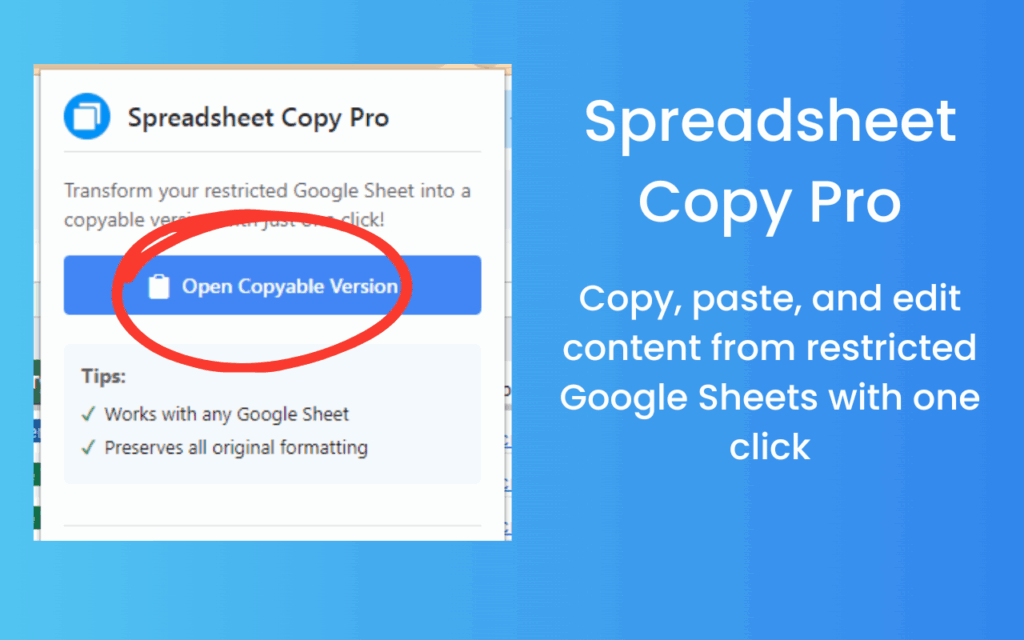
There are no complicated menus or multi-step processes involved. A single click on the extension icon is all it takes to convert a restricted Google Sheet into a fully copyable version. The extension activates instantly, so you can get straight to work without any setup or configuration.
Preserves Original Formatting
When you copy data from a spreadsheet, formatting matters. Spreadsheet Copy Pro maintains all colors, fonts, borders, cell alignment, and styling exactly as they appear in the original sheet. Whether you are working with a financial model, a project tracker, or an academic dataset, the copied content looks exactly as intended.
Data Integrity Protection
The extension never writes to or modifies the source document. It creates a separate read-only enhanced view in a new browser tab, which means there is zero risk of accidentally editing or corrupting the original file. The owner of the sheet will never know you accessed a copyable version.
Works with Any Google Sheet
Spreadsheet Copy Pro is compatible with all types of Google Sheets — whether shared via a direct link, embedded on an external website, or distributed through Google Workspace or personal Gmail accounts. It works regardless of who owns the file or what sharing settings have been applied.
Instant Processing with No Lag
The extension processes the sheet as soon as it loads in your browser, with no noticeable delay. There is no waiting for a server response or additional loading time — the copyable version is ready within seconds of opening the sheet.
Universal Account Compatibility
Whether you use a personal Gmail account, a Google Workspace account for work, or a school-issued Google account, Spreadsheet Copy Pro functions seamlessly across all of them. It also handles sheets embedded in third-party websites without any issues.
How to Install Spreadsheet Copy Pro
- Open the Chrome Web Store and search for Spreadsheet Copy Pro.
- Click the extension listing to open its detail page.
- Select Add to Chrome and confirm by clicking Add extension in the popup.
- Once installed, the extension icon will appear in your Chrome toolbar.
- Open any restricted Google Sheet, click the Spreadsheet Copy Pro icon, and start copying content freely.
Why Analysts and Researchers Love It
Data professionals spend a significant portion of their time extracting, cleaning, and transferring information from shared spreadsheets. When copy restrictions block that workflow, productivity suffers. Spreadsheet Copy Pro eliminates that bottleneck without requiring any technical skills or workarounds. Students appreciate it for copying lecture materials and study resources. Business analysts use it to pull numbers into their own reports. Researchers rely on it to collect dataset entries without manual re-entry. The common thread is that it respects both the user’s time and the original document’s integrity.
Screenshots
Frequently Asked Questions
Does Spreadsheet Copy Pro modify the original Google Sheet?
No. The extension creates a separate read-only version of the sheet in a new tab. The original document is never altered, and the file owner will not see any changes to their file.
Will this work on Google Sheets shared with view-only access?
Yes. The extension is specifically designed for view-only sheets where standard copy and selection features have been disabled. It restores those capabilities in the cloned version it generates.
Is Spreadsheet Copy Pro compatible with Google Workspace accounts?
Absolutely. It works with personal Gmail accounts, Google Workspace accounts used in business environments, and institutional accounts used in schools and universities.
Does the copied data retain its original formatting?
Yes. All cell formatting — including fonts, colors, borders, and alignment — is preserved in the copyable version. You do not need to reformat the data after copying it.
Does it work on sheets embedded in other websites?
Yes. Spreadsheet Copy Pro handles Google Sheets that are embedded within external websites, not just those accessed directly through Google Drive or Sheets.
If you regularly work with shared spreadsheets and need a reliable, non-destructive way to access and copy content, Spreadsheet Copy Pro is worth adding to your Chrome browser today. Install it once and remove copy-restriction frustration from your workflow for good.





