
What Is SVG Copy Pro?
SVG Copy Pro is a Chrome extension built for anyone who needs to copy SVG from webpage elements quickly and without friction. Instead of digging through browser DevTools or manually hunting through source code, you simply right-click on any SVG graphic and select “Copy SVG” — the full, clean vector code lands directly in your clipboard. Front-end developers, UI/UX designers, and content creators all benefit from having instant access to editable SVG markup without extra steps or messy cleanup.
The extension works silently in the background, activating only when an SVG element is detected. It integrates cleanly into your existing browser workflow without adding clutter or slowing down your browsing experience.
Key Features of SVG Copy Pro
One-Click SVG Extraction
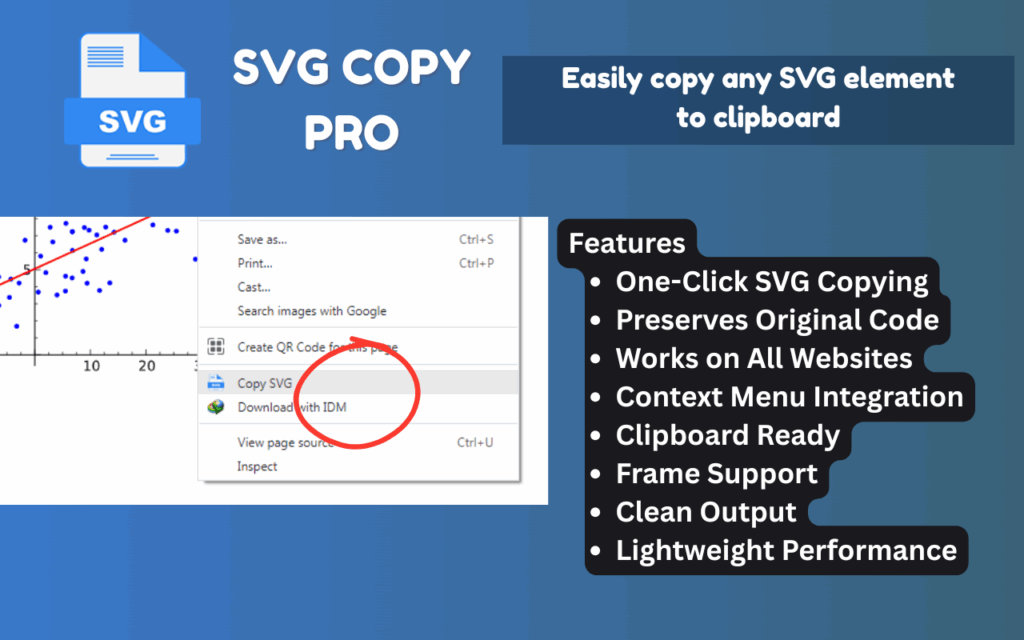
Right-clicking on any SVG element reveals the “Copy SVG” option directly in your browser context menu. The entire process takes under a second, eliminating the need to open DevTools, scroll through markup, or manually select and copy code blocks.
Full Code Preservation
SVG Copy Pro captures the complete SVG markup — including inline styles, path data, group attributes, and class names — exactly as it appears on the page. You get a faithful copy that behaves identically to the original when pasted into your project or design tool.
Works Across All Websites
Whether you are browsing icon libraries, design inspiration sites, documentation portals, or complex web applications, SVG Copy Pro works wherever SVGs are rendered. There are no domain restrictions or site-specific limitations to worry about.
Context Menu Integration
The “Copy SVG” option only appears in the context menu when you right-click on an actual SVG element. This keeps your right-click menu clean and uncluttered on pages where no SVGs are present, making the experience feel native and non-intrusive.
Iframe and Embedded Content Support
Many SVGs are loaded inside iframes, modals, or embedded widgets — areas that other tools often cannot reach. SVG Copy Pro handles these cases seamlessly, giving you access to vector graphics no matter how they are structured on the page.
Clean Output, No Extra Markup
The extension isolates and copies only the SVG element itself, stripping away any surrounding HTML containers or wrapper elements. What you paste into your editor or design tool is exactly what you need — nothing more, nothing less.
Lightweight and Non-Intrusive
SVG Copy Pro runs with minimal resource usage and has no measurable impact on page load speed or browser performance. It stays out of your way until you need it, then works instantly when you do.
How to Install SVG Copy Pro
- Open the Chrome Web Store and search for SVG Copy Pro.
- Click the Add to Chrome button on the extension listing page.
- Confirm the installation prompt by clicking Add extension.
- Navigate to any webpage that contains SVG graphics.
- Right-click on an SVG element and select Copy SVG from the context menu.
- Paste the copied code into your code editor, design application, or project file.
Why Developers and Designers Love SVG Copy Pro
Anyone who works regularly with web graphics knows how tedious it can be to extract SVG assets manually. Inspecting elements, locating the correct node in a deeply nested DOM, selecting the markup without missing attributes, and cleaning up the output is a workflow that wastes real time. SVG Copy Pro eliminates every one of those steps.
Front-end developers use it to pull icons and UI components into reusable component libraries. Designers use it to collect vector assets for mood boards, style guides, and Figma files. UX researchers use it to document visual patterns across competing products. QA engineers use it to verify that SVG elements render correctly by comparing original markup against what appears in staging environments. Whatever your role, if you work with vector graphics on the web, this tool saves you meaningful time every single day.
Screenshots
Frequently Asked Questions
Does SVG Copy Pro work on all websites?
Yes. The extension works on any website where SVG elements are present in the DOM, including sites that load SVGs dynamically or inside embedded content like iframes.
Will the copied SVG include its styles and attributes?
Absolutely. SVG Copy Pro copies the full SVG markup, preserving inline styles, path definitions, class names, and all other attributes exactly as they appear on the source page.
Can I paste the copied SVG directly into Figma or Illustrator?
Yes. Both Figma and Adobe Illustrator support pasting SVG code directly. You can also paste into VS Code, Sublime Text, or any other code editor without any additional formatting required.
Does the extension slow down my browser?
No. SVG Copy Pro is designed to be lightweight and only activates when you right-click on an SVG element. It has no background processes that affect browsing speed or page load times.
What happens when I right-click on a non-SVG element?
The “Copy SVG” option will not appear in the context menu if the element you right-clicked is not an SVG. The menu stays clean and uncluttered on pages or elements where the extension is not applicable.
If you work with web graphics in any capacity, SVG Copy Pro is the kind of tool that becomes indispensable within the first few minutes of use. Install it today and stop wasting time on manual SVG extraction — your workflow will be noticeably faster from the very first right-click.





