
What Is Chrome Extension Downloader – CRX & ZIP Extractor?
The Chrome Extension Downloader – CRX & ZIP Extractor is a lightweight browser tool that lets you download, extract, and inspect any Chrome or Microsoft Edge extension directly from the store page. Whether you need a CRX packed file or a ready-to-inspect ZIP archive, this chrome extension downloader CRX ZIP solution handles it all with a single click — no external websites, no complicated workarounds, and no account required. It is built for developers, security researchers, QA engineers, and power users who want direct, clean access to extension source files.
Chrome Extension Downloader
Key Features of Chrome Extension Downloader
One-Click Extension Downloads
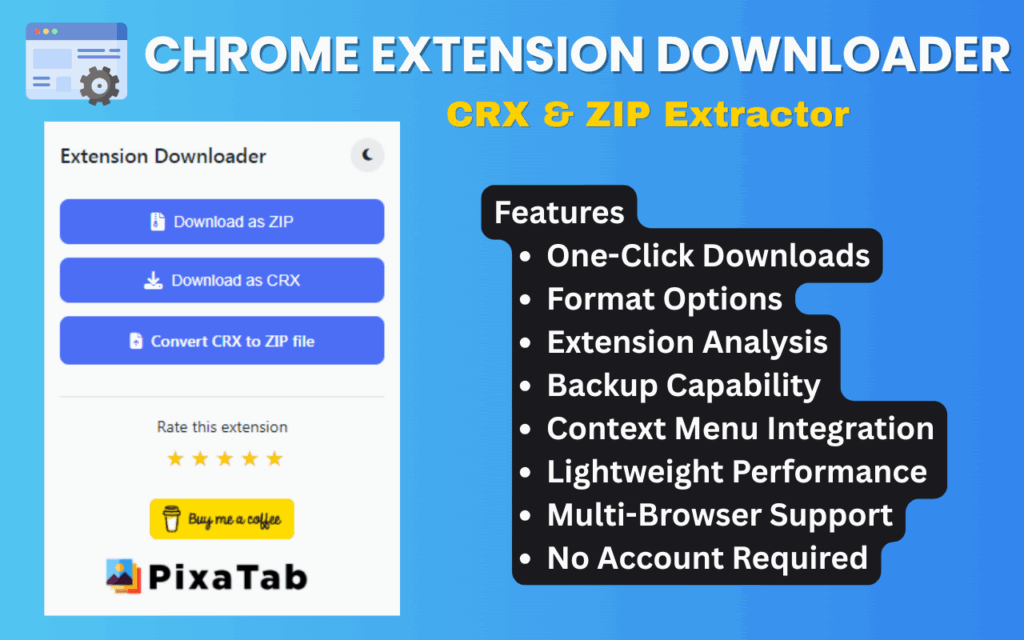
Navigate to any Chrome Web Store or Microsoft Edge Add-ons page and download the extension instantly by clicking the toolbar icon. There is no need to copy IDs, visit third-party services, or run command-line scripts — the download starts immediately from the official store source.
CRX and ZIP Format Options
Choose between two output formats depending on your workflow. The CRX format gives you the standard packed Chrome extension file, while the ZIP format delivers a pre-extracted archive that is immediately ready for code review, asset extraction, or local development use.
Context Menu Integration
Right-click anywhere on an extension store page to access the Download Extension option directly from the browser context menu. This provides a fast alternative to opening the popup, making the workflow even quicker for power users who prefer keyboard and mouse shortcuts.
Lightweight and Efficient
The extension runs quietly in the background with a minimal memory footprint and no noticeable impact on browser performance. It does not inject scripts into unrelated pages or run continuous background processes, keeping your browser fast and clean.
Multi-Browser Support
This tool works seamlessly with both Google Chrome and Microsoft Edge, covering the two most widely used Chromium-based browsers. Whether you are auditing extensions from the Chrome Web Store or the Edge Add-ons marketplace, the downloader handles both without any configuration changes.
Dark Mode Toggle
Switch the popup interface to dark mode with a single click for comfortable use in low-light environments. The dark theme applies instantly and persists across sessions, so you do not need to re-enable it each time you open the extension.
No Account or Login Required
Install the extension and start downloading immediately — there is no sign-up form, no email verification, and no subscription wall. All functionality is available from the moment you add it to your browser.
How to Install Chrome Extension Downloader
- Find the Chrome Extension Downloader – CRX & ZIP Extractor listing on the Chrome Web Store.
- Click the Add to Chrome button and confirm the installation prompt.
- Once installed, navigate to any Chrome or Edge extension store page.
- Click the extension icon in your browser toolbar to open the download popup.
- Select your preferred format — CRX or ZIP — and click Download.
- Open the downloaded file with any archive tool to inspect, modify, or back up the extension contents.
Why Developers and Researchers Love It
Security researchers use this tool to audit browser extensions for suspicious permissions, obfuscated scripts, or data collection behaviors before recommending them to clients. Web developers use it to study how popular open-source extensions are structured, learn implementation patterns, and reference real-world code. QA engineers rely on it to capture exact extension builds for regression testing, ensuring that a specific version can be re-installed and validated at any point. Power users appreciate the ability to keep local backups of their favorite add-ons, protecting against unexpected removal from the store. In every case, the tool eliminates the friction of relying on unreliable third-party downloader websites that may serve outdated or modified files.
Screenshots
Frequently Asked Questions
Does this extension work with Microsoft Edge extensions?
Yes. The downloader supports both the Chrome Web Store and the Microsoft Edge Add-ons marketplace, allowing you to save extensions from either platform in CRX or ZIP format.
What is the difference between the CRX and ZIP download options?
A CRX file is the standard packed Chrome extension format used for installation. A ZIP file contains the same contents but is already extracted, making it easier to browse source files, edit scripts, or inspect assets without a separate extraction step.
Is it safe to use this extension?
The extension only activates on Chrome Web Store and Edge Add-ons pages and does not request access to your personal data, browsing history, or other websites. It downloads files directly from the official store infrastructure.
Can I use the downloaded ZIP file to install an extension manually?
Yes. You can load a ZIP or extracted folder as an unpacked extension in Chrome by enabling Developer Mode in the Extensions settings and using the Load Unpacked option to select the folder.
Does the extension require any ongoing permissions or background access?
No persistent background access is required. The extension operates only when you interact with it on a supported store page, keeping its permission scope minimal and its impact on browser performance negligible.
If you regularly work with browser extensions — whether for development, security analysis, testing, or backup purposes — the Chrome Extension Downloader – CRX & ZIP Extractor is one of the most practical tools you can add to your workflow. Give it a try and take full control of the extensions in your browser environment.





