
The Twitter Color Customizer extension is a lightweight Chrome extension that breaks you free from Twitter’s six built-in accent colors and lets you apply any color from the full spectrum to your Twitter or X.com interface. Whether you want to match your personal brand, express your aesthetic, or simply enjoy a fresher-looking feed, this tool gives you real creative control without requiring any technical knowledge.
What Is Twitter Color Customizer?
Twitter Color Customizer – Unlimited Theme Options is a browser extension built specifically for Chrome users who want more than what Twitter’s default settings offer. Instead of choosing from a handful of preset colors, the extension opens up the entire color spectrum so you can apply a custom accent color across buttons, links, icons, and other interactive UI elements. It works seamlessly on both twitter.com and x.com, meaning the experience stays consistent regardless of which domain you use.
Twitter Color Customizer

Key Features of Twitter Color Customizer
Unlimited Color Choices
Unlike Twitter’s built-in theme options that limit you to six colors, this extension provides a full color picker so you can select any shade, tint, or hue you want. From subtle pastels to bold neons, the choice is entirely yours.
Custom Accent Color Application
Your chosen color is applied consistently across Twitter’s interactive elements including buttons, hyperlinks, and icons. This creates a cohesive, polished look throughout the entire interface rather than isolated changes.
One-Click Activation
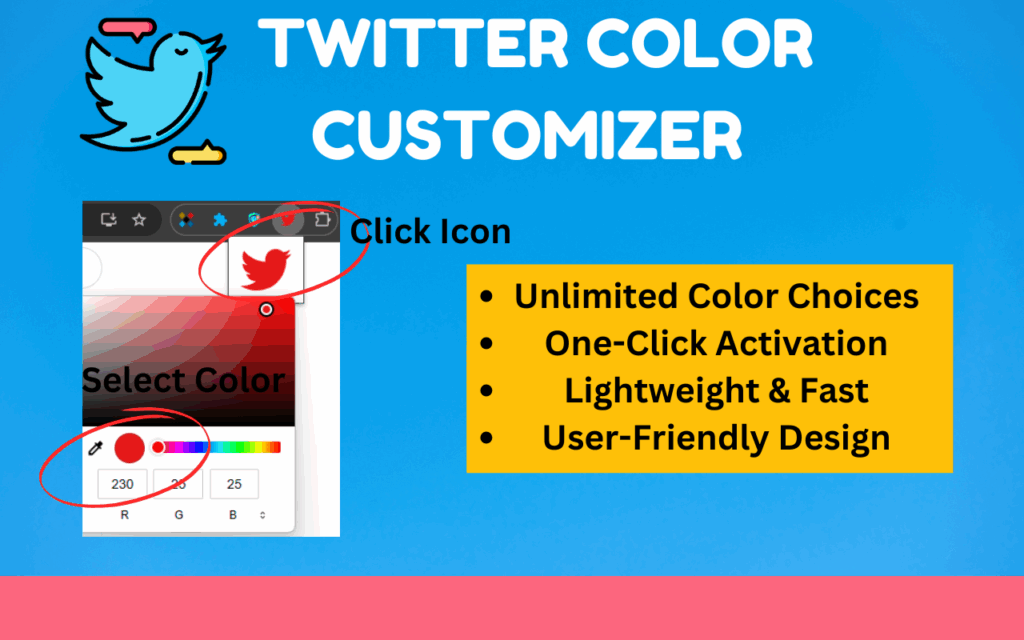
The color picker opens directly from the extension icon in your Chrome toolbar while you browse Twitter. There are no extra menus or settings pages to navigate — the process is designed to be as quick as possible.
Instant Live Preview
Before you commit to a color, the extension shows you a real-time preview of how it will look on your feed. Once you are satisfied, refreshing the page applies the new theme immediately.
Lightweight and Non-Intrusive
The extension runs quietly in the background and does not consume significant browser resources. Your browsing speed and performance remain unaffected even when the customization is active.
Compatible with X.com and Twitter.com
Whether Twitter has redirected you to x.com or you still access the platform through twitter.com, the extension functions correctly on both domains. You do not need to adjust any settings when switching between them.
Simple, User-Friendly Interface
The controls are straightforward enough for anyone to use on their first try. There is no learning curve, no code to write, and no settings to configure beyond picking your preferred color.
How to Install Twitter Color Customizer
- Search for “Twitter Color Customizer – Unlimited Theme Options” in the Chrome Web Store.
- Click the “Add to Chrome” button and confirm the installation when prompted.
- Once installed, navigate to Twitter.com or X.com in your browser.
- Click the extension icon in your Chrome toolbar to open the color picker.
- Select your preferred color and watch the live preview update on the page.
- Refresh the page to apply your custom theme across the entire Twitter interface.
Why Twitter Users and Creators Love It
Most Twitter users have noticed that the platform’s default color options feel limiting, especially for those who care about the visual consistency of their online presence. Content creators, brand managers, and designers in particular find that being locked into six preset colors makes it harder to align Twitter’s look with their broader aesthetic or brand identity. This extension solves that problem directly.
Influencers who want their profile environment to feel personal, businesses that want Twitter to reflect their brand colors, and everyday users who simply want something different from the standard blue-gray interface all benefit from this tool. The setup takes under a minute, and the results are visible immediately.
Screenshots
Frequently Asked Questions
Does this extension work on X.com as well as Twitter.com?
Yes, the extension is fully compatible with both twitter.com and x.com. It automatically applies your chosen color regardless of which domain you are currently using.
Will using this extension slow down my browser?
No. The extension is designed to be lightweight and runs in the background without noticeably affecting browser performance or page load times.
Do I need any coding knowledge to use this extension?
None at all. The interface is built for everyday users. You simply open the color picker, select a color, and refresh the page.
Can I change the color multiple times or switch back to Twitter’s default?
Yes, you can open the extension at any time and select a different color. If you want to return to Twitter’s default appearance, you can either disable the extension or select a color that matches Twitter’s original accent color.
Does the extension store or share my data?
The extension focuses solely on applying your chosen color to the Twitter interface. It does not collect personal data, track your activity, or share information with third parties.
If you want a Twitter and X.com experience that actually looks the way you want it to, the Twitter Color Customizer extension is one of the simplest and most effective ways to get there. Install it from the Chrome Web Store and start customizing your feed today.





