
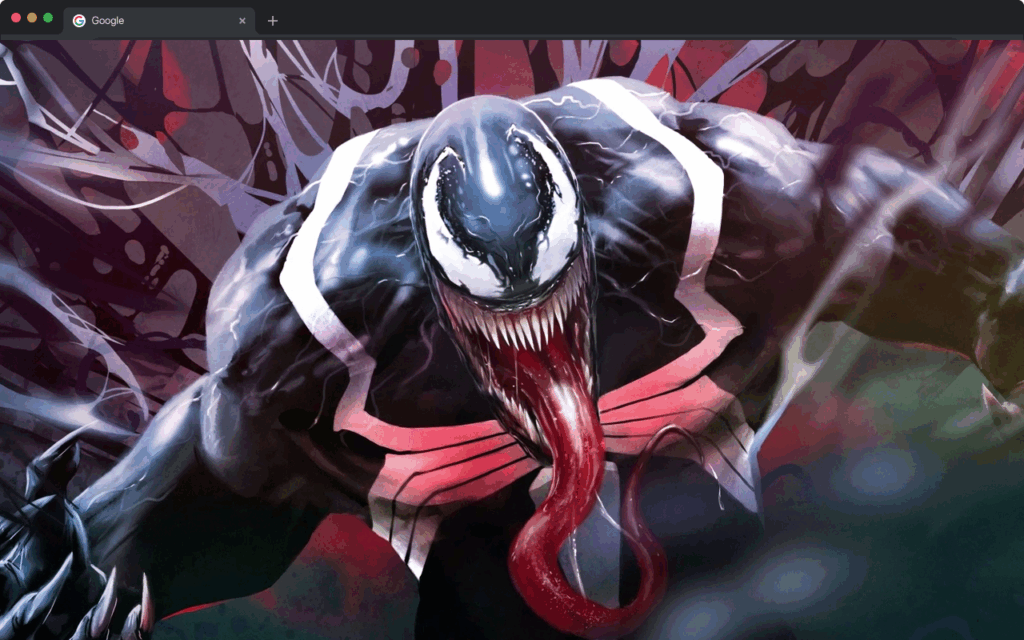
If you are a fan of Marvel’s most iconic anti-hero, the Venom live wallpaper Chrome extension is exactly what your browser has been missing. This extension replaces your default new tab page with stunning, high-definition animated visuals of Venom — from his razor-edged grin to the swirling chaos of the symbiote suit — turning an otherwise blank tab into a cinematic experience every single time you open your browser.

What Is the Venom Live Wallpaper Extension?
The Venom Live Wallpaper is a Chrome browser extension designed to transform your new tab page into a dynamic, animated showcase of one of Marvel’s most beloved characters. Rather than staring at an empty tab, you get immersive, looping HD animations featuring Eddie Brock, the Venom symbiote, and iconic battle scenes pulled straight from the comics and films.
Beyond the visuals, the extension also integrates practical tools — a real-time clock, a Google search bar, and quick-access shortcuts — so it works just as hard as it looks good. It is built for Marvel fans, gamers, students, and anyone who wants their browser to reflect their personality.
Key Features of the Venom Live Wallpaper Extension
HD Animated Wallpaper
The centerpiece of this extension is its high-definition looping animation that brings Venom to life on your new tab page. Every detail — from the symbiote tendrils to the intense combat stances — is rendered in sharp, vivid quality that makes a strong visual impression without feeling cluttered or distracting.
Clean and Minimal Layout
Despite the bold visuals, the extension maintains a clean, minimalist interface that keeps your browsing experience smooth and uncluttered. The design is carefully balanced so Venom takes center stage without overwhelming the functional elements you rely on every day.
Real-Time Clock and Date Display
A sleek digital clock and date display is built directly into the new tab layout, keeping you on schedule without requiring a separate widget or tab. The typography is styled to complement the dark, intense aesthetic of the Venom theme seamlessly.
Quick Access Shortcuts
One-click shortcut icons give you instant access to the websites you visit most, including YouTube, Instagram, Twitter, ChatGPT, and more. These shortcuts are neatly arranged so they never interfere with the wallpaper display, offering convenience without compromising style.
Integrated Google Search Bar
Search the web directly from your new tab using the built-in Google search bar, saving you the extra step of navigating to a search engine first. It works with your default browser search settings, making the transition seamless and familiar.
Options and Settings Menu
The extension includes a dedicated settings menu where you can access the privacy policy, uninstall information, additional extensions, and a feedback form all in one place. This makes it easy to manage your preferences and stay in control of your browsing environment.
How to Install the Venom Live Wallpaper Extension
- Open the Chrome Web Store in your Google Chrome browser.
- Search for Venom Live Wallpaper in the search bar.
- Click on the extension from the search results to open its listing page.
- Click the Add to Chrome button and confirm by selecting Add Extension in the popup.
- Once installed, open a new tab to immediately see Venom in full animated glory.
Why Marvel Fans Love This Extension
The Venom Live Wallpaper extension goes beyond simple browser customization. For fans of the character, it is a daily reminder of the raw power, moral complexity, and visual intensity that makes Venom one of Marvel’s most enduring figures. It turns a routine action — opening a new tab — into a moment that actually feels engaging.
It is equally popular among gamers and creative professionals who appreciate dark, cinematic aesthetics and want a workspace that reflects their taste. The combination of high-quality visuals and genuinely useful tools means you are not sacrificing functionality for style. You get both in a single, lightweight extension that does not slow down your browser.
Screenshots
Frequently Asked Questions
Does this extension slow down Chrome?
No. The Venom Live Wallpaper extension is optimized to run smoothly without placing significant load on your browser or system resources. Most users notice no difference in browser performance after installation.
Can I still use Google Search from the new tab?
Yes. The extension includes a fully functional Google search bar directly on the new tab page, so you can search the web without navigating away or opening a separate tab.
Is this extension free to use?
Yes, the extension is available to install and use at no cost through the Chrome Web Store.
Will this extension work on browsers other than Chrome?
This extension is specifically built for Google Chrome and Chromium-based browsers. It may not be available or fully functional on other browsers such as Firefox or Safari.
How do I remove the extension if I change my mind?
You can uninstall the extension at any time by going to Chrome’s Extensions menu, finding the Venom Live Wallpaper, and clicking Remove. You can also access uninstall information directly from the extension’s settings menu.
If you are ready to give your browser a bold, Marvel-worthy upgrade, the Venom Live Wallpaper extension is a simple and satisfying way to do it. Install it today and let the symbiote take over your new tab.