
The Age Calculator with Birthday Calculator is a lightweight and reliable age calculator Chrome extension that tells you your exact age in years, months, and days — and shows you how many days remain until your next birthday. Whether you’re tracking personal milestones, planning a celebration, or simply curious about how long you’ve been on this planet, this tool delivers accurate results the moment you open it.
Age Calculator with Birthday Calculator
What Is Age Calculator with Birthday Calculator?
Age Calculator with Birthday Calculator is a Chrome browser extension designed to give you instant, precise age information without any manual math or online searches. You enter your date of birth once, and from that point on, every time you open the extension, it automatically displays your current age and your upcoming birthday countdown. It functions as both a personal age tracker and a birthday reminder tool, all within your browser.
Key Features of This Age Calculator Chrome Extension
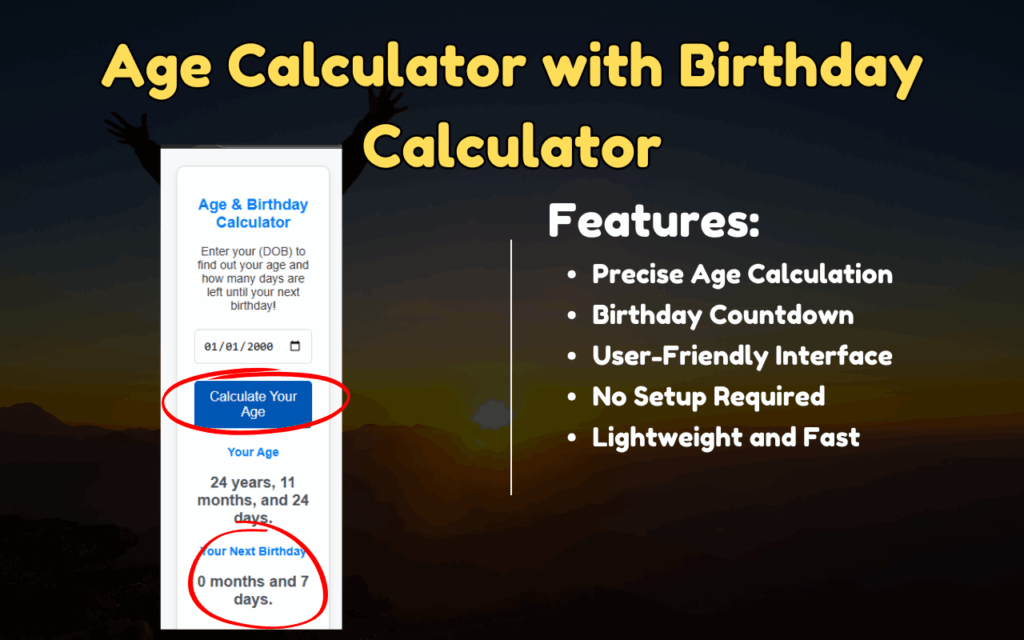
Precise Age Calculation Down to the Day
This extension calculates your exact age based on your birthdate, displaying results in years, months, and days. Unlike generic online calculators, it updates automatically each time you open the popup — so the information is always current without any extra effort on your part.
Birthday Countdown Timer
Never forget how close your next birthday is. The extension displays a live countdown showing exactly how many days remain until your special day, making it easy to plan ahead for parties, gifts, or simply marking the occasion for yourself or a loved one.
Clean and Intuitive Interface
The interface is minimal by design — no cluttered menus, no unnecessary options. Everything you need is visible the moment you click the extension icon, making it accessible even for users who are not particularly tech-savvy.
No Login or Configuration Required
Once installed, the extension is ready to use immediately. There is no account creation, no sign-in process, and no complicated setup. Simply enter your date of birth and the extension handles everything else automatically from that point forward.
Offline Functionality
The extension works entirely within your browser without needing an active internet connection after installation. Your date of birth is stored locally, meaning your data stays private and the tool remains functional even when you are offline.
Lightweight Performance
Designed to have virtually zero impact on browser speed, this extension runs efficiently in the background. It does not slow down page loading times or consume significant system resources, making it a practical addition to any Chrome setup.
How to Install the Age Calculator Extension
- Open the Chrome Web Store and search for Age Calculator with Birthday Calculator.
- Click the Add to Chrome button on the extension listing page.
- Confirm the installation when prompted by clicking Add Extension.
- Once installed, click the extension icon in your Chrome toolbar.
- Enter your date of birth in the provided field.
- Your current age and birthday countdown will appear instantly — no further steps needed.
Why Users Love This Birthday and Age Calculator Tool
People use this extension for a wide range of practical and personal reasons. Parents track the exact ages of their children for school enrollment deadlines or medical records. Adults use it to stay aware of milestone birthdays approaching for friends or family members. Some users simply enjoy knowing their precise age in days as a fun personal fact. What makes this extension stand out is its combination of accuracy, simplicity, and the fact that it requires no ongoing effort after the initial setup. The information is always one click away, stored securely on your device, and updated in real time.
Screenshots
Frequently Asked Questions
Does the extension save my date of birth permanently?
Yes. Your date of birth is saved locally in your browser’s storage, so you only need to enter it once. Each time you open the extension, it retrieves your saved birthdate and recalculates your age automatically.
Is my personal data shared with any third parties?
No. All data is stored locally on your device. The extension does not transmit your birthdate or any personal information to external servers.
Can I use this extension to calculate someone else’s age?
Yes. You can update the date of birth field at any time to calculate the age of a family member, friend, or anyone else. The extension will recalculate instantly based on the new date you enter.
Does the birthday countdown reset automatically after my birthday passes?
Yes. Once your birthday passes, the countdown automatically resets to count down to the same date in the following year — no manual update is required.
Is this extension compatible with all versions of Chrome?
The extension is designed to work with modern versions of Google Chrome. It is recommended to keep your browser updated to ensure full compatibility and optimal performance.
If you want a simple, reliable way to track your age and stay ahead of upcoming birthdays, the Age Calculator with Birthday Calculator extension is worth adding to your browser today. Install it once and enjoy effortless, real-time age tracking every time you need it.





