

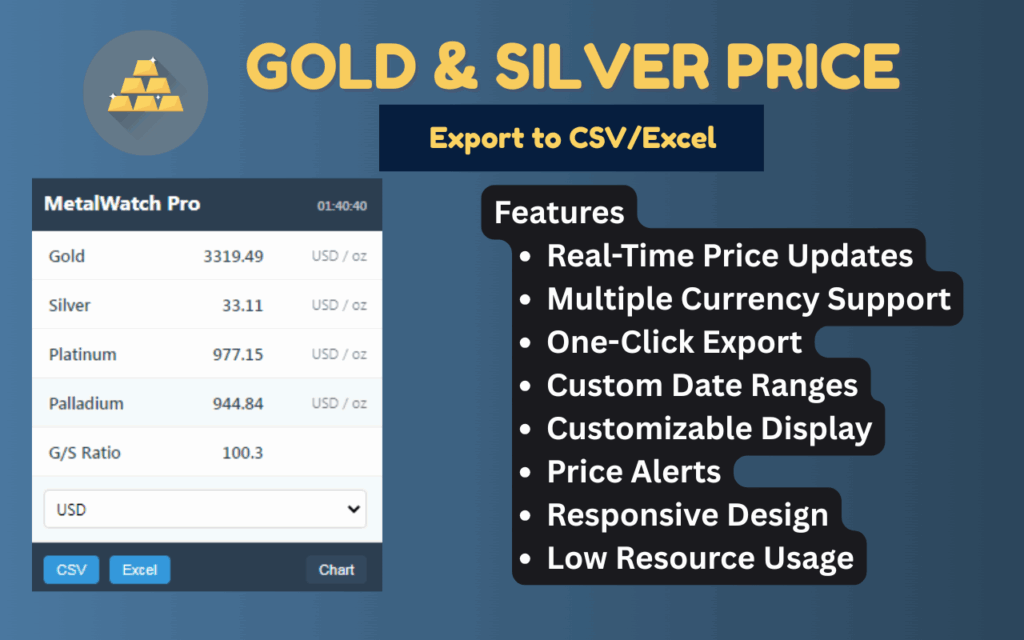
The gold silver price tracker extension is a practical Chrome tool designed for anyone who needs fast, accurate access to live precious metal prices without leaving their browser. Whether you are an investor monitoring bullion values, a jeweler calculating material costs, or an analyst comparing commodity trends, this extension delivers real-time data for gold, silver, platinum, and palladium — with one-click export to CSV or Excel for seamless record-keeping and reporting.
Gold & Silver Price Tracker

What Is Gold & Silver Price Tracker?
Gold & Silver Price Tracker is a lightweight Chrome extension that displays live precious metal prices directly in your browser toolbar. It supports multiple global currencies and eliminates the need to visit separate financial websites every time you need an updated quote. The extension is free to use, requires no account or login, and is built to work efficiently in the background without slowing down your browser.
Key Features of Gold & Silver Price Tracker
Real-Time Precious Metal Prices
The extension continuously fetches the latest market prices for gold, silver, platinum, and palladium. You always see current values without needing to manually refresh the page or open a new tab.
Multiple Currency Support
View prices in USD, EUR, GBP, JPY, and other major global currencies with ease. This makes the extension genuinely useful for international users and businesses that operate across different markets.
One-Click CSV and Excel Export
With a single click, you can export the current price data into a CSV or XLSX file compatible with Excel, Google Sheets, and other spreadsheet tools. This is especially valuable for traders, analysts, and business owners who need to log or compare data over time.
Clean and Intuitive Interface
The extension uses a minimal, well-organized layout that makes it easy to read price data at a glance. There is no clutter, no distracting ads, and no unnecessary elements competing for your attention.
Lightweight and Fast
Designed to run quietly in the background, this extension has a negligible impact on browser speed and memory usage. It does its job without getting in the way of your normal browsing experience.
Privacy-Focused by Design
No account registration is required, and the extension does not track your browsing activity or collect personal data. You get the information you need while keeping your privacy intact.
How to Install Gold & Silver Price Tracker
- Open the Chrome Web Store and search for Gold & Silver Price Tracker.
- Click the Add to Chrome button on the extension listing page.
- Confirm the installation by clicking Add Extension in the popup dialog.
- Once installed, click the extension icon in your Chrome toolbar to open the price panel.
- Select your preferred currency from the dropdown menu to view prices in your local or preferred denomination.
- Click the Export button and choose either CSV or Excel (XLSX) format to download your data file.
Why Investors and Traders Love This Extension
Professionals who work with precious metals on a daily basis need tools that are fast, reliable, and easy to integrate into their existing workflows. This extension removes the friction of manually visiting financial data sites and copy-pasting values into spreadsheets. Instead, you get a direct pipeline from live market data to your preferred file format in seconds. Jewelers use it to price materials accurately before quoting clients. Investors use it to log portfolio snapshots without complex software. Analysts appreciate the export function for building custom comparison reports. It is a straightforward solution to a common and time-consuming problem.
Screenshots
Frequently Asked Questions
Which metals does this extension track?
The extension tracks four precious metals: gold, silver, platinum, and palladium. All four are displayed simultaneously so you can compare values at a glance.
Can I export data to Google Sheets?
Yes. The CSV format exported by the extension is fully compatible with Google Sheets. Simply open a new sheet and import the downloaded CSV file to start working with your data.
Does the extension work offline?
No. Since the extension fetches live market data, an active internet connection is required for price updates. Exported files can of course be accessed offline after downloading.
Is there a cost to use this extension?
The extension is completely free. There are no premium tiers, in-app purchases, or subscription fees involved.
How often are the prices updated?
Prices are updated in real time as market data becomes available, ensuring you always have access to the most current values without any manual action on your part.
If you work with precious metals in any capacity, the Gold & Silver Price Tracker extension is a simple upgrade that saves time and improves accuracy. Install it from the Chrome Web Store today and start exporting clean, reliable price data in seconds.





