

What Is the JoJo’s Bizarre Adventure Cursor?
The JoJo’s Bizarre Adventure cursor is a Chrome browser extension that replaces your default mouse pointer with custom-designed cursors inspired by Hirohiko Araki’s legendary manga and anime series. Whether you’re a longtime fan of the Joestar bloodline or just discovering the world of Stands and bizarre battles, this extension lets you carry that unmistakable JoJo energy into every corner of your browsing experience. From Jonathan Joestar to Jolyne Cujoh, the collection spans all major parts of the series with artwork that stays true to Araki’s bold, iconic visual style.

Key Features of the JoJo’s Bizarre Adventure Cursor Extension
Full JoJo Character and Stand Collection
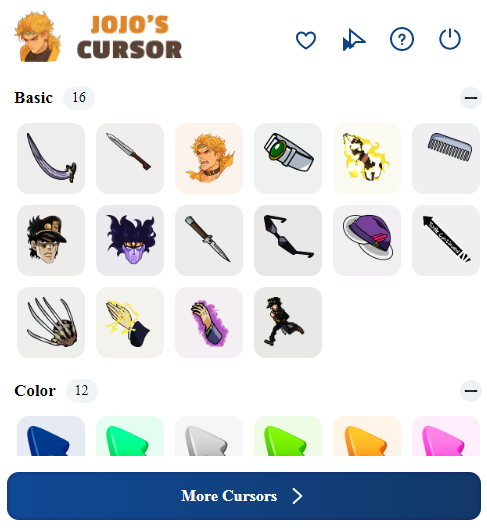
The extension includes cursor designs featuring all the major Joestars — Jonathan, Joseph, Jotaro, Josuke, Giorno, and Jolyne — alongside legendary Stands like Star Platinum, The World, Gold Experience, Killer Queen, and Stone Free. Each design captures a defining moment or visual element from the character, so fans can rep their favorite part of the series with every click.
Faithful to Araki’s Art Style
Every cursor in this collection is designed to reflect the bold linework, intense color contrasts, and dramatic poses that make JoJo’s Bizarre Adventure instantly recognizable. The graphics are crisp and clear at any cursor size, so the artwork reads well whether you’re on a large monitor or a compact laptop screen.
Adjustable Cursor Size
A built-in size slider lets you scale your cursor up or down to match your personal preference or screen setup. Whether you want a subtle pointer or a statement-making cursor that dominates your screen, the adjustment takes just seconds and applies instantly without needing to reload your browser.
Favorites System for Quick Switching
Save your most-used cursor designs to a personal favorites list so you can switch between characters and Stands without scrolling through the entire collection each time. This is especially handy if you rotate between multiple favorites depending on your mood or the site you’re visiting.
Lightweight with No Performance Drag
The extension is optimized to run in the background without consuming noticeable memory or slowing down your tabs. You get the full visual upgrade without sacrificing browser speed, which matters if you tend to run multiple tabs while watching episodes or reading manga online.
Easy On/Off Toggle
Need to switch back to your default cursor temporarily? A single click on the extension icon toggles the JoJo cursor off and restores your standard pointer instantly. This makes it simple to flip between custom and default modes whenever the situation calls for it.

How to Install the JoJo’s Bizarre Adventure Cursor
- Search for the JoJo’s Bizarre Adventure Cursor extension in the Chrome Web Store.
- Click the “Add to Chrome” button and confirm the installation prompt.
- Once installed, click the extension icon in your Chrome toolbar to open the cursor selector.
- Browse through the available JoJo character and Stand cursor designs.
- Click on any cursor to set it as your active pointer immediately.
- Use the size slider to adjust the cursor to your preferred scale.
- Star your favorite designs to save them for quick access later.
Why JoJo Fans Love This Cursor Extension
JoJo’s Bizarre Adventure has built one of the most dedicated fan communities in anime history, and this extension gives that community a small but satisfying way to show their allegiance during everyday browsing. Unlike wearing a shirt or posting fan art, a custom cursor is something you interact with constantly — every scroll, every click, every hover is a tiny reminder of the series you love. Fans appreciate that the designs don’t feel like lazy sprites — they’re detailed, recognizable, and respectful of the source material. The extension also gets regular updates to expand the cursor collection, so there’s always something new to discover as more parts and characters get added.
Screenshots
Frequently Asked Questions
Does this extension work on all websites?
The JoJo cursor works on most standard websites you visit in Chrome. A small number of sites with strict content security policies may prevent custom cursors from displaying, but this is uncommon and doesn’t affect the majority of browsing.
Is the extension free to use?
Yes, the extension is free to install and use. You get access to the full cursor collection without any paywalls or subscription fees.
Will this extension slow down my browser?
No. The extension is built to be lightweight and has minimal impact on browser performance. Most users report no noticeable difference in speed after installation.
Can I use this alongside other Chrome extensions?
In most cases, yes. The JoJo cursor extension is compatible with the majority of other Chrome extensions. If you experience any conflicts, toggling the extension off and on usually resolves the issue.
How do I remove the extension if I no longer want it?
Right-click the extension icon in your Chrome toolbar and select “Remove from Chrome,” or go to Chrome’s extension settings page and uninstall it from there. Your browser will return to its default cursor immediately.
If you’re a JoJo’s Bizarre Adventure fan looking to add a bit of bizarre flair to your daily browsing, this cursor extension is a quick and genuinely fun upgrade. Install it, find your favorite Stand or Joestar, and make every click count.





