
What Is Quick Settings Pro?
Quick Settings Pro is a lightweight Chrome extension built to give you quick access to Chrome settings without digging through multiple menus. Whether you need to adjust privacy controls, switch your default search engine, or manage passwords, this extension puts every major Chrome setting one or two clicks away. It works directly from your toolbar icon or through a right-click context menu on any webpage, making it one of the most practical productivity tools available for everyday Chrome users.
Key Features of Quick Settings Pro
One-Click Settings Launch
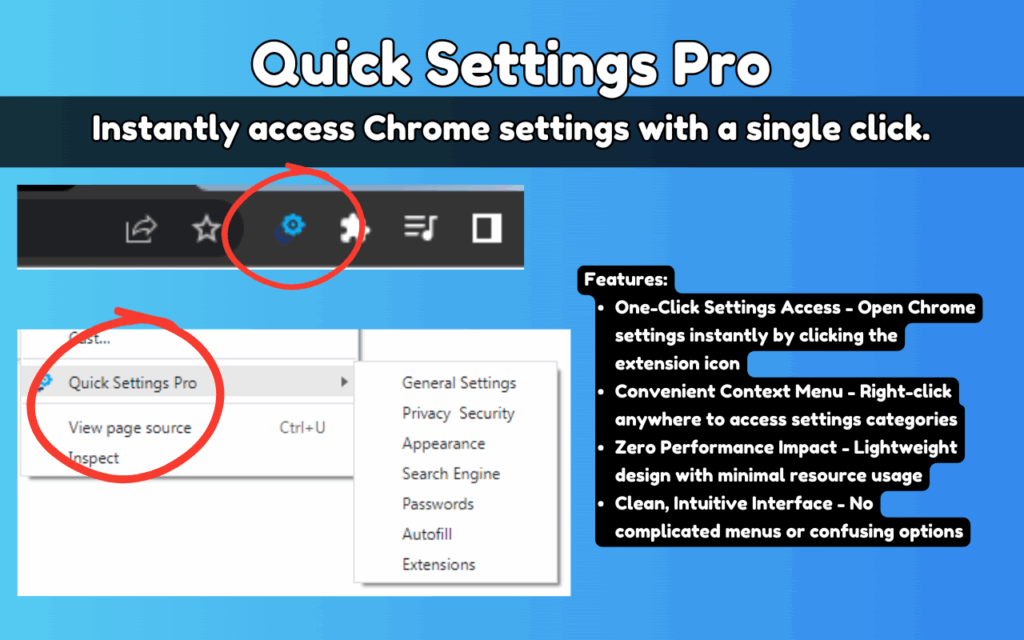
Clicking the Quick Settings Pro icon in your Chrome toolbar instantly opens the general settings page. You no longer need to navigate to the three-dot menu, scroll through options, or remember where a specific setting is buried. The extension eliminates that friction entirely, saving you several clicks every single time.
Right-Click Context Menu Integration
The right-click context menu is the standout feature of this extension. On any webpage, a simple right-click reveals a Quick Settings Pro submenu with a full list of settings categories. Each option takes you directly to the relevant Chrome settings page, meaning you are never more than two clicks away from any setting regardless of what you are doing in the browser.
Direct Category Navigation
Instead of landing on the general settings page and then searching for what you need, Quick Settings Pro lets you jump straight to specific sections. You can navigate directly to Privacy and Security, Appearance, Autofill, Passwords, Extensions, and Search Engine settings without any intermediate steps.
Zero Performance Impact
The extension is built with minimal code and consumes virtually no system resources. It does not slow down page load times, run background processes, or affect Chrome’s overall performance. Users with older machines or those running many tabs simultaneously will appreciate how light it is.
Offline Functionality
Quick Settings Pro does not require an internet connection to function. Because it simply navigates to Chrome’s built-in settings pages, it works fully offline. This makes it reliable in any environment, whether you are on a plane, in a location with poor connectivity, or working on a secure internal network.
Privacy-First Design
The extension does not collect personal data, browsing history, or any user information. It operates entirely within your local browser environment. For users who are conscious about the privacy implications of browser extensions, Quick Settings Pro is designed to be as transparent and unintrusive as possible.
How to Install Quick Settings Pro
- Open the Chrome Web Store in your Chrome browser.
- Search for Quick Settings Pro in the search bar.
- Click on the extension listing to open its detail page.
- Click the Add to Chrome button and confirm by clicking Add extension.
- Once installed, the Quick Settings Pro icon will appear in your Chrome toolbar.
- Click the icon or right-click any webpage to start using the extension immediately.
Why Chrome Power Users Love It
People who spend hours in Chrome every day understand how much time gets lost navigating menus. Developers, remote workers, researchers, and students who rely on Chrome as their primary workspace find Quick Settings Pro especially valuable. It removes a small but repetitive friction point that adds up significantly over weeks and months. Rather than breaking focus to dig through settings, users can make quick adjustments and return to their work in seconds. The context menu integration in particular is praised for feeling natural and non-intrusive, fitting seamlessly into existing browsing habits without requiring any behavior change.
Screenshots
Frequently Asked Questions
Does Quick Settings Pro work on all versions of Chrome?
The extension is compatible with modern versions of Chrome on Windows, macOS, and Linux. It is kept updated to remain compatible as Chrome releases new versions.
Will this extension slow down my browser?
No. Quick Settings Pro is intentionally lightweight and runs no background processes. It has no measurable effect on browser speed or page load performance.
Does the extension access my browsing data?
No personal data, browsing history, or user information is collected or transmitted. The extension functions entirely within your local Chrome environment.
Can I use it to access Chrome flags or developer settings?
Quick Settings Pro focuses on the standard Chrome settings categories available to all users. It is designed for everyday settings management rather than advanced developer or experimental options.
Is there a cost to use Quick Settings Pro?
The extension is free to install and use, with no hidden fees or premium tiers required to access its full functionality.
If you find yourself constantly navigating Chrome’s menus to adjust basic settings, Quick Settings Pro is worth adding to your browser today. Install it once and you will wonder how you managed without it.





