
What Is the Smiling Friends Cursor Extension?
The Smiling Friends Cursor is a Chrome extension that replaces your default mouse pointer with custom cursor designs inspired by the hit Adult Swim animated series. Featuring beloved characters like Pim, Charlie, Alan, and Glep, this extension brings the wholesome absurdist charm of Zach Hadel and Michael Cusack’s critically acclaimed show directly to your browser. Whether you’re a longtime fan or newly obsessed with the series, this is a fun and lightweight way to personalize your daily browsing experience.

Key Features of the Smiling Friends Cursor
Complete Character Cursor Collection
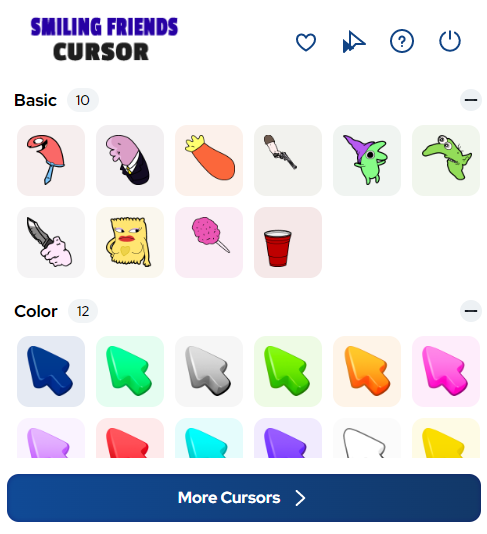
The extension includes a wide range of cursor designs featuring the full cast of Smiling Friends. You’ll find cursors based on Pim the eternal optimist, Charlie the reluctant cynic, Alan the red-suited manager, Glep, Mr. Boss, and a variety of memorable side characters like Gwimbly and DJ Spit. Iconic moments, mission settings, and office scenes from both seasons are also represented in the collection.
Faithful Mixed-Media Art Style
Each cursor is designed to reflect the show’s distinctive visual identity, which blends traditional animation with surreal, mixed-media elements. The crisp and expressive graphics stay true to the character designs fans recognize from the series, making every cursor feel like it jumped straight out of an episode.
Adjustable Cursor Size
You can resize your cursor to suit your screen setup and personal comfort level. Whether you prefer a subtle cursor that stays out of the way or a larger pointer that’s easy to spot, the size adjustment feature gives you full control over your browsing experience.
Favorites System
With the built-in favorites system, you can save the cursor designs you use most often for quick access. Instead of scrolling through the full collection every time, simply mark your preferred characters or scenes as favorites and switch between them instantly.
Zero Performance Impact
The extension is built to be lightweight and efficient, meaning it won’t slow down your browser or consume noticeable system resources. It runs quietly in the background so you can enjoy your custom cursor without any disruption to your normal browsing speed or performance.
Easy Toggle On and Off
Life sometimes calls for a more professional cursor setup, and this extension makes it simple to switch back to your default pointer with a single click. Toggling the Smiling Friends Cursor on or off takes seconds and requires no complicated settings adjustments.
How to Install the Smiling Friends Cursor
- Open the Chrome Web Store and search for the Smiling Friends Cursor extension.
- Click the “Add to Chrome” button and confirm the installation prompt.
- Once installed, click the Smiling Friends Cursor icon in your Chrome toolbar to open the extension.
- Browse through the available cursor designs and select your favorite character or scene.
- Adjust the cursor size if needed using the built-in size controls.
- Start browsing with your new custom cursor active.
Why Smiling Friends Fans Love This Cursor Extension
Adult Swim animation fans appreciate creative ways to express their love for the shows they enjoy, and this cursor extension delivers exactly that. The Smiling Friends series has built a passionate fanbase thanks to its unique combination of optimistic storytelling, surreal humor, and genuinely memorable characters. Using this extension while rewatching episodes, browsing fan communities, or creating fan content adds a small but satisfying personal touch to the experience. It’s the kind of detail that makes your browser feel like your own space rather than a generic tool.
Screenshots
Frequently Asked Questions
Does this extension work on all versions of Chrome?
The Smiling Friends Cursor extension is designed for Google Chrome and works on most up-to-date versions of the browser. Keeping Chrome updated ensures the best compatibility and performance.
Will this extension affect my browser’s loading speed?
No. The extension is intentionally built to be lightweight and has no meaningful impact on browser performance or page load times. Most users report no difference in speed after installation.
Can I use multiple cursor designs or only one at a time?
You can only have one active cursor at a time, but the favorites system makes it easy to switch between your preferred designs quickly. You’re not locked into a single choice permanently.
Is the extension free to use?
Yes, the Smiling Friends Cursor extension is available for free through the Chrome Web Store. You can browse and use the cursor collection without any paid subscription or hidden fees.
What should I do if the cursor stops displaying correctly?
Try disabling and re-enabling the extension from your Chrome toolbar. If the issue persists, removing and reinstalling the extension typically resolves any display problems.
If you’re a fan of Smiling Friends and want a simple way to bring a little of that optimistic energy to your everyday browsing, this cursor extension is worth adding to your Chrome setup. Install it today and let Pim, Charlie, and the rest of the crew join you on every page you visit.





sooo cute!!! love the show btw