
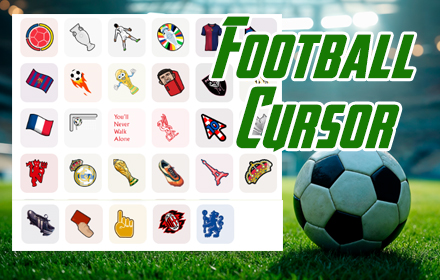
What Is the Soccer Cursor for Chrome?
The Soccer Cursor for Chrome is a lightweight browser extension that replaces your default mouse pointer with animated, football-themed cursor designs. Whether you follow club football, international tournaments, or just love the sport, this extension brings the energy of the pitch directly into your browsing experience. From classic black-and-white footballs to World Cup trophies and national flags, every detail is crafted for the true football fan.
Instead of staring at the same generic arrow every day, you get a visually engaging cursor that reflects your passion for the game. It works across all websites inside Google Chrome and requires zero technical setup to get started.

Key Features of the Soccer Cursor Extension
Football-Themed Cursor Designs
The extension offers a wide range of cursor styles inspired by the world’s most popular sport. You can choose from designs featuring classic footballs, goalposts, referee cards, football boots, and even national flags from top football nations like Brazil, Argentina, Germany, France, and Spain. Each design is crafted with clean graphics to ensure it looks sharp at every screen resolution.
Smooth Animations
These are not static icons — the cursors feature fluid motion that adds a dynamic, lively feel to your browsing. The animations are optimized to run efficiently so they never interrupt page loading or cause any lag in your browser. The result is a polished visual experience that feels responsive and natural.
Multiple Cursor Themes
Switch between different cursor themes to match the occasion — use a trophy design during a major tournament, a matchday theme when watching live streams, or a player silhouette theme when browsing your favorite team’s stats. Having multiple options means your cursor can evolve with your football mood throughout the season.
Lightweight and Browser-Friendly
The extension is built to be efficient, using minimal system resources even during heavy browsing sessions. It runs quietly in the background without affecting Chrome’s speed or your device’s performance. You get all the visual benefits of a custom cursor without any of the slowdown.
Instant One-Click Activation
There is no complicated configuration or account registration required. Once the extension is added to Chrome, the soccer cursor activates immediately and works across every website you visit. Switching between cursor styles is just as quick, making it easy to personalize your setup at any time.
How to Install the Soccer Cursor Extension
- Open the Google Chrome browser on your desktop or laptop.
- Navigate to the Chrome Web Store and search for “Soccer Cursor.”
- Click the extension listing and select the “Add to Chrome” button.
- Confirm the installation when Chrome prompts you.
- The soccer cursor will activate automatically — no restart or additional setup needed.
- Click the extension icon in your Chrome toolbar to switch between available cursor themes.
Why Football Fans Love This Extension
Football is more than a sport for most fans — it is a daily part of life. From checking match results in the morning to watching highlights late at night, football fans are constantly online. The Soccer Cursor extension gives those moments a personal touch by making even routine browsing feel connected to the game they love.
Fans who support iconic players like Lionel Messi, Cristiano Ronaldo, or Kylian Mbappé appreciate being able to express that passion in every corner of their digital life. The extension is also popular among viewers who follow major tournaments like the UEFA Champions League, Copa América, and the FIFA World Cup, since themed cursor options let them celebrate alongside global events in a fun, visual way.
It also makes a great conversation starter. When screen-sharing with friends or during a video call, a custom football cursor is a small but noticeable detail that sparks reactions from fellow fans.
Screenshots

Frequently Asked Questions
Does the Soccer Cursor extension work on all websites?
Yes, the cursor replacement works across all websites opened in Google Chrome. A small number of browser system pages, such as the Chrome settings page, may not display the custom cursor due to browser security restrictions.
Will this extension slow down my browser?
No. The extension is specifically optimized for minimal resource usage. It runs in the background without interfering with page load times, video streaming, or any other browser activity.
Can I switch back to my default cursor?
Yes. You can disable or remove the extension at any time through Chrome’s extension manager, which will immediately restore your original system cursor.
Is the Soccer Cursor extension free to use?
The extension is free to install and use. Core cursor designs are available without any cost or subscription.
How many cursor designs are included?
The extension includes multiple football-themed cursor styles covering a range of designs from matchday icons to tournament memorabilia. New themes may be added over time to keep content fresh and relevant.
If you are a football fan who spends time online every day, the Soccer Cursor for Chrome is a simple and satisfying way to bring your love of the sport into your browser. Add it to Chrome today and experience browsing the way a true football fan should.





