
If you regularly pull data from websites, the Table to CSV Exporter Chrome extension is the tool you have been waiting for. Instead of manually copying rows and columns from HTML tables, this lightweight extension lets you export any web table directly to a clean, structured CSV file — compatible with Excel, Google Sheets, and virtually every data analysis tool on the market.
What Is Table to CSV Exporter?
Table to CSV Exporter is a browser extension built for anyone who works with tabular data online. It detects HTML tables on any webpage and gives you an instant, one-click option to download that data as a CSV file. Whether you are a student compiling research, an analyst extracting financial data, or a professional archiving product listings, this extension removes the friction from data collection entirely. It supports both UTF-8 and UTF-8 with BOM encoding, so international characters and special symbols are always handled correctly.
Key Features of Table to CSV Exporter
One-Click Table Export
Simply click on any visible HTML table and the extension handles the rest. There is no need for technical knowledge or manual formatting — the entire table is converted and downloaded as a ready-to-use CSV file in seconds.
Right-Click Context Menu Access
The extension integrates directly into your browser’s right-click context menu, making exports feel natural and instant. You can trigger an export without opening any extra panels or settings windows, which keeps your workflow smooth and uninterrupted.
Excel and Google Sheets Compatible
Every CSV file generated by this extension opens cleanly in Microsoft Excel, Google Sheets, LibreOffice Calc, and other spreadsheet applications. The data structure is preserved exactly as it appears on the page, so you spend less time cleaning up imports.
UTF-8 Encoding Options
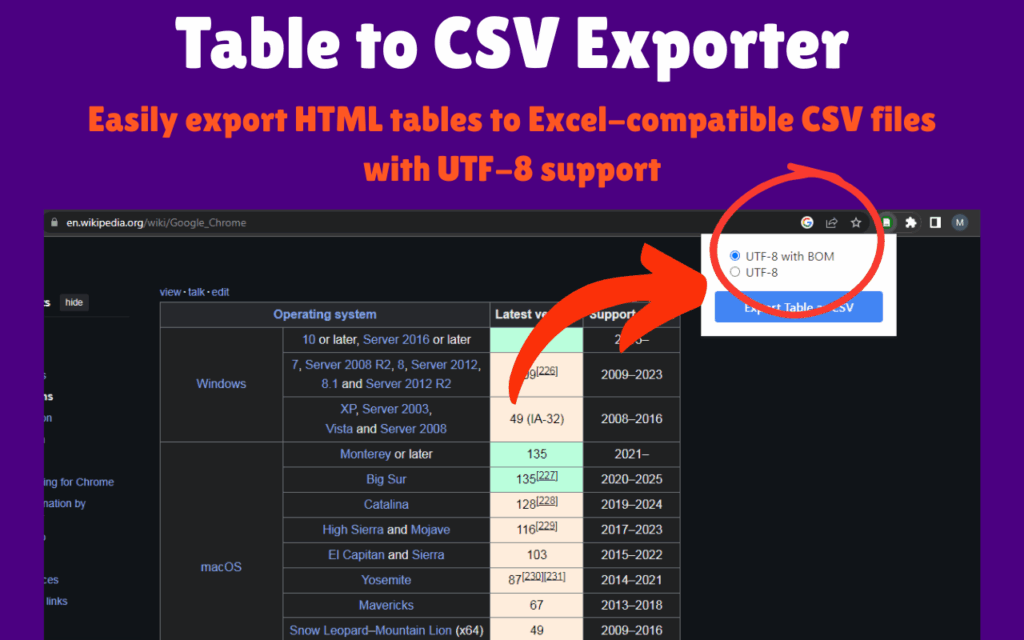
Choose between standard UTF-8 and UTF-8 with BOM encoding depending on your needs. UTF-8 with BOM is particularly useful when opening files in older versions of Excel that may otherwise misread special or international characters.
Preserves Complex Table Structure
Many real-world HTML tables use rowspan and colspan attributes to merge cells across rows and columns. This extension intelligently handles those structures so your exported data mirrors the original layout without errors or missing cells.
Captures Input Field Values
Beyond static text content, the extension also captures values entered into input fields and textareas embedded within tables. This makes it especially useful for exporting dynamically filled forms and editable data grids.
Custom Filenames for Exported Files
You can assign a custom filename to each exported CSV before saving. This helps you stay organized when exporting multiple tables from different pages or sources during a single research or analysis session.
Lightweight with No Ads or Tracking
The extension runs quietly in the background with minimal impact on browser speed. There is no advertising, no data collection, and no cloud uploads — your data stays entirely on your device.
How to Install Table to CSV Exporter
- Open the Chrome Web Store and search for Table to CSV Exporter.
- Click the Add to Chrome button on the extension listing page.
- Confirm the installation when prompted by your browser.
- Once installed, the extension icon will appear in your Chrome toolbar.
- Navigate to any webpage containing an HTML table and use the toolbar button or right-click menu to export it.
Why Data Professionals and Researchers Love It
Manual data extraction is time-consuming and error-prone. Copy-pasting from HTML tables often breaks formatting, drops characters, or requires hours of cleanup in a spreadsheet. Table to CSV Exporter solves this by automating the entire process. Analysts use it to pull financial and market data from reporting sites. Students use it to save course schedules, grade tables, and academic datasets. Business professionals rely on it to export pricing tables and comparison charts. QA testers use it to validate structured content across different environments. The extension works consistently across a wide range of website types, making it a dependable addition to any productivity toolkit.
Screenshots
Frequently Asked Questions
Does this extension work on all websites?
It works on any webpage that uses standard HTML table elements. Some websites render tables using JavaScript frameworks in ways that do not produce standard HTML, and those may not always be detected by the extension.
What is the difference between UTF-8 and UTF-8 with BOM?
UTF-8 is the standard encoding format. UTF-8 with BOM includes a byte order mark at the start of the file, which helps certain applications like older versions of Microsoft Excel correctly identify the encoding and display special characters without errors.
Will the exported CSV include merged cells?
Yes, the extension is designed to handle tables with rowspan and colspan attributes. It maps the original structure as accurately as possible so that merged cell data is not lost or duplicated in the output file.
Is my data sent anywhere when I use this extension?
No. All processing happens locally within your browser. No data is uploaded to any server, and the extension does not collect or transmit any information about you or the tables you export.
Can I export multiple tables from the same page?
Yes. You can export each table individually by clicking on it or using the right-click menu. Each export produces a separate CSV file, and you can assign a unique filename to each one for easy organization.
Table to CSV Exporter is a practical, privacy-respecting tool that makes online data extraction fast and reliable. If your work or studies regularly involve pulling structured data from the web, adding this extension to your browser is one of the simplest productivity upgrades you can make.





