
What Is ChatGPT for WhatsApp?
The ChatGPT for WhatsApp extension is a lightweight Chrome tool that brings the power of OpenAI’s GPT-3.5 directly into your WhatsApp Web interface. Instead of switching between tabs or copying text manually, you can generate smart, context-aware AI responses and share them with your contacts in just a few clicks. Whether you want to draft a funny message, craft a creative story, or simply find the right words for a conversation, this extension makes the process fast and effortless.
Designed for everyday users and professionals alike, ChatGPT for WhatsApp removes the friction of AI-assisted messaging. It works entirely within your Chrome browser, requires no technical setup, and connects seamlessly with WhatsApp Web so your workflow stays smooth and uninterrupted.

Key Features of ChatGPT for WhatsApp
Seamless WhatsApp Web Integration
The extension plugs directly into WhatsApp Web without requiring any separate applications or complicated configurations. Once installed, it appears within your browser interface exactly where you need it, keeping your messaging experience fluid and distraction-free.
Powered by GPT-3.5
At the core of this extension is OpenAI’s GPT-3.5 language model, one of the most capable conversational AI engines available. This ensures that the responses generated are coherent, contextually relevant, and natural-sounding — not robotic or repetitive.
Personalized Prompt Input
You are in full control of the content. Simply enter a topic, question, or creative prompt and the AI will tailor the output to match your intent and tone. This makes every generated message feel personal rather than generic.
One-Click Sharing
Once the AI generates a conversation or response, you can send it directly to any WhatsApp contact or group with a single click. There is no need to copy, paste, or reformat anything — the extension handles it all automatically.
Group Chat Enhancement
Keeping group conversations engaging can be a challenge, but this extension gives you an endless supply of fresh ideas, witty remarks, and interesting content to contribute. It is especially useful for community groups, team chats, and family conversations.
Creative Storytelling Support
Beyond casual messaging, the extension doubles as a creative writing assistant. You can collaborate with the AI to build imaginative dialogues, short stories, or hypothetical scenarios and share them instantly with your audience on WhatsApp.
No Technical Knowledge Required
The extension was built with simplicity in mind. From installation to daily use, every step is straightforward and beginner-friendly. Anyone comfortable using WhatsApp Web in Chrome can get started within minutes.
How to Install ChatGPT for WhatsApp
- Find the extension in the Chrome Web Store and click the Add to Chrome button.
- Confirm the installation prompt to add the extension to your browser.
- Open WhatsApp Web in Google Chrome and log in with your phone.
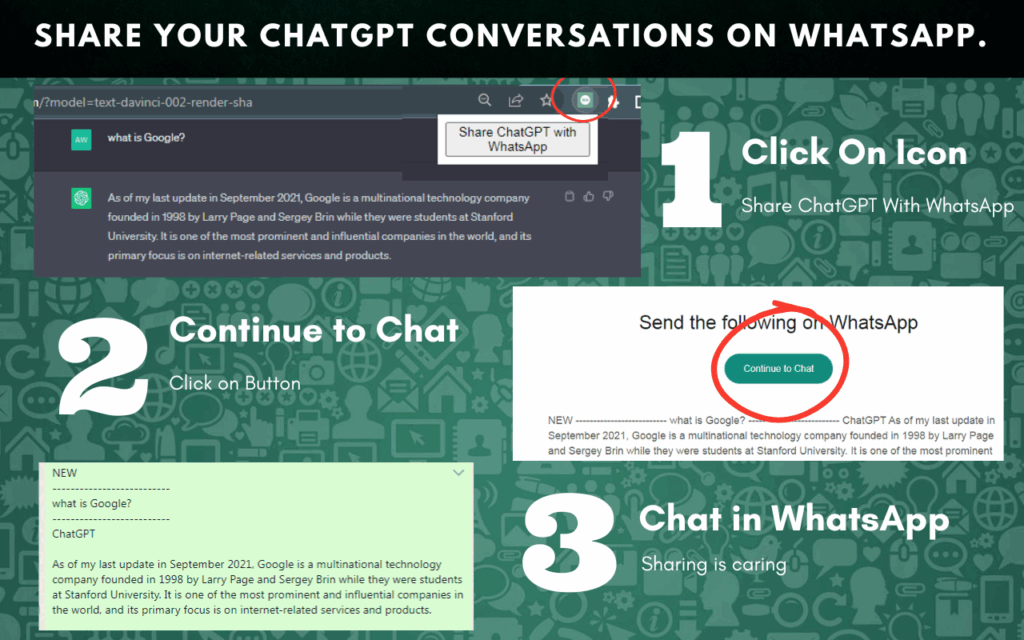
- Click the ChatGPT for WhatsApp extension icon in your browser toolbar.
- Type a prompt or topic into the input field to generate an AI response.
- Review the output, make any edits if needed, and click Share to send it to your chosen WhatsApp contact or group.
Why WhatsApp Users Love This Extension
Millions of people use WhatsApp every day, yet many find themselves struggling to keep conversations interesting or productive. This extension solves that problem by acting as an AI co-writer that is always available. Professionals use it to brainstorm message drafts and polish communication. Friends use it to generate jokes and playful banter. Families use it to share creative stories or fun facts that bring everyone together.
The extension is also valuable for anyone who communicates in a second language, as the GPT-3.5 model can help produce grammatically correct and natural-sounding text. It saves time, reduces the pressure of coming up with responses on the spot, and consistently delivers content that feels thoughtful and engaging.
Screenshots
Frequently Asked Questions
Does this extension work on mobile devices?
No, this is a Chrome browser extension designed specifically for desktop use with WhatsApp Web. It does not work on mobile browsers or the native WhatsApp mobile app.
Do I need an OpenAI account to use it?
Some versions of the extension may require you to connect an OpenAI API key for GPT-3.5 access. Check the extension settings after installation for specific configuration instructions.
Is the extension free to use?
The extension itself is free to install from the Chrome Web Store. Depending on how it accesses the GPT-3.5 model, there may be usage limits tied to OpenAI’s free tier or your personal API usage.
Can I use it in group chats?
Yes, once you generate a response you can share it to any open WhatsApp conversation, including group chats, directly through the extension interface.
Is my chat data kept private?
The extension only processes the prompts you manually enter. It does not read your existing WhatsApp messages or store your conversation history. Always review the extension’s privacy policy for full details.
If you are ready to make your WhatsApp conversations smarter, more creative, and genuinely more enjoyable, ChatGPT for WhatsApp is worth adding to your Chrome browser today. Give it a try and discover just how much an AI writing partner can change the way you communicate.





