
What Is Old Images Redirect: Disable Google Lens?
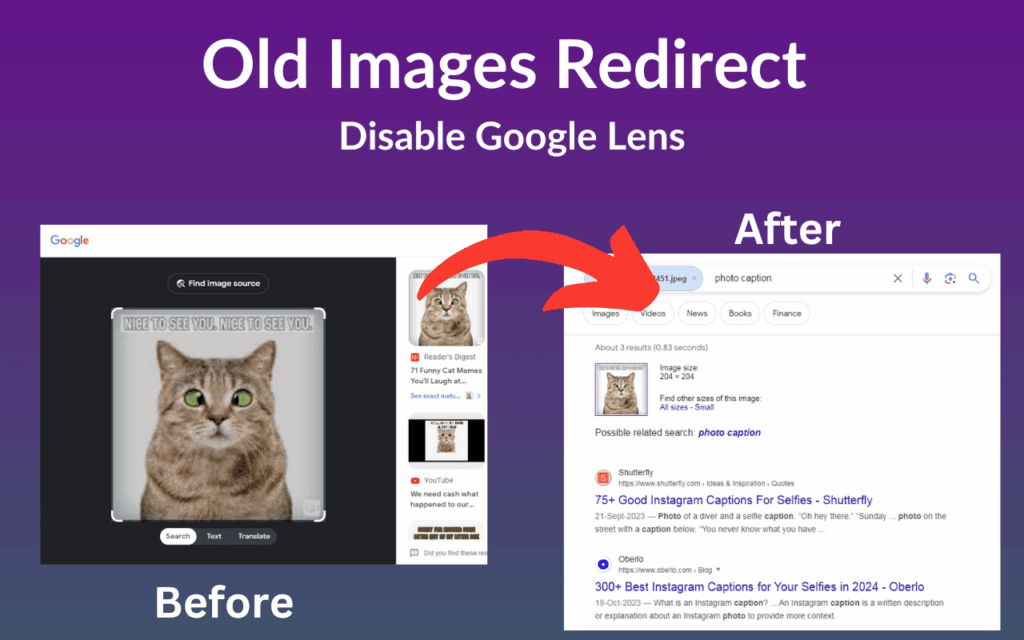
Old Images Redirect: Disable Google Lens is a lightweight Chrome extension designed to bring back the traditional Google Images interface. If you rely on this disable Google Lens extension, you can skip the cluttered modern layout — complete with Lens overlays, AI suggestions, and embedded videos — and jump straight into a clean, responsive image search experience that prioritizes speed and simplicity over unnecessary features.
The extension works automatically in the background. Once installed, every Google Images search you perform gets redirected to the classic view without any manual steps or settings to adjust. It is a set-it-and-forget-it solution for users who find the current Google Images interface more distracting than helpful.
Old Images Redirect: Disable Google Lens Extension

Key Features of Old Images Redirect
Automatic Redirect to Classic Google Images
Every time you search for images on Google, this extension silently redirects you to the classic layout before the modern interface ever loads. You never have to manually switch views or change settings — the redirect happens instantly and consistently across every search session.
Complete Removal of Google Lens
Google Lens integrates deeply into the modern image search experience, triggering pop-ups and contextual panels that many users find disruptive. This extension disables Lens entirely, so clicking on any image takes you directly to the source rather than opening an interactive Lens overlay.
Clean and Minimal Interface
The classic Google Images layout is stripped of the visual noise that has accumulated over recent years. Without Lens menus, video previews, and AI-generated suggestions crowding the page, you can focus entirely on finding the images you actually need.
Faster Load Times
Modern Google Images loads a significant amount of additional scripts and resources to power Lens and its related features. By bypassing that interface, Old Images Redirect reduces the page weight and delivers noticeably faster load times, particularly on slower connections or older hardware.
Zero Configuration Required
There are no settings panels, no permission prompts beyond the basic installation, and no learning curve involved. The extension works immediately after installation, making it accessible to every type of user regardless of technical experience.
Lightweight Design
The extension is built to run efficiently without consuming extra memory or CPU resources. It does its job quietly in the background without impacting the performance of other tabs or extensions you have running simultaneously.
How to Install Old Images Redirect
- Open the Chrome Web Store on your browser.
- Search for Old Images Redirect: Disable Google Lens in the search bar.
- Click the Add to Chrome button on the extension page.
- Confirm the installation when prompted by clicking Add Extension.
- Navigate to Google Images and perform any search — the classic layout will load automatically.
Why Researchers, Designers, and Power Users Love It
For professionals and everyday users alike, efficiency in image search matters more than interactive features. Designers looking for visual references do not want to wade through Lens suggestions when browsing inspiration. Researchers hunting for historical photographs or specific visual data need direct access to results without extra friction. Photographers comparing styles or sourcing vintage imagery benefit from a faster, uninterrupted workflow.
Beyond professional use cases, many people simply prefer the web as it used to work — straightforward, fast, and focused. Old Images Redirect respects that preference without asking you to compromise. It does not try to replace Google Images with something entirely different; it just restores what Google Images used to be before feature bloat set in.
Screenshots
Frequently Asked Questions
Does this extension affect any other Google services?
No. Old Images Redirect only activates on Google Images search pages. Your regular Google web search, Gmail, Google Drive, and other Google services remain completely unaffected.
Will this extension stop working if Google updates its layout?
The extension is maintained and updated to stay compatible with changes Google makes to its Images interface. If a major update causes issues, checking for an extension update in the Chrome Web Store usually resolves it quickly.
Is the extension safe to use?
Yes. The extension requires minimal permissions and does not collect any personal data or browsing history. It only redirects Google Images URLs to the classic layout and nothing more.
Can I temporarily turn off the redirect without uninstalling the extension?
Most Chrome extensions can be disabled temporarily through the Chrome Extensions menu without needing to be uninstalled. You can toggle Old Images Redirect off and back on whenever you want to switch between layouts.
Does it work on all versions of Chrome?
The extension is built for modern versions of Google Chrome and Chromium-based browsers such as Microsoft Edge and Brave. It is recommended to keep your browser updated for the best compatibility.
If the current Google Images interface has been slowing you down or getting in the way of your work, Old Images Redirect: Disable Google Lens is worth adding to your browser today. Install it once and enjoy a faster, cleaner image search experience every time you use Google Images.






Not working for Chrome Version 137.0.7151.56 (64-Bit) Any solutions?
We are working on this, It will be fixed in few days. Google review team take time. Thanks for the comment.
Should be working for Chrome Version 137.0.7151.69 (64-bit)?