
If you are a dedicated Vault Dweller or simply a fan of the post-apocalyptic world Bethesda built, the Fallout cursor Chrome extension is the perfect way to bring that wasteland atmosphere into your everyday browsing. Instead of the generic default arrow, your mouse pointer becomes a recognizable icon from the Fallout universe — complete with retro-futuristic style that fans of the series will instantly appreciate. From Vault Boy to the Pip-Boy interface, every cursor option is designed to reflect the look and feel of one of gaming’s most iconic RPG franchises.
What Is the Fallout Cursor Extension?
The Fallout Cursor extension is a lightweight Chrome browser add-on that replaces your default mouse pointer with themed cursor designs inspired by the Fallout game series. It works quietly in the background across most websites you visit, requiring no configuration after installation. Whether you are watching lore breakdowns on YouTube, scrolling through Reddit, or reading up on mod guides, the extension keeps the Fallout aesthetic present at all times. It is built for fans of Fallout 3, New Vegas, Fallout 4, and the broader post-apocalyptic RPG community.
Key Features of the Fallout Cursor Chrome Extension
Iconic Fallout-Themed Cursor Designs
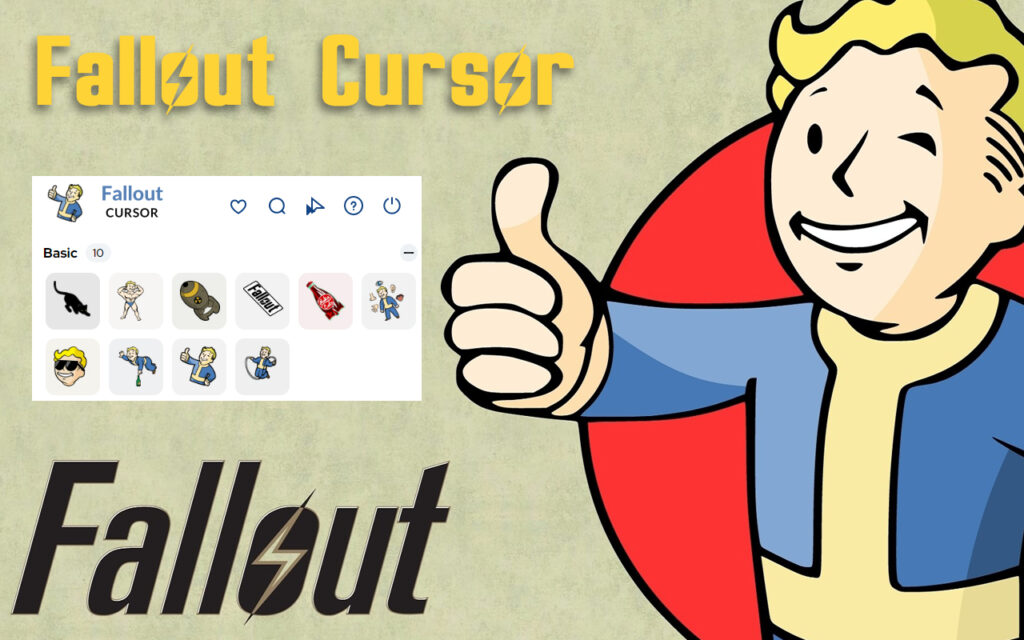
The extension offers a curated selection of cursor styles drawn directly from Fallout’s visual identity. Options include the beloved Vault Boy, the Pip-Boy interface design, the Nuka-Cola bottle, radiation symbols, and the classic Fallout logo. Each design is crafted to feel authentic to the series rather than generic.
High-Quality Retro-Futuristic Graphics
Every cursor is rendered with crisp, clean visuals that honor the unique aesthetic of the Fallout games. The retro-futuristic art direction is preserved in each design, making the cursor feel like a natural extension of the games rather than a low-effort fan asset.
Quick and Easy Style Switching
Swapping between different cursor styles takes only a few seconds using the extension’s toolbar menu. There is no need to dig through settings or restart your browser — the change takes effect immediately across your open tabs.
Lightweight Performance
The extension is optimized to run without affecting browser speed or system resources. It operates silently in the background, so you get the visual upgrade without any noticeable slowdown or memory drain during normal browsing.
No Login or Configuration Required
Once installed, the extension works right away. There is no account to create, no permissions to configure manually, and no setup process to follow. Install it and your cursor is immediately upgraded.
Broad Website Compatibility
The Fallout cursor activates across most standard websites and web applications. Note that Chrome extensions are restricted from running on Chrome Web Store pages and the browser’s new tab or home screen by default, which is standard behavior for all Chrome extensions of this type.
How to Install the Fallout Cursor Extension
- Open the Google Chrome browser on your desktop or laptop.
- Navigate to the Chrome Web Store using the address bar.
- Type Fallout Cursor into the search field and press Enter.
- Locate the extension in the search results and click on it to open the details page.
- Click the Add to Chrome button and confirm by selecting Add Extension in the prompt.
- Once installed, click the extension icon in your toolbar to choose your preferred Fallout cursor style.
- Refresh any open tabs to see your new cursor active across the web.
Why Fallout Fans Love This Extension
Browser customization tools are most satisfying when they connect to something you genuinely care about. For Fallout fans, seeing Vault Boy or a Pip-Boy graphic follow your mouse around the screen adds a small but consistent reminder of a game world you love — even during mundane tasks like checking email or reading the news. Content creators and streamers who record their screen also benefit from using a distinctive, recognizable cursor that adds personality to their footage. It is a simple, zero-cost way to keep the Fallout spirit alive outside of active gameplay sessions, and it sparks conversation whenever someone notices it on a shared screen.
Screenshots
Frequently Asked Questions
Is the Fallout Cursor extension free to use?
Yes, the extension is completely free to install and use. There are no premium tiers, subscriptions, or in-app purchases required to access the cursor designs.
Will this extension slow down my browser?
No. The extension is built to be lightweight and runs with minimal resource usage. Most users report no difference in browser performance after installation.
Can I switch between different cursor styles?
Yes. The toolbar menu lets you toggle between the available Fallout cursor designs at any time without needing to reinstall or restart Chrome.
Does it work on all websites?
The cursor works on the vast majority of websites. However, Chrome’s built-in security policies prevent extensions from running on Chrome Web Store pages and the browser’s default new tab page, which is a platform-wide limitation rather than a flaw in this extension.
Is this extension officially affiliated with Bethesda or the Fallout franchise?
No. This is an independent fan-made browser extension created for personal customization purposes and is not officially associated with Bethesda Softworks or the Fallout brand.
If you are ready to add a touch of the wasteland to your daily browsing, the Fallout Cursor Chrome extension is one of the easiest and most satisfying ways to do it. Search for it in the Chrome Web Store and give your mouse pointer the Vault-Tec upgrade it deserves.





