
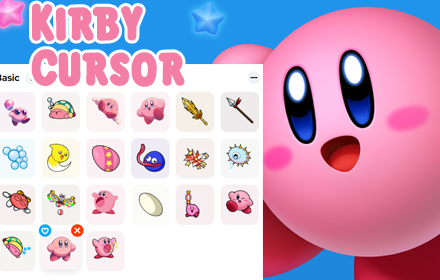
If you are a Kirby fan who wants to bring a little Dream Land magic into your daily browsing, the Kirby cursor Chrome extension is exactly what you need. This lightweight browser add-on replaces your standard mouse pointer with charming, high-quality Kirby-themed cursor designs — from classic pink Kirby to copy ability icons and beloved characters like Waddle Dee and King Dedede. It works silently in the background with zero performance impact, making every click a tiny celebration of one of Nintendo’s most iconic franchises.
What Is the Kirby Cursor Chrome Extension?
The Kirby Cursor Chrome extension is a browser customization tool that swaps your default system cursor for hand-crafted designs inspired by the Kirby game series. It is built for fans who want a more personal and playful browsing experience without sacrificing speed or usability. The extension integrates directly into Chrome with no complex setup, and its intuitive interface lets you switch between cursor styles in just a few clicks. Whether you are a longtime fan of the original Dream Land games or a newer player who discovered Kirby on Nintendo Switch, this extension offers something nostalgic and fun for everyone.
Key Features of the Kirby Cursor Chrome Extension
Wide Variety of Kirby-Themed Cursors
The extension includes a rich collection of cursor designs pulled straight from the Kirby universe. You can choose from classic pink Kirby, copy ability cursors such as Fire, Sword, Hammer, and Ice, as well as fan-favorite characters and symbols including Waddle Dee, King Dedede, and Star Power icons. New designs are added over time, keeping the collection fresh for returning users.
High-Quality, Crisp Graphics
Every cursor in the collection is designed with clean pixel art and vibrant colors that stay true to the visual identity of the Kirby games. The graphics scale well across different screen resolutions, so your cursor looks sharp whether you are on a standard monitor or a high-DPI display. The attention to detail in each design makes the experience feel polished rather than generic.
Adjustable Cursor Size
Not everyone wants the same cursor size, and this extension gives you control over that. You can scale the cursor up for better visibility or keep it compact for a more subtle look. This flexibility makes the extension accessible to a wide range of users, including those who need larger interface elements for comfort or accessibility reasons.
Favorites System for Quick Access
If you regularly switch between a few preferred designs, the favorites system lets you bookmark your top picks for instant access. This is particularly useful if you enjoy matching your cursor to different moods or themes throughout the day. Instead of scrolling through the full library every time, your saved favorites appear at the top of the selection panel.
Zero Performance Impact
The extension is built to be lightweight and efficient, meaning it will not slow down your browser or drain system resources. It runs quietly alongside your other extensions and websites without causing lag, stuttering, or increased memory usage. You get full customization without any trade-off in browsing speed.
Easy Toggle On and Off
There are times when you may need your standard cursor back — during a work presentation, a video call, or when using certain web applications. The extension includes a simple toggle that lets you disable the custom cursor instantly and re-enable it just as quickly. This makes it practical for everyday use even in professional or academic environments.
How to Install the Kirby Cursor Chrome Extension
- Open the Google Chrome browser on your desktop or laptop.
- Navigate to the Chrome Web Store using the address bar.
- Search for Kirby Cursor in the search field.
- Click on the extension listing and select Add to Chrome.
- Confirm the installation prompt when it appears.
- Once installed, click the extension icon in your toolbar to open the cursor selector and choose your first design.
Why Kirby Fans and Nintendo Enthusiasts Love It
The Kirby Cursor extension goes beyond simple decoration. For fans of the series, it is a small but meaningful way to keep the spirit of Dream Land alive during everyday tasks like browsing, studying, or working. Students use it to make their computer sessions more enjoyable, streamers appreciate the visual personality it adds to screen recordings, and collectors love having yet another piece of Kirby-inspired content in their digital life. The extension also makes a great discovery for parents looking to make their child’s browsing environment more fun and familiar.
Screenshots

Frequently Asked Questions
Is the Kirby Cursor Chrome extension free to use?
Yes, the extension is free to install and use. You get access to the full cursor library and all settings without any paid subscription or hidden fees.
Will this extension slow down my browser?
No. The extension is specifically designed to be lightweight. It has no measurable impact on browser performance and does not interfere with page load times or memory usage.
Can I use this extension on any website?
The custom cursor works on the vast majority of websites you visit in Chrome. In rare cases, certain web applications may override browser cursor settings at the page level, but this is uncommon.
How many cursor designs are included?
The collection features a wide range of Kirby-themed designs covering characters, copy abilities, and iconic symbols from across the game series. The library is updated periodically with new additions.
Does the extension require any special permissions?
The extension requests only the minimal permissions needed to function. It does not collect personal data, track your browsing history, or access any sensitive information.
If you want to add a touch of Kirby charm to every session you spend online, this extension is a simple and satisfying way to do it. Search for the Kirby Cursor Chrome extension in the Chrome Web Store and start browsing with a little more magic today.





