
What Is the Kpop Demon Hunters Cursor?
The Kpop Demon Hunters Cursor is a custom Chrome extension that replaces your default mouse pointer with bold, action-packed designs inspired by the fusion of Korean pop culture and supernatural demon-hunting fantasy. If you have ever imagined your favorite K-pop idols wielding mystical weapons and battling dark forces, this extension brings that vision directly to your browsing experience. Every cursor in the collection is crafted to reflect both the polished visual style of K-pop aesthetics and the dramatic intensity of supernatural combat storytelling.

Key Features of the Kpop Demon Hunters Cursor Extension
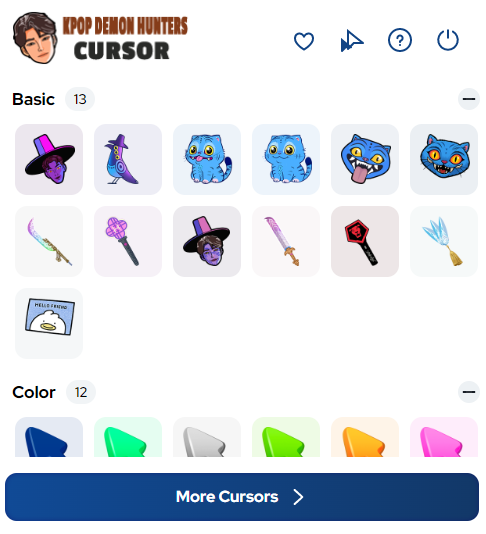
Full Demon Hunter Cursor Collection
This extension gives you access to a wide variety of cursor designs featuring idol-inspired demon hunters, mystical weapons, supernatural symbols, magical effects, and dark force imagery. Each design blends the high-energy visual language of K-pop with fantasy action elements, giving your cursor a personality that stands out from the ordinary.
High-Energy Visual Design
Every cursor in the pack features vibrant colors, sharp compositions, and dynamic poses that capture both the glamour of K-pop and the grit of demon-slaying action. The artwork is optimized for screen clarity so details remain crisp whether you are on a small laptop display or a large desktop monitor.
Adjustable Cursor Size
The extension includes a built-in size slider that lets you scale your cursor up or down to match your screen resolution and personal preference. Whether you prefer a subtle accent or a bold statement piece, you can dial in the exact size that works best for your setup.
Favorites System for Quick Switching
Save your preferred cursor designs to a personal favorites list for one-click access at any time. This is especially useful if you enjoy switching between different demon hunter characters, weapon styles, or supernatural themes depending on your mood or the content you are browsing.
Zero Performance Impact
The extension is built with performance optimization in mind, meaning it runs quietly in the background without slowing down your browser or interfering with other tabs and applications. You get a fully enhanced cursor experience without any trade-off in speed or system responsiveness.
Easy On/Off Toggle
Switch your Kpop Demon Hunters cursor on or off instantly using the extension icon in your Chrome toolbar. This makes it simple to flip back to your default pointer whenever you need a distraction-free environment without uninstalling anything.

How to Install the Kpop Demon Hunters Cursor
- Open the Chrome Web Store and search for Kpop Demon Hunters Cursor.
- Click the Add to Chrome button on the extension listing page.
- Confirm the installation prompt when Chrome asks for your permission.
- Once installed, click the extension icon that appears in your Chrome toolbar.
- Browse the full cursor collection and select a design that fits your style.
- Use the size slider to adjust the cursor dimensions to your preference.
- Start browsing with your new demon hunter cursor active across all websites.
Why K-pop and Supernatural Fans Love This Extension
Fans of K-pop, Korean dramas, and supernatural action anime are drawn to this extension because it captures something that feels genuinely unique — the mashup of idol culture with dark fantasy. Instead of a generic custom cursor, this one tells a story. Whether you are streaming music videos, scrolling through fan communities, or watching the latest fantasy K-drama, the cursor adds a layer of personality to your browser that reflects your actual interests. It is a small detail, but one that makes the time you spend online feel a little more like your own creative space.
Screenshots
Frequently Asked Questions
Does this extension work on all websites?
Yes, the Kpop Demon Hunters Cursor works across virtually all websites you visit in Chrome. The custom cursor will appear on every page as long as the extension is toggled on.
Will this extension slow down my browser?
No. The extension is lightweight and optimized to run without any noticeable impact on your browser’s speed or memory usage.
Can I use multiple cursor designs from the collection?
Absolutely. You can switch between different designs at any time directly from the extension panel, and you can save favorites for quicker access to the ones you use most often.
Is the Kpop Demon Hunters Cursor free to use?
The extension is available to install from the Chrome Web Store. Check the listing page for the most up-to-date information on pricing or any premium options.
Do I need a Chrome account to install it?
You will need to be signed into your Google account to install extensions from the Chrome Web Store, which is standard for all Chrome extensions.
If you are ready to bring a new level of personality to your browser, the Kpop Demon Hunters Cursor is worth adding to your Chrome setup. Search for it in the Chrome Web Store and start your demon hunting adventure today.





