
If you regularly need to save, share, or archive web content, the Screenshot to PDF Chrome extension known as Screenshot to PDF Pro is one of the most efficient tools available. It captures entire webpages — including content below the fold — and converts them into clean, professional PDF documents with selectable text, all from within your browser in a single click. No print dialogs, no third-party websites, no watermarks.
What Is Screenshot to PDF Pro?
Screenshot to PDF Pro is a Chrome extension built to simplify how you capture and convert web content into PDF files. Unlike basic screenshot tools that save pages as flat images, this extension produces fully searchable, text-selectable PDFs that look polished and are easy to share or archive. It is designed for students, professionals, researchers, and anyone who regularly works with online content and needs reliable document exports without leaving the browser.
Key Features of Screenshot to PDF Pro
One-Click Full Page PDF Capture
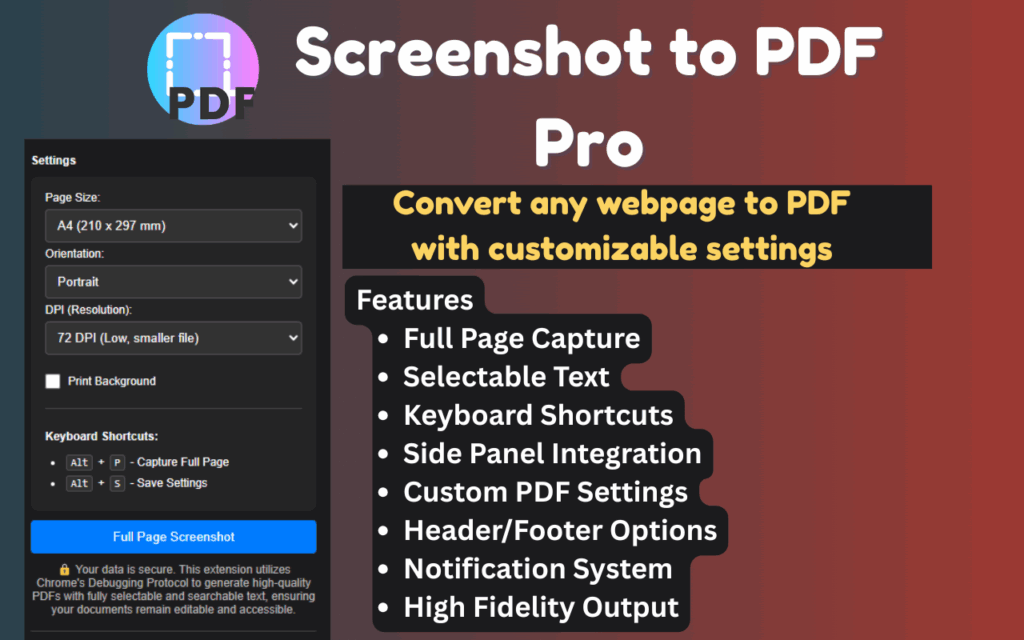
With a single click or keyboard shortcut, Screenshot to PDF Pro captures the entire scrollable height of any webpage. You do not need to scroll manually, take multiple screenshots, or stitch images together. The full page is captured and converted in one seamless action, saving you significant time on repetitive tasks.
Selectable and Searchable Text Output
Unlike image-based screenshot tools, Screenshot to PDF Pro generates PDFs where the text remains fully selectable and searchable. This means you can copy text from the exported PDF, use Ctrl+F to find specific words, and even edit the document in compatible PDF editors — a critical advantage for professionals handling reports, contracts, or research materials.
Customizable Output Settings
The extension gives you granular control over your PDF output. You can choose from multiple paper sizes including A4 and Letter, switch between portrait and landscape orientation, and adjust margins to suit your needs. These options ensure your exported PDFs look exactly the way you want them, whether for printing or digital sharing.
Side Panel Interface
All extension settings and features are accessible through a clean side panel interface that opens directly in your browser window. You can launch it instantly using the keyboard shortcut Alt + O. The side panel keeps everything organized and within reach without interrupting your browsing workflow.
Keyboard Shortcuts for Power Users
Screenshot to PDF Pro is built with efficiency in mind. Press Alt + P to trigger an instant full-page PDF capture, or use Alt + O to open the side panel quickly. These shortcuts eliminate the need to interact with toolbar icons, making the workflow faster for users who rely on the extension throughout their day.
Dark Mode Support
The extension interface includes built-in dark mode support, which reduces eye strain during extended evening or nighttime work sessions. The dark theme applies to the side panel and settings UI, making it comfortable to use regardless of your ambient lighting conditions.
No Watermarks and No Usage Limits
Many free PDF tools restrict how many documents you can export or stamp a watermark on every file. Screenshot to PDF Pro removes both of those frustrations entirely. You get unlimited conversions with clean, watermark-free output every single time — no subscription required for core functionality.
How to Install Screenshot to PDF Pro
- Open the Chrome Web Store and search for Screenshot to PDF Pro.
- Click the Add to Chrome button on the extension listing page.
- Confirm the installation by clicking Add Extension in the browser prompt.
- Once installed, the extension icon will appear in your Chrome toolbar.
- Navigate to any webpage, click the icon or press Alt + P to generate your first PDF.
Why Researchers, Students, and Professionals Love It
Screenshot to PDF Pro solves a real problem that millions of people face daily. Students saving lecture notes and online articles get properly formatted PDFs they can annotate later. Professionals capturing dashboards, email threads, or legal documents get clean exports that preserve the original layout. Researchers archiving online sources get reliable, citable documents with accurate formatting. Developers documenting UI flows get quick visual exports without extra tooling. The extension works across virtually any website and handles long-form pages that would otherwise require multiple screenshots or complex workarounds.
Screenshots
Frequently Asked Questions
Does Screenshot to PDF Pro work on all websites?
The extension works on the vast majority of standard webpages. Some browser-restricted pages such as the Chrome Web Store itself or internal browser pages may not support full capture due to Chrome’s security policies.
Is the exported PDF text searchable?
Yes. The PDF output preserves the actual text from the webpage, meaning you can search, highlight, and copy text within the exported document — unlike image-only screenshot exports.
Can I change the paper size before exporting?
Absolutely. Through the side panel, you can select your preferred paper size such as A4 or Letter, choose the page orientation, and set custom margins before generating the PDF.
Do I need to create an account to use it?
No account or sign-in is required. Simply install the extension and start converting webpages to PDF immediately without any registration process.
Are there any limits on how many PDFs I can create?
There are no imposed usage limits. You can convert as many webpages as you need without hitting a cap or being prompted to upgrade for basic functionality.
If you want a faster, cleaner way to save web content as professional PDF documents, Screenshot to PDF Pro is the Chrome extension worth adding to your workflow today. Install it once and eliminate the need for clunky print menus or unreliable third-party converters.





