
If your browser constantly runs slow because of too many open tabs, the Smart Tab Manager Chrome extension is the solution you have been looking for. This lightweight tool lets you set hard limits on how many tabs can be open at once — both per window and globally across your entire browser — so you stay focused, organized, and running at full speed.
Smart Tab Manager - Control Browser Tabs
What Is Smart Tab Manager?
Smart Tab Manager is a Chrome extension designed to give users precise control over their tab usage. Instead of letting tabs pile up unchecked, the extension enforces customizable limits and notifies you the moment you are approaching or hitting those limits. It works silently in the background, consuming minimal resources, while keeping your browsing environment clean and efficient. Whether you are a developer juggling multiple tools, a student doing research, or a professional managing several projects at once, this extension brings structure to your workflow without getting in the way.
Key Features of Smart Tab Manager
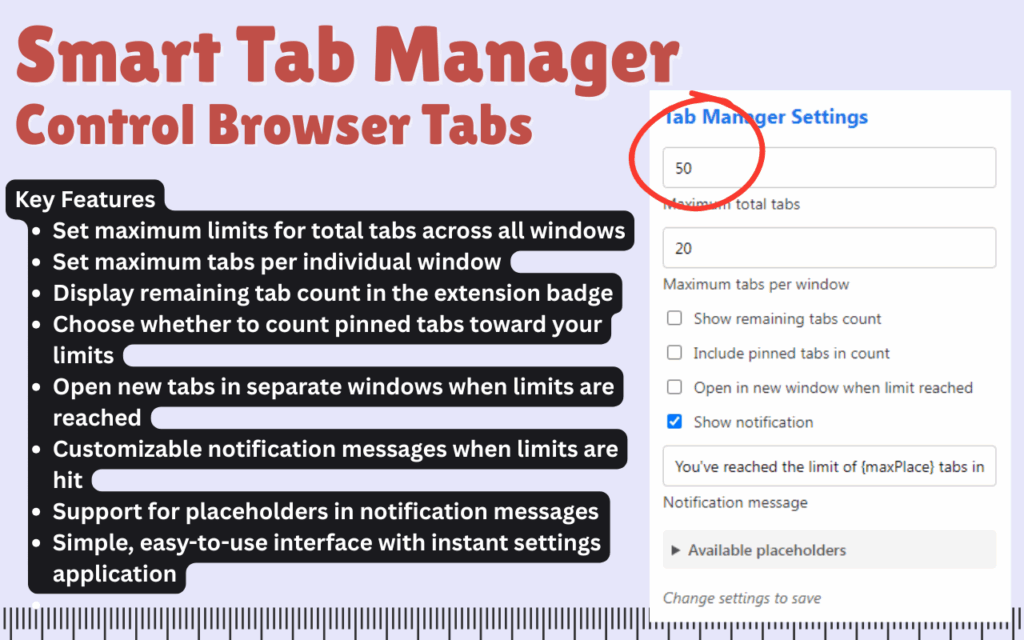
Maximum Tabs Per Window
You can define exactly how many tabs are allowed in each individual Chrome window. This is especially useful for separating work contexts — for example, keeping one window for research and another for communication — without either one becoming unmanageable. Once the limit is reached, the extension prevents new tabs from opening in that window.
Global Tab Limit
Beyond per-window limits, Smart Tab Manager lets you set a cap on the total number of tabs open across all Chrome windows combined. This helps prevent memory overload and keeps your system performance stable even during long browsing sessions. It is the most effective way to enforce browser discipline at scale.
Badge Tab Counter
The extension icon in your Chrome toolbar displays a live count showing how many tabs you have remaining before hitting your set limit. This gives you a constant, at-a-glance awareness of your tab usage without needing to open any panel or settings page. It is a small detail that makes a big difference in daily use.
Pinned Tab Settings
You have full control over whether pinned tabs count toward your tab limits. If you keep certain tabs permanently pinned — like your email or calendar — you can exclude them from the count so they never interfere with your available tab budget. This adds a layer of flexibility that makes the extension practical for real-world workflows.
Auto Open in New Window
When a tab limit is reached in the current window, Smart Tab Manager can automatically open the next tab in a new window instead of blocking it entirely. This ensures your browsing is never interrupted while still enforcing the structure you have defined. It is a smooth, user-friendly fallback that keeps productivity intact.
Customizable Notifications
When you hit a tab limit, the extension can display a custom notification message of your choosing. You can use dynamic placeholders like %current% and %max% to make the message contextual and informative. This feature is particularly useful for users who want a gentle reminder rather than a hard stop.
Instant Settings Application
Any changes you make to the extension settings take effect immediately — no need to restart Chrome or reload tabs. This makes it easy to adjust your limits on the fly as your workload changes throughout the day. The responsiveness of the settings panel reflects the overall efficiency of the extension.
How to Install Smart Tab Manager
- Open the Chrome Web Store and search for Smart Tab Manager.
- Click the Add to Chrome button and confirm the installation prompt.
- Once installed, click the extension icon in your Chrome toolbar to open the settings panel.
- Set your preferred tab limit per window and your global tab limit across all windows.
- Choose whether pinned tabs should count toward your limits.
- Enable the auto-open in new window option if you want uninterrupted browsing when limits are hit.
- Customize your notification message using the available placeholders.
- Your settings are saved and applied instantly — start browsing with control.
Why Productivity-Focused Users Love It
Tab overload is one of the most common causes of browser slowdowns, lost focus, and wasted time. Smart Tab Manager addresses this problem directly without requiring any complex configuration. Users appreciate that it works quietly in the background, that the badge counter keeps them informed, and that the customizable settings adapt to different types of workflows. Developers use it to separate environments, students use it to stay on task during research, and remote professionals use it to manage project windows cleanly. The result is a faster browser, a clearer mind, and a more intentional approach to how you use the web.
Screenshots
Frequently Asked Questions
Will Smart Tab Manager slow down my browser?
No. The extension is built to be extremely lightweight and runs in the background with minimal CPU and memory usage, making it suitable even for older or lower-spec devices.
Can I set different tab limits for different windows?
The per-window tab limit applies uniformly to all Chrome windows. However, you can combine it with the global limit to create a layered tab management strategy that fits your specific needs.
What happens when I reach my tab limit?
Depending on your settings, the extension will either display a notification, block the new tab from opening, or automatically redirect it to a new window. You choose which behavior best suits your workflow.
Do pinned tabs count toward my limit?
That is entirely up to you. The extension includes a dedicated setting that lets you decide whether pinned tabs are included in or excluded from your tab count.
Does the extension require any special permissions?
Smart Tab Manager only requests the permissions necessary to monitor and manage your tabs. It does not access your browsing history, personal data, or any website content.
Take back control of your browser today. Smart Tab Manager is the straightforward, effective Chrome extension that brings real order to your tab habits — install it once and notice the difference immediately.





