

What Is the Pusheen Cursor for Chrome?
The Pusheen cursor for Chrome is a lightweight browser extension that replaces your default mouse pointer with adorable, kawaii-inspired designs featuring everyone’s favorite chubby gray cat. Whether you spend your day working, studying, or browsing social media, this extension adds a soft and playful personality to your everyday online experience. Inspired by the beloved cartoon character created by Claire Belton and Andrew Duff, the Pusheen cursor brings charm and warmth to your screen with every move of your mouse.
This is more than just a novelty — it is a small but meaningful way to personalize your browser and make your digital space feel uniquely yours. Fans of Pusheen, kawaii culture, and cute aesthetics will find this extension to be a perfect fit for their browsing style.
Key Features of the Pusheen Cursor Extension
Pusheen-Themed Cursor Designs
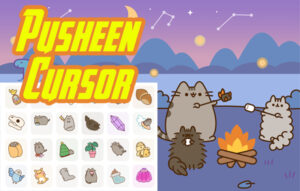
The extension replaces your standard browser cursor with carefully crafted designs based on Pusheen’s most iconic looks and moments. You will find cursors featuring classic gray Pusheen, Pusheen in pajamas, Space Pusheen floating through stars, Pusheen with cupcakes and snacks, and seasonal holiday versions for Christmas, Halloween, and Valentine’s Day. Each design is drawn to capture Pusheen’s signature cozy and lovable personality.
Multiple Kawaii Styles to Match Your Mood
The extension offers a variety of cursor themes so you can switch between styles depending on how you feel. Options range from sleepy and snuggly Pusheen to dancing and flying versions, along with pastel hearts, sparkles, and donut-inspired designs. Having multiple styles available means your cursor can reflect your mood or the season without any extra effort.
Smooth Animations and Soft Visual Design
Each cursor is designed with smooth, clean animations that feel natural as you navigate your browser. The pastel color palette and soft line work ensure the cursors look polished and visually consistent across all types of websites. The animations are subtle enough to avoid distraction while still adding a delightful touch to your browsing experience.
Lightweight and Fast Performance
The Pusheen cursor extension is built to run efficiently without affecting your browser’s speed or performance. It operates quietly in the background, consuming minimal system resources so your tabs, videos, and web apps load just as quickly as before. You get a fun visual upgrade without any technical trade-offs.
Works Across All Websites in Chrome
Unlike some cursor tools that only work on specific pages, this extension applies your chosen Pusheen cursor consistently across every website you visit in Chrome. Whether you are on a news site, a shopping platform, a streaming service, or a productivity tool, the cursor follows you seamlessly. Full cross-site compatibility ensures a unified and uninterrupted kawaii experience.
How to Install the Pusheen Cursor Extension
- Open the Google Chrome browser on your computer.
- Visit the Chrome Web Store and search for “Pusheen Cursor.”
- Click on the extension listing that matches this tool.
- Press the “Add to Chrome” button on the extension page.
- Confirm the installation by clicking “Add Extension” in the popup dialog.
- Once installed, the Pusheen cursor will activate automatically — no additional setup is required.
Why Kawaii and Pusheen Fans Love This Extension
Pusheen has built a massive global following thanks to her relatable, cozy, and endlessly adorable personality. Fans who grew up with Pusheen stickers, GIFs, and plushies now have a way to bring that same energy into their browser. The cursor extension feels like a small act of self-expression — a way to make a screen that you stare at for hours each day feel a little more personal and joyful.
For those who enjoy kawaii aesthetics more broadly, the soft color palette and cute character designs align perfectly with the gentle, feel-good visual style that defines the kawaii genre. It appeals to anime fans, sticker collectors, cat lovers, and anyone who simply wants their browser to spark a little more happiness throughout the day.
Screenshots

Frequently Asked Questions
Is the Pusheen cursor extension free to use?
Yes, the extension is free to install and use directly from the Chrome Web Store. There are no hidden fees or subscription requirements to enjoy the cursor designs.
Will this extension slow down my browser?
No. The extension is designed to be lightweight and has a minimal impact on browser performance. Most users notice no difference in loading speed or responsiveness after installation.
Does the Pusheen cursor work on every website?
The cursor is compatible with virtually all websites you visit in Chrome. It applies consistently across different types of pages, from social media platforms to productivity tools and beyond.
Can I switch between different Pusheen cursor styles?
Yes, the extension includes multiple kawaii-themed cursor designs inspired by different Pusheen looks and moods. You can select the style that best matches your preference at any time.
Is this extension officially licensed by the Pusheen brand?
This extension is a fan-made, kawaii-inspired customization tool. It draws inspiration from the Pusheen character aesthetic to create a fun and personalized browsing experience for fans.
If you are ready to add a little more cuteness and personality to your daily browsing, the Pusheen cursor extension for Chrome is a simple and delightful way to do it. Install it today and let your cursor do the talking — one adorable paw at a time.






I love this
amazing! thank you. pusheen forever