

What Is the Final Fantasy Cursor for Chrome?
The Final Fantasy cursor for Chrome is a browser extension that replaces your default mouse pointer with custom-designed cursors inspired by Square Enix’s legendary RPG franchise. Whether you’re a longtime fan who’s played every mainline entry or a newcomer drawn in by Final Fantasy XIV or the FF7 Remake, this extension lets you carry a piece of that iconic world into your everyday browsing. From Cloud Strife’s Buster Sword to cheerful chocobos and glowing materia orbs, every cursor design is crafted to reflect the rich visual identity that has made Final Fantasy one of the most beloved game series in history.

Key Features of the Final Fantasy Cursor Extension
Expansive Cursor Collection
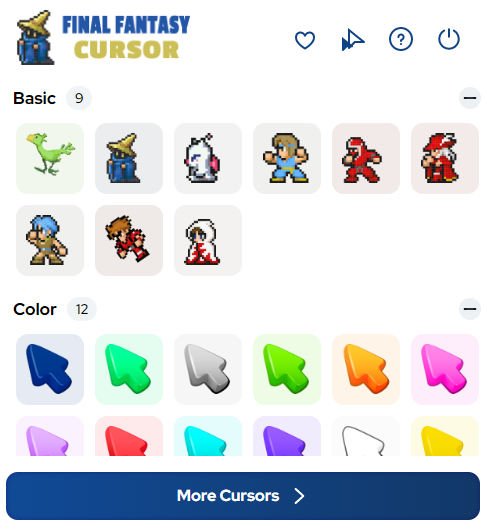
The extension includes a wide range of cursor designs covering characters, creatures, and iconic symbols from across the entire Final Fantasy series. You’ll find options featuring Cloud, Tifa, Aerith, Sephiroth, Lightning, Squall, and many more, alongside fan-favorite creatures like moogles and chocobos. Legendary weapons, crystal motifs, job class emblems, and airships round out a collection that spans decades of FF history.
Premium HD Graphics
Each cursor is rendered in high definition to ensure crisp, clean visuals at any screen resolution. The designs honor both the pixel art aesthetic of classic entries and the polished, modern look of recent titles, so fans of every era will find something that feels right at home on their screen.
Adjustable Cursor Size
A built-in size slider lets you scale your cursor up or down depending on your display setup and personal preference. Whether you’re working on a large monitor or a compact laptop screen, you can dial in the exact size that keeps your cursor visible and comfortable to use.
Favorites System
With the favorites feature, you can bookmark your go-to cursor designs for instant access without scrolling through the full collection each time. This is especially useful if you like switching between different characters or eras to match your mood or the Final Fantasy content you’re currently enjoying.
Zero Performance Impact
The extension is built to run efficiently in the background without slowing down your browser or draining system resources. You get a fully immersive cursor experience without any noticeable lag, keeping your browsing as smooth as a perfectly timed Limit Break.
Easy Toggle On and Off
A simple on/off toggle in the extension toolbar lets you switch back to your system’s default cursor whenever you need to. This makes it easy to adapt to different tasks or switch the effect off temporarily without having to uninstall or disable the extension entirely.
How to Install the Final Fantasy Cursor Extension
- Open the Chrome Web Store and search for the Final Fantasy Cursor extension.
- Click the “Add to Chrome” button and confirm the installation prompt.
- Once installed, click the Final Fantasy Cursor icon in your Chrome toolbar to open the extension panel.
- Browse the cursor collection and click on any design to apply it immediately.
- Use the size slider to adjust the cursor dimensions to your liking.
- Use the favorites feature to save designs you want to return to quickly.

Why Final Fantasy Fans Love This Extension
Final Fantasy has always been about more than just gameplay — it’s about the worlds, the stories, and the characters that stay with you long after the credits roll. This cursor extension gives dedicated fans a subtle but meaningful way to keep that connection alive during everyday computer use. Instead of a generic pointer, every scroll, click, and hover becomes a small nod to the series you love. It’s also a great conversation starter for anyone who spots your screen. For gamers who want their desktop to reflect their personality and passions, this kind of personalization goes a long way.
Screenshots
Frequently Asked Questions
Does this extension work on all websites?
The cursor works across most websites you visit in Chrome. There are some browser-restricted pages, such as the Chrome settings menu or the Chrome Web Store itself, where custom cursors cannot be displayed due to browser security rules.
Will this extension slow down my browser?
No. The extension is optimized for minimal resource usage and should have no noticeable effect on your browser’s speed or performance during normal use.
Can I use multiple cursor designs?
Yes. You can switch between any cursor in the collection at any time through the extension panel. The favorites system makes it easy to store and cycle through your preferred designs without searching through the entire library.
Is the extension free to use?
The core cursor collection is available to use after installing the extension from the Chrome Web Store. Check the extension listing for the most up-to-date details on available features and any premium options.
Which Final Fantasy games and characters are represented?
The collection draws from across the mainline series, including fan-favorite characters from FF7, FF8, FF13, and beyond, as well as creatures and symbols that appear throughout the franchise. New designs may be added over time to expand the collection further.
If you’re ready to bring a touch of Final Fantasy magic to your browser, install the extension and start exploring the full cursor collection today. It’s a simple upgrade that makes every click feel a little more epic.





