
If you are a fan of Disney’s hit animated series, the Big City Greens cursor for Chrome is a fun and easy way to bring the show’s colorful characters into your everyday browsing. Instead of a plain default pointer, your mouse cursor becomes Cricket, Tilly, Gramma Green, or other beloved characters and symbols from the show — making every click, scroll, and hover a little more entertaining.
What Is the Big City Greens Cursor Extension?
The Big City Greens Cursor extension is a free Chrome browser add-on that replaces your standard mouse pointer with custom-designed cursors inspired by the Disney animated series. The show follows Cricket Green, a mischievous country boy, and his quirky family as they navigate life in the big city. This extension captures that same energy through hand-crafted cursor designs featuring the main characters and iconic props from the series.
It is lightweight, easy to use, and works silently in the background without affecting your browser speed or performance. Whether you are a kid who loves the show or an adult who enjoys a bit of cartoon nostalgia while working, this extension adds a personal touch to your Chrome setup.
Key Features of the Big City Greens Cursor Extension
Character-Themed Cursor Designs
The extension includes multiple cursor styles based on popular characters from the show, including Cricket, Tilly, and Gramma Green. Each design is crafted to reflect the character’s personality — from Cricket’s energetic posture to Tilly’s expressive enthusiasm — so you always have something fun moving across your screen.
High-Quality Graphics
Every cursor is designed at a high resolution, ensuring clean and sharp visuals on any screen size or display setting. You will not encounter pixelated or blurry images, as each pointer scales properly whether you are on a standard monitor or a high-DPI display.
Easy Cursor Switching
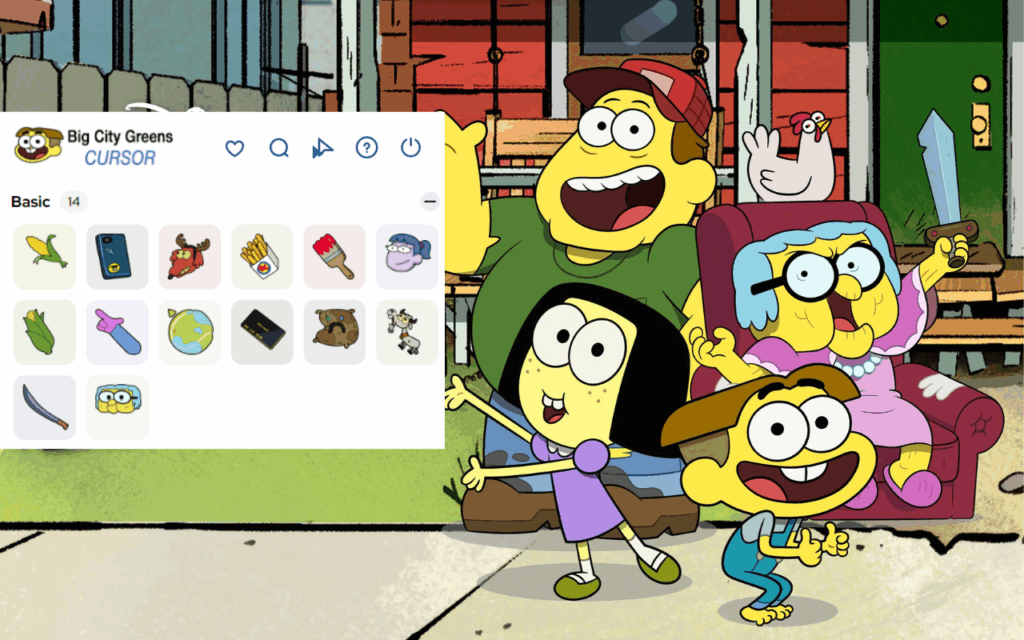
Switching between cursor styles takes only a few seconds through the extension’s simple interface. There is no need to dig through settings menus or restart your browser — just open the extension, pick your favorite design, and your cursor updates instantly.
Adjustable Size and Opacity
The extension lets you adjust cursor size and opacity to suit your viewing preference and screen background. This is especially useful if you work across websites with varying color schemes and need your cursor to remain visible at all times.
Lightweight and Non-Intrusive
Unlike some browser extensions that slow down page loading, this one is optimized for minimal resource usage. It runs quietly without interfering with your tabs, bookmarks, or any other Chrome functionality.
How to Install the Big City Greens Cursor Extension
- Open the Google Chrome browser on your computer.
- Go to the Chrome Web Store and search for “Big City Greens Cursor.”
- Click on the extension listing and select “Add to Chrome.”
- Confirm the installation when prompted by clicking “Add Extension.”
- Once installed, click the extension icon in your Chrome toolbar to open the cursor selector.
- Choose your preferred Big City Greens character cursor and start browsing.
Why Big City Greens Fans Love This Extension
Fans of the show appreciate how this extension captures the spirit of Big City Greens without being overwhelming. It is a small but meaningful way to show appreciation for a series that has built a loyal fanbase across kids and adults alike. Parents who watch the show with their children enjoy setting it up as a fun surprise, while students use it to add some personality to long study sessions.
The variety of cursor designs also means you can change things up whenever you feel like a new look. From country-themed icons to character-specific designs, there is always something fresh to try. It is the kind of detail that makes your browser feel genuinely yours rather than a generic out-of-the-box setup.
Screenshots
Frequently Asked Questions
Is the Big City Greens cursor extension free to use?
Yes, the extension is completely free to download and use. There are no hidden charges, subscriptions, or in-app purchases required to access the cursor designs.
Will this extension slow down my Chrome browser?
No. The extension is built to be lightweight and uses minimal system resources. Most users notice no difference in browser performance after installing it.
Can I use this on multiple devices?
The extension works on any device running Google Chrome. If you are signed into your Google account and have sync enabled, it may carry over to other Chrome installations automatically.
How do I switch back to my default cursor?
You can disable the extension at any time by clicking the extension icon and toggling it off, or by going to Chrome’s extension manager and deactivating it from there.
Is this extension officially made by Disney?
This is a fan-made browser extension inspired by the Big City Greens series. It is not an official Disney product but is created by fans for fans who enjoy personalizing their browsing experience.
If you are ready to add some Big City Greens charm to your daily browsing, this cursor extension is a simple and satisfying way to do it. Search for it in the Chrome Web Store and give your mouse pointer the cartoon upgrade it deserves.





