

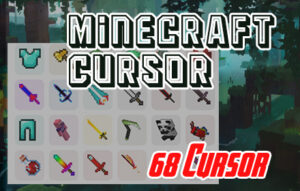
The Minecraft cursor Chrome extension lets you swap out your plain browser pointer for iconic Minecraft-themed designs — from the Diamond Pickaxe to the Creeper face and Steve’s head. Whether you’re watching build tutorials, browsing Redstone guides, or just exploring the web, this lightweight extension keeps the blocky Minecraft universe with you at all times.
What Is the Minecraft Cursor Extension?
The Minecraft Cursor extension is a browser customization add-on that replaces your default mouse pointer with pixel-art cursors inspired by the world’s most popular sandbox game. Instead of a plain white arrow, your cursor becomes a recognizable Minecraft item or character — crisp, clean, and true to the game’s iconic 8-bit visual style.
It’s designed for players, fans, content creators, and really anyone who wants to inject a little personality into their daily browsing. The extension installs directly into Chrome and works across all websites without slowing down your browser or affecting performance.
Key Features of the Minecraft Cursor Chrome Extension
Wide Selection of Minecraft-Themed Cursors
Choose from a growing library of cursor designs that includes the Diamond Pickaxe, Iron Sword, Creeper face, Steve’s head, Enderman eyes, and more. Each cursor is carefully crafted to match the original in-game artwork, so you get an authentic Minecraft feel with every click.
Pixel-Perfect Graphics
Every cursor is rendered at high quality to preserve the sharp, blocky aesthetic that makes Minecraft instantly recognizable. The designs look clean and crisp across different screen sizes and resolutions, from standard HD displays to high-DPI monitors.
Adjustable Cursor Size
The extension lets you scale your cursor up or down to suit your screen and personal preference. Whether you prefer a subtle pointer or a bold, oversized cursor that’s impossible to miss, the size controls make it simple to dial in the right fit.
Favorites System
Mark your preferred cursors as favorites for fast access whenever you want to switch things up. This feature is especially useful if you rotate between a few designs depending on your mood or the type of content you’re browsing.
Zero Performance Impact
The extension is lightweight by design, meaning it runs in the background without consuming noticeable memory or CPU resources. Your browsing speed remains completely unaffected, even on older machines or when running multiple tabs.
Easy Toggle On and Off
You can disable the custom cursor with a single click directly from the extension icon in your Chrome toolbar. This makes it easy to switch back to your default system cursor whenever you need a more neutral setup, like during work calls or screen shares.
How to Install the Minecraft Cursor Extension
- Open the Chrome Web Store in your Google Chrome browser.
- Search for “Minecraft Cursor” in the search bar.
- Click on the extension from the search results to open its detail page.
- Click the “Add to Chrome” button and confirm by selecting “Add extension” in the popup.
- Once installed, click the extension icon in your Chrome toolbar to open the cursor selection panel.
- Browse the available Minecraft cursor designs and click any one to activate it instantly.
Why Minecraft Fans Love This Extension
For players who spend hours in Minecraft’s world of blocks, tools, and survival challenges, this extension is a small but satisfying way to carry that passion into everyday browsing. Seeing a Diamond Pickaxe or a Creeper face follow your mouse around a webpage adds a layer of fun that makes routine tasks feel less mundane.
It’s also a great fit for streamers and content creators who want their browser to match their Minecraft-themed setup during screen recordings or live streams. Students and educators who use Minecraft as a learning tool can keep the theme consistent across their digital workspace as well.
Beyond aesthetics, there’s something genuinely enjoyable about a well-made browser customization that actually works as advertised — fast, stable, and visually on point. This extension delivers exactly that.
Screenshots

Frequently Asked Questions
Does this extension work on all websites?
Yes, the Minecraft cursor activates across all websites you visit in Chrome. A small number of sites with custom cursor overrides in their own code may display the default cursor instead, but this is rare and not specific to the extension.
Will this extension slow down my browser?
No. The extension is designed to be extremely lightweight and has no measurable impact on browsing speed or system performance, even when multiple tabs are open.
Can I switch between different Minecraft cursors?
Absolutely. The extension includes a full cursor library you can browse at any time, and you can switch between designs instantly from the extension panel. The favorites feature makes it even faster to jump between your most-used options.
Is the Minecraft Cursor extension free to use?
Yes, the extension is free to install and use. You get access to the full cursor library and all features without any subscription or payment required.
Does it work on Chrome for Mac and Windows?
Yes, because it’s a Chrome browser extension rather than a system application, it works on any operating system that supports Google Chrome — including Windows, macOS, and Linux.
If you’re ready to add a touch of the blocky Minecraft world to your browser, the Minecraft Cursor Chrome extension is a simple, polished, and completely free way to do it. Install it today and make every click count.






شكرا 🥰🥰🥰🥰🥰🥰
very lag , so i advice you don’t log on to this web , very lag and can make your compter or smartphone boom
This website dont have login system, We transferred to new server now website speed is better than before. Thanks for the comment, have a nice day.