
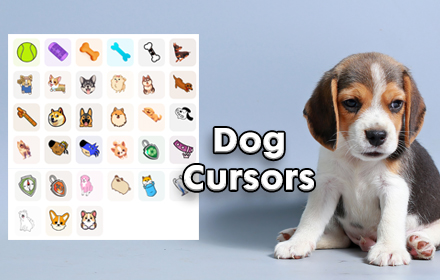
If you are a dog lover who spends hours browsing the web, the Dogs Cursor for Chrome is the perfect way to bring some canine joy to your daily screen time. This lightweight Chrome extension replaces your standard mouse pointer with charming dog-themed cursor designs — including paw prints, dog breeds, and bones — so every click feels a little more fun.
What Is the Dogs Cursor Extension?
Dogs Cursor is a browser customization extension designed specifically for Chrome. Once installed, it swaps out your default system cursor with a collection of dog-inspired designs that are colorful, crisp, and genuinely delightful. The extension is built for anyone who loves dogs — from proud pet parents and animal rescue supporters to kids doing schoolwork or remote workers looking to add a little personality to their setup. It runs quietly in the background without slowing down your browser or interfering with your workflow.

Key Features of Dogs Cursor for Chrome
Wide Variety of Dog-Themed Cursor Designs
The extension includes cursor designs inspired by popular dog breeds such as Poodles, Bulldogs, and Huskies, as well as playful paw prints, dog faces, and tasty bones. There is enough variety to keep things fresh, whether you want something cute and silly or a design that matches your own dog’s breed.
High-Quality Graphics
Each cursor is rendered in crisp, colorful detail that looks sharp on any screen resolution. The visuals are carefully designed to reflect the lovable character of dogs without looking pixelated or out of place on modern websites.
Adjustable Cursor Size
You can resize the cursor to suit your monitor and personal preference. Whether you want a subtle accent or a bold statement piece on your screen, the size controls let you dial it in exactly how you like it.
Favorites System
The built-in Favorites feature lets you save the cursor designs you use most often for instant access. This is especially useful if you like switching between a few go-to designs without scrolling through the full collection every time.
Zero Performance Impact
Dogs Cursor is engineered to be lightweight and efficient. It does not consume excess memory or cause browser lag, so your streaming, browsing, and work sessions stay smooth and uninterrupted.
Easy Toggle On and Off
Need to switch back to your default cursor for a presentation or a specific task? The extension includes a simple toggle that lets you disable the custom cursor instantly and re-enable it just as quickly when you are ready.
How to Install the Dogs Cursor Extension
- Open the Google Chrome browser on your computer.
- Go to the Chrome Web Store and search for Dogs Cursor.
- Click the Add to Chrome button on the extension listing page.
- Confirm the installation when prompted by clicking Add Extension.
- Once installed, click the Dogs Cursor icon in your Chrome toolbar.
- Browse the available cursor themes and click any design to activate it.
- Use the Favorites option to save designs you want to return to quickly.
Why Dog Lovers Cannot Get Enough of This Extension
Browser customization tools are popular, but most of them focus on themes and colors rather than the small interactive details that make daily browsing feel personal. The cursor is something you interact with constantly — every scroll, every click, every hover — which makes it one of the most impactful yet overlooked parts of your browser experience. Dogs Cursor turns that overlooked detail into a source of genuine joy. For people who miss their dog during work hours, who volunteer at animal shelters, or who simply adore animals, having a dog paw or a grinning Bulldog follow your mouse around the screen is a small but meaningful touch. It is also a great conversation starter during video calls where your screen is shared.
Screenshots

Frequently Asked Questions
Is Dogs Cursor free to use?
Yes, the Dogs Cursor Chrome extension is available for free. You can browse and activate cursor designs without any subscription or payment required.
Will this extension slow down my browser?
No. The extension is built to be lightweight and has no measurable impact on Chrome’s performance. Your browsing speed and memory usage remain unaffected.
Can I use this extension on any website?
Dogs Cursor works across the vast majority of websites you visit in Chrome. There may be rare cases where a site’s own cursor styling overrides the extension, but this is uncommon.
How do I switch between different dog cursor designs?
Click the extension icon in your Chrome toolbar to open the cursor gallery. Select any design to activate it immediately. You can also save preferred designs to your Favorites for faster switching.
Is the extension safe to install?
Yes. The extension does not collect personal data, does not modify website content, and does not require unnecessary permissions. It is a straightforward cursor customization tool with a clean, simple codebase.
If you are ready to make your browser a little more playful and a lot more you, Dogs Cursor is one of the easiest upgrades you can make today. Search for it in the Chrome Web Store and start browsing with your favorite four-legged companion by your side.






bau
zankyou😎