
The My Hero Academia cursor Chrome extension replaces your default mouse pointer with custom cursors inspired by the world of UA High, featuring designs based on Deku, Bakugo, Todoroki, and other beloved characters from the series. Whether you spend your time rewatching episodes, browsing fan wikis, or just doing everyday tasks online, this extension adds a touch of heroic flair to every click without slowing down your browser.
What Is the My Hero Academia Cursor Extension?
The My Hero Academia Cursor is a lightweight Chrome browser extension that swaps out your standard system cursor for anime-themed designs drawn from the My Hero Academia universe. It is built for fans who want to personalize their browsing experience with imagery from one of the most popular shonen anime series of the past decade. The extension is easy to install, simple to use, and has no noticeable effect on browser performance.
Key Features of the My Hero Academia Cursor Extension
Wide Selection of Anime-Themed Cursors
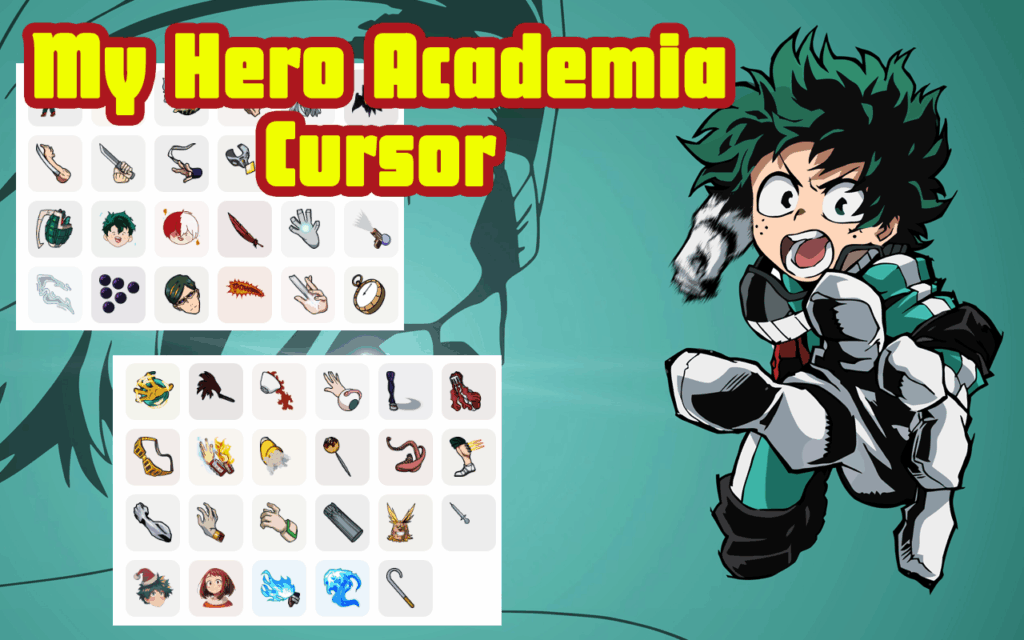
The extension offers multiple cursor designs inspired by characters and symbols from the series, including Deku’s One For All emblem, Bakugo’s explosion motif, Todoroki’s dual-element theme, and the UA Academy crest. Each design is carefully crafted to reflect the visual style of the anime, giving your browser a look that any fan would recognize immediately.
High-Quality Graphics
Every cursor is rendered with sharp, clean visuals optimized for different screen resolutions. The artwork captures the bold color palette and dynamic energy that My Hero Academia is known for, so the cursors look great on both standard and high-DPI displays.
Adjustable Cursor Size
You can resize the cursor to suit your monitor setup and personal preference. Whether you prefer a subtle accent or a larger, more visible pointer, the size controls let you dial in exactly what works best for your screen.
Favorites System
The built-in favorites feature lets you save and quickly switch between your preferred cursor designs. This is especially useful if you like rotating between characters or want instant access to a specific design without scrolling through the full library each time.
Zero Performance Impact
The extension is built to be lightweight and efficient, using minimal system resources even while running in the background. You will not notice any lag, slowdowns, or browser instability — it simply runs quietly and does its job.
Easy Toggle On and Off
If you need to switch back to a standard cursor temporarily, you can disable the extension with a single click. This makes it convenient for work calls, presentations, or any situation where a custom cursor might not be appropriate.
How to Install the My Hero Academia Cursor Extension
- Open the Google Chrome browser on your desktop or laptop.
- Visit the Chrome Web Store and search for “My Hero Academia Cursor.”
- Click the “Add to Chrome” button on the extension listing page.
- Confirm the installation by clicking “Add Extension” in the popup dialog.
- Once installed, click the extension icon in your Chrome toolbar to open the cursor selector.
- Browse the available designs, pick your favorite, and start browsing with your new cursor.
Why My Hero Academia Fans Love This Extension
For fans of the series, small touches like a themed cursor can make everyday computer use feel more connected to something they genuinely enjoy. Instead of a plain arrow pointer, you get a visual reminder of the perseverance, ambition, and camaraderie at the heart of My Hero Academia. It works especially well for students and creatives who spend long hours at their computers and want their workspace to reflect their interests. The extension also makes a great conversation starter during screen shares or streaming sessions with friends who are fellow fans of the show.
Screenshots
Frequently Asked Questions
Is the My Hero Academia cursor extension free to use?
Yes, the extension is completely free to download and use. There are no paywalls or subscription fees required to access the cursor library.
Will this extension slow down my browser?
No. The extension is designed to be extremely lightweight and runs without any measurable impact on Chrome’s speed or memory usage.
Can I use this extension on any website?
The custom cursor works across most websites. If a particular site overrides the cursor style with its own CSS, the extension cursor may not display on that page, but this is rare.
Is the extension compatible with all versions of Chrome?
The extension is compatible with modern versions of Google Chrome on Windows, macOS, and Linux. Make sure your browser is up to date for the best experience.
How many cursor designs are included?
The extension includes a growing collection of designs featuring major characters and symbols from the My Hero Academia series. New designs may be added in future updates.
If you are a My Hero Academia fan looking to add a creative touch to your daily browsing, this cursor extension is a simple and satisfying way to do it. Install it today and bring the Plus Ultra spirit to every click.






AM IN LOVE!!!💙