

What Is Classic Cursor?
Classic Cursor for Chrome is a browser extension that replaces your standard mouse pointer with carefully crafted designs inspired by the golden age of computing. Whether you’re drawn to the sharp pixel art of early Windows, the minimalist pointers of MS-DOS, or the iconic arrows from classic Mac interfaces, this extension brings that nostalgic aesthetic directly into your modern browsing experience. It’s a simple, lightweight way to personalize your desktop while paying homage to decades of interface design history.

Key Features of Classic Cursor
Comprehensive Vintage Cursor Collection
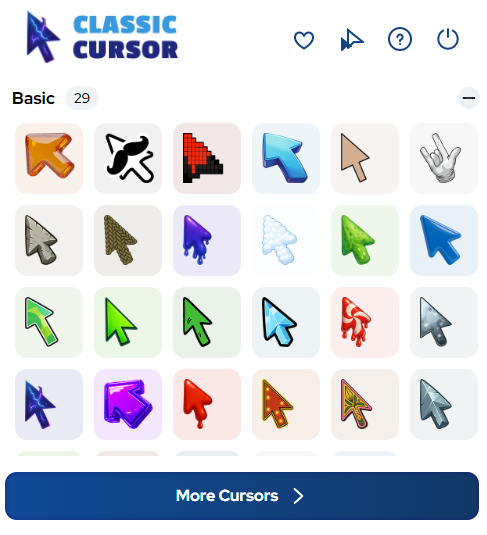
The extension includes a wide range of cursor designs inspired by retro operating systems, early graphical interfaces, and classic pixel art traditions. You can browse pointers that evoke everything from monochrome MS-DOS terminals to the pastel-toned cursors of early Windows and classic Mac OS, giving you a genuine trip through computing history.
Sharp Pixel-Perfect Rendering
Each cursor is rendered with crisp, clean pixel precision that stays true to the original aesthetic of retro computer graphics. The designs don’t blur or distort at standard screen sizes, preserving the authentic monochrome and low-resolution charm that made classic pointers iconic in the first place.
Adjustable Cursor Size
A built-in size slider lets you scale your chosen cursor to fit your monitor resolution and personal comfort. This means you can maintain the vintage look while ensuring the pointer remains practical and easy to spot on modern high-density displays.
Favorites System
Once you find cursor styles you love, you can save them to a favorites list for instant access. Switching between different retro cursor eras becomes effortless, so you can match your pointer to your mood or workflow without searching through the full collection each time.
Easy Toggle On and Off
A single click on the extension icon lets you switch between your chosen classic cursor and your browser’s default pointer. This is especially useful when you need maximum precision for tasks like graphic editing or document work, then want to return to your retro style immediately after.
Zero Performance Impact
Classic Cursor is built to be lightweight and efficient, running quietly in the background without slowing down page load times or browser responsiveness. You get full visual customization without sacrificing any of the speed you rely on for everyday browsing.
How to Install Classic Cursor
- Open the Chrome Web Store and search for Classic Cursor by TabPlugins.
- Click the Add to Chrome button and confirm the installation when prompted.
- Once installed, click the Classic Cursor icon in your Chrome toolbar to open the extension panel.
- Browse through the available vintage cursor collections and click any design to preview it live.
- Use the size slider to adjust the cursor dimensions to your preference.
- Save your favorite designs using the favorites feature for quick access in the future.
- Use the toggle switch to turn the custom cursor on or off whenever needed.

Why Retro Computing and Design Enthusiasts Love It
Vintage computing fans appreciate Classic Cursor because it adds a layer of personality to an otherwise overlooked part of the browsing experience. For pixel art enthusiasts, each pointer is a small but satisfying nod to the craft of early interface designers who had to work within extreme technical constraints. Design minimalists love the clean, no-frills aesthetic that strips away the glossy, over-rendered pointers of modern operating systems. Tech history buffs get a functional reminder of how far UI design has come, while productivity-focused users enjoy the subtle novelty that makes long browsing sessions feel a little more personal. It works seamlessly across websites and does not interfere with normal browser behavior, making it a practical choice for anyone who wants style without compromise.
Screenshots
Frequently Asked Questions
Does Classic Cursor work on all websites?
The extension works across the vast majority of websites you visit in Chrome. A small number of sites with strict content security policies may limit third-party cursor customization, but this affects very few pages in everyday browsing.
Will the extension slow down my browser?
No. Classic Cursor is optimized for minimal resource usage and runs efficiently in the background. Most users notice no difference in browser speed or performance after installation.
Can I use multiple cursor styles?
Yes. You can browse the full collection at any time and switch between designs instantly. The favorites system makes it easy to save the ones you return to most often.
Is the extension free to use?
Classic Cursor is available as a free download from the Chrome Web Store. You can access a broad selection of vintage cursor designs without any upfront cost.
Does it work on Chrome on Windows and Mac?
Yes, Classic Cursor works on Chrome regardless of whether you’re running Windows, macOS, or Linux. The extension functions at the browser level, so your operating system does not affect its performance.
If you’ve been looking for a simple, well-crafted way to add some retro character to your daily browsing, Classic Cursor is worth trying. Install it today and rediscover the timeless charm of vintage computing design every time you move your mouse.





